In this article
- The problem was not writing the article
- The first idea was automation
- Manual posting is not a downgrade
- What the plugin does now
- The AI part has one job
- Character limits matter
- Featured images became part of the workflow
- Tracking is half the value
- Why not just use Buffer?
- What worked
- What I would not automate yet
- The real product is a publishing assistant
I have been trying to get more consistent with posting Old Stack Journal content across the platforms I actually use. Not in a growth-hack way. Not in a “spray the same post everywhere and hope the algorithm notices” way. I just wanted a practical system that helped me turn an article into decent shortform posts without opening eight tabs, rewriting the same idea eight times, and then forgetting where I had already posted it.
So I built a small WordPress plugin for it.
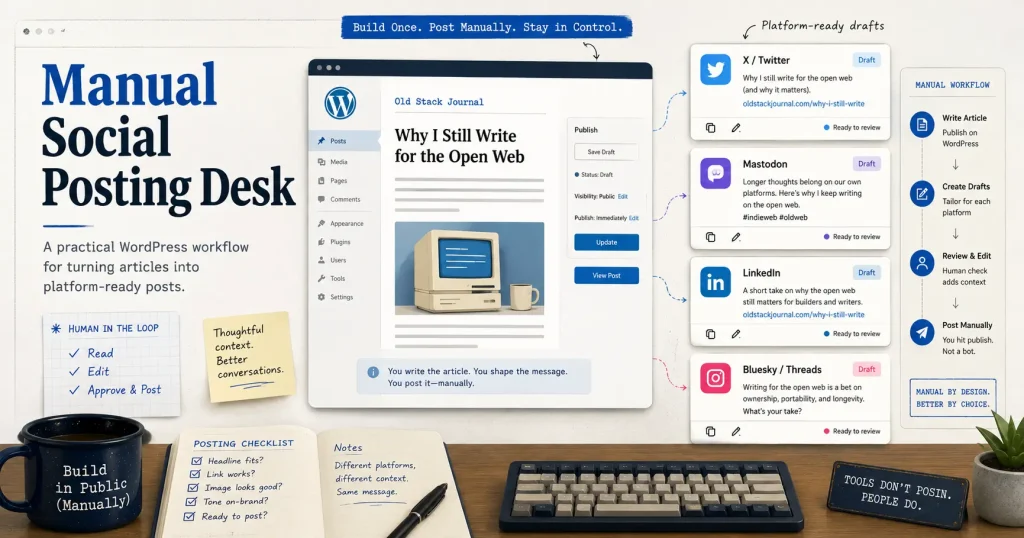
The important part is that the plugin is manual by design. It doesn’t try to replace judgment. It doesn’t publish blindly. It doesn’t pretend every social platform wants the same post with a different logo beside it. It takes the article I already wrote, creates platform-specific shortform drafts, gives me the tools to fine-tune them, and then lets me post them myself.
After using it on a real article, that feels like the right call.
The problem was not writing the article
The article writing part was already handled.
Old Stack Journal is where the proper longform work happens. That is where I can explain what I built, what worked, what failed, what I would do differently, and who a tool or workflow might actually help. The problem comes after publishing.
Once an article is live, there is still a whole second job waiting:
- write a short X post
- write a slightly more conversational Threads post
- write a Facebook Page version
- write something that works for Bluesky
- write a LinkedIn version without sounding like a corporate robot
- make an Instagram caption
- think about TikTok or YouTube Shorts angles
- track what has been posted
- avoid posting the wrong draft
- avoid losing the link
- avoid rewriting the same hook over and over
That part is not hard in a technical sense, but it is annoying enough that it creates friction.
And friction is usually where useful little tools come from.
The first idea was automation
At first, the obvious thought was: why not auto-post everything?
Build the WordPress plugin, connect every API, generate the posts, approve them, and let the plugin submit them to X, Facebook, Threads, Bluesky, LinkedIn, Instagram, and whatever else.
That sounds nice until you actually look at the platform APIs.
Bluesky was fine. Nice, clear, practical enough. Got that working, including clickable links and featured images.
X was possible, but the API cost model made me stop and think. If an API-posted X post contains a URL, it can cost real money per post. That changed the feeling completely. I didn’t want a simple article promotion workflow quietly turning into a paid distribution pipeline every time I click a button.
Meta was worse in a different way. Facebook, Threads, and Instagram all sit in the same broad developer world, but the permissions, tokens, app modes, page IDs, user IDs, access tokens, feature approvals, and review rules are a fucking nightmare lot to untangle. It is not impossible, but it is not the kind of thing I want blocking the publishing workflow.
That was the point where the plugin’s direction became clearer.
The useful product was not “auto-post everywhere.”
The useful product was “make manual posting much less painful.”
Manual posting is not a downgrade
This is the thing that surprised me a little.
Once I used the plugin properly, manual posting felt better than full automation would have.
The AI-generated drafts were good, but I still wanted to touch them. Not rewrite them from scratch. Just adjust the odd phrase, trim something, choose whether the post should be more direct or more conversational, and make sure it matched the platform.
That hands-on step matters.
A Bluesky post can be compact and link-focused. A Facebook Page post can breathe a little. LinkedIn needs to be useful without slipping into business-speak. Instagram may need a caption that works with an image. X needs to be short enough to fit the account and the moment. Quora is a different thing entirely. TikTok and YouTube Shorts are more like production prompts than simple text posts.
The plugin handles the heavy lift. I still handle the judgment.
That’s the balance I actually wanted.
What the plugin does now
The plugin lives inside WordPress, which makes sense because that is where the article already lives.
When I publish an article, I can open the post in the WordPress admin and use the Social Desk box to generate shortform versions. The plugin reads the article and creates drafts for the platforms I care about.
At this point the plugin supports draft generation and workflow tracking for:
- X
- Facebook Page
- Threads
- Bluesky
- YouTube Shorts
- TikTok
- Mastodon
- Quora
Not all of those are auto-posting targets. That is intentional. Some are manual-only channels. Some may get API support later. Some may never need it.
The important part is that each platform gets its own draft, its own status, and its own little workflow.
I can copy the text, open the platform, paste it, tweak it, post it, and then mark it as posted back in WordPress.
That sounds simple because it is. That’s the point.
The AI part has one job
The AI is not writing articles for me. The article is mine. The ideas are mine. The build notes, opinions, examples, and mistakes are mine. The AI’s job is much narrower:
Take the article I already wrote and turn it into strong shortform versions for each platform.
That is the right use of AI here.
It’s not inventing a post out of nowhere. It’s not pretending to have tested something I haven’t tested. It is not filling the site with generated sludge. It’s adapting existing work into the formats needed for social posting.
The plugin uses the WordPress AI/OpenAI integration, which means it can call the AI from inside WordPress without me building a separate OpenAI settings screen into the plugin. I added a model preference so it can use a cheaper model for this job, because turning an article into shortform social drafts does not need the most expensive reasoning model available.
The plugin also tracks estimated usage and cost, which is handy. I want AI to be useful, but I also want to know what it is doing.
Character limits matter
One thing I did not want was a system that generated a great-looking post and then made me discover it was too long while I was already inside the platform.
So the plugin has platform limits.
There is a hard limit and a target limit.
A platform might technically allow a long post, but that does not mean I want the AI to fill the space. For OSJ, most social posts should be short, clear, and useful. The point is to make someone want to click through or respond, not to compress the whole article into a social post.
The plugin uses those limits in the AI prompt, checks the generated drafts afterward, and shows counters in the editor.
That gives me confidence before I copy anything.
Featured images became part of the workflow
The article featured image is already in WordPress, so it makes sense to use it.
The plugin can show the featured image as part of the posting workflow and, for platforms that support images, treat it as the default visual asset. That means I can post to visual platforms without needing to create a video every time.
That is especially useful for Instagram-style posting. Not every article needs a Reel, a Short, or a TikTok. Sometimes the featured image plus a good caption is enough.
The video helper fields are still useful, but I think of them as a production brief rather than something to paste directly. They give me:
- an opening hook
- a caption
- hashtags
- a first comment idea
- a video or visual angle
That’s enough to make a quick Canva graphic, CapCut clip, or native platform post when I want one.
But the system does not force everything into video. Good.
Tracking is half the value
The other useful part is not generation. It is memory.
Once I have posted to a few platforms, I don’t want to wonder what is done and what is not. The plugin tracks platform status per article.
A platform can be drafted, edited, approved, posted, skipped, or marked in another workflow state. It also records useful timestamps, like when something was copied or posted.
That turns the WordPress article into a little posting record.
For a solo builder, that’s more useful than it sounds. There is no social media team. There is no spreadsheet. There is no campaign manager. There is just me, an article, and a handful of platforms that all want slightly different things.
Having the record live beside the article is the right place for it.
Why not just use Buffer?
Buffer is still a possible layer later.
Its API looks interesting because it can sit between the plugin and multiple platforms. That could avoid some of the pain of direct integrations with Meta or other services.
But for now, I am happy with manual posting.
The manual workflow gives me more control. It lets me see how each post will look in the actual platform editor. It lets me adjust tone platform by platform. It avoids surprise API costs. It avoids long token setup sessions when I could be building or writing.
Most importantly, it matches how I actually want to work.
What worked
The best part of this build is that it removed the repeated thinking.
Before, every platform started with a blank box.
Now, every platform starts with a solid draft.
That changes the feeling completely. I’m not trying to create eight social posts from nothing. I’m reviewing and improving eight already-useful drafts.
That’s a much better place to start.
It also means I can publish an article and immediately have a practical distribution checklist inside WordPress:
- generate drafts
- review them
- copy one
- open the platform
- paste and fine-tune
- post
- mark as posted
- move to the next one
There is still work involved, but it is organised work.
What I would not automate yet
I would not rush into full auto-posting.
Bluesky worked well, and it proved the idea technically. But after using the plugin manually, I’m less convinced that full automation is the main win.
Auto-posting may still make sense for some platforms later. It might be useful for Bluesky, Mastodon, or other services where the API is clean, free, and predictable. It may also make sense if I eventually use Buffer as a middle layer.
But for X, Meta, Instagram, and similar platforms, manual posting is not a failure. It’s probably the safer workflow.
The plugin can still prepare the post perfectly. I can still paste it manually. I can still track the result. That gives me most of the value without the platform API swamp.
The real product is a publishing assistant
That’s where I landed.
OSJ Social Desk is not really an auto-poster. It’s a publishing assistant.
It sits inside WordPress, reads the article I already wrote, creates platform-aware shortform drafts, helps me keep them within limits, lets me use the featured image, and tracks what I have posted where. That’s enough.
It turns social posting from a messy afterthought into a repeatable publishing step.
For Old Stack Journal, that is the right kind of tool: small, focused, practical, and built around the way I actually work.