In this article
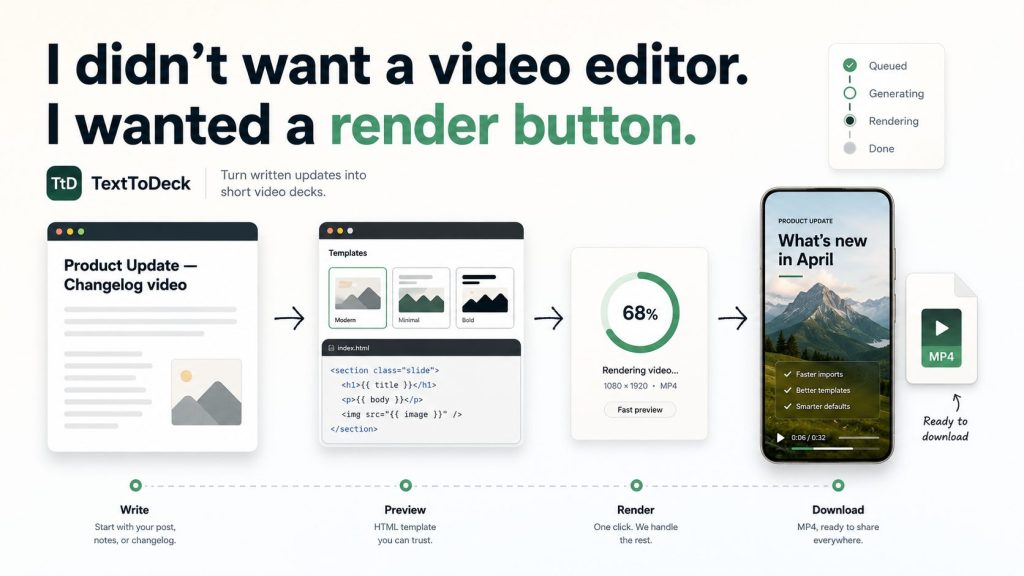
- I didn’t want a video editor. I wanted a render button.
- The original problem wasn’t video. It was friction.
- HTML turned out to be a good video template system.
- The product shape is intentionally narrow.
- The app split became clearer after the first prototype.
- What’s working so far.
- The progress bar is honest enough for now.
- The public site is starting to matter too.
- I added an Obsidian vault because chat history isn’t a project memory.
- What I’m trying to prove.
- The next real test is Old Stack Journal itself.
- The WordPress plugin still makes sense, but not yet.
- Where it stands now.
I didn’t want a video editor. I wanted a render button.
I’ve been making short promo videos for Old Stack Journal articles with a workflow that probably sounds strange until you see the output. I’d write the article, get ChatGPT to help turn it into a little HTML/CSS animation, open that animation in Chrome, record it with OBS, trim it in Clipchamp, export the MP4, and then post it manually to places like YouTube Shorts, TikTok, Instagram, and wherever else made sense. for an example see a early example on YouTube: https://www.youtube.com/shorts/jBD4gDlL9kA
That workflow worked better than it had any right to. The videos looked consistent, the style matched Old Stack Journal, and I didn’t have to fight Canva every time I wanted a short visual promo. But it was still a pile of manual steps wrapped around something that felt like it should have had one obvious button at the end: render this as an MP4.
That’s where TextToDeck started.
The original problem wasn’t video. It was friction.
I wasn’t trying to become a video editor. I already had the hard part done: the article. I had the title, the excerpt, the main point, the useful details, the categories, and usually a featured image. What I didn’t have was a reliable way to turn that written update into a short vertical video without starting a whole new creative project every time.
Most of the tools in this space assume you want a general editor. They give you timelines, layers, stock assets, transitions, music libraries, brand kits, templates, publishing options, AI avatars, and enough buttons to make a 20-second article promo feel like a client job. That’s useful for some people, but it wasn’t the job I was trying to do.
I wanted something much narrower. Pick a visual style, fill in a few fields, preview the animation, generate an MP4, and download it. No timeline editing. No direct posting. No “AI makes videos for you” magic show. Just a small system for turning written updates into short video decks.
HTML turned out to be a good video template system.
The thing that made the whole idea click was realising that a lot of these promo videos are basically animated slide decks. They aren’t complex films. They’re a few scenes with text, layout, motion, timing, and a call to action. HTML and CSS are already good at that.
HTML gives you layout, typography, panels, cards, images, and structure. CSS gives you animation, timing, spacing, and responsive-ish control. A browser gives you a live preview. Headless Chromium can render it. FFmpeg can turn the captured frames into an MP4. None of that is especially glamorous, but together it makes a pretty sensible pipeline.
That’s also where the name TextToDeck came from. The videos I’m making aren’t really “AI videos” in the usual sense. They’re short video decks generated from structured text and trusted templates. That feels like a more honest description of the thing.
The product shape is intentionally narrow.
The current positioning is simple: TextToDeck turns posts, updates, changelogs, launches, quotes, and announcements into short videos you can customise, preview, generate, and download. That’s the lane I want it to stay in, at least for the first real version.
The flow is meant to be boringly practical: choose a video style, add your words, preview the actual HTML template, generate the MP4, and download it. That’s it. The user can still post manually wherever they want, which avoids the API mess that comes with TikTok, Instagram, YouTube, X, Facebook, LinkedIn, and the rest of the platform swamp.
I’m deliberately not trying to build a Canva clone or a CapCut clone. That would be a great way to make something worse than both. TextToDeck should be useful because it’s smaller. It doesn’t try to solve every visual content problem. It solves one repeatable publishing problem.
The app split became clearer after the first prototype.
The original prototype was more Node-heavy, because Playwright, Chromium, and FFmpeg naturally live in that world. But the more I thought about the actual product, the more uncomfortable I got with having the whole website shaped around the renderer. Accounts, templates, credits, job history, admin pages, public pages, and member pages are normal web app work. For me, that means PHP and MySQL.
So the current architecture is split in a way that feels much better. The PHP/MySQL app owns the product: accounts, admin approval, template gallery, generator forms, brand kits, render jobs, credits, job detail pages, downloads, public landing pages, and admin tools. The private Node renderer does the specialised rendering work: Playwright, headless Chromium, FFmpeg, thumbnails, previews, and worker processing.
PHP runs the service. Node renders the videos. My WordPress plugin, when it eventually comes into the picture, should only be a client layer that sends render jobs to the hosted service. I don’t want WordPress installs trying to run Chromium and FFmpeg locally just because someone wants a short promo video for a blog post.
What’s working so far.
The app is now live enough to test properly. There are real accounts, registration, admin approval, user-owned render jobs, manual credits, a template gallery (a really shit template gallery, next job will be actually creating nicer templates with sound), generated preview assets, job history, downloadable MP4 outputs, and a render status page that updates while the job is queued or generating.
The credit system is still manual, which is fine for this stage. A fast render costs fewer credits than a quality render, credits are deducted when a job is queued, and failed renders can return credits. I’m not touching Stripe or proper billing until the workflow itself feels worth charging for. Payment systems are easy to add too early and annoying to remove once they shape the product.
The template gallery is also starting to behave more like the product I want. The first format is 9:16 vertical, because that’s the obvious fit for Shorts, Reels, and TikTok-style posts. I’ve also started adding 4:5 portrait support for feed-style posts, with one template family able to support multiple trusted format variants. That way the gallery doesn’t become a wall of duplicate cards pretending to be different products.
The progress bar is honest enough for now.
One of the small UI jobs this week was the render status page. It now shows queued, generating, ready, or failed states, and it updates without the user manually refreshing the page. The progress bar isn’t reading exact FFmpeg frame progress yet, and I’m okay with that.
Right now it behaves more like a live activity indicator. It moves while the job is generating, caps itself below completion, then switches to 100% when the server says the MP4 is ready. From a developer point of view, you can see that it’s estimating. From a user point of view, the page no longer looks dead while the render is happening.
That’s good enough for this stage. Perfect progress reporting can wait until it’s worth wiring the renderer to expose frame-level progress properly. For now, the useful thing is that the user knows the job is queued, generating, or ready, and they get the download when it’s done.
The public site is starting to matter too.
Because the service is now sitting at TextToDeck.com, I’ve started doing the less exciting public-site work as well. That means proper page titles, meta descriptions, canonical URLs, Open Graph tags, Twitter card tags, robots.txt, sitemap.xml, and noindex rules for member and admin pages.
That isn’t the glamorous part of building a product, but it’s the sort of thing that makes the site feel less like a private scaffold. If someone lands on the homepage, shares a template page, or if a crawler finds the site while I’m away from the project for a week, the basics should be there.
I’m not pretending the public site is finished. It still needs stronger template pages, better examples, more visual variety, and clearer pricing once the credit model has been tested. But the foundation is there, and that’s a good place to leave it for a short break.
I added an Obsidian vault because chat history isn’t a project memory.
One small thing I’m glad I added is a project-notes folder inside the repo that works as an Obsidian vault. It’s just Markdown files, but that’s exactly why it’s useful. Current status, architecture, deployment notes, runbooks, changelog, decisions, handovers, code snippets and TODOs all live beside the code now.
AI-assisted coding produces a lot of context, and context disappears quickly if it only lives in chat threads. A week later, I don’t want to reverse-engineer why I made a decision by reading Git diffs and half-remembered messages. I want to open the notes and see what changed, what was decided, what still needs testing, and what should be left alone.
If I change architecture, routes, deployment, renderer behaviour, credit logic, public positioning, or important user-facing copy, the notes should be updated too. It’s not complicated. It’s just a way of keeping the project from turning into a pile of disconnected patches.
What I’m trying to prove.
The basic bet is that a lot of people who publish written updates need lightweight video output, but they don’t necessarily need a full video editor. A blogger, indie developer, small SaaS builder, agency, newsletter writer, changelog-heavy product, or WordPress site owner often already has the source material. The missing step is turning that material into a decent short video without making it a whole production job.
TextToDeck is aimed at that gap. It’s for the person who has a post, update, launch note, changelog, quote, or announcement and wants a short video version that looks consistent and doesn’t take an hour to make. It’s not for someone who loves editing every frame in a timeline. It’s for people who’d rather reuse a good template and get back to writing, building, or publishing.
That’s why I’m keeping the first version focused. No AI avatars. No automatic posting. No music picker. No template marketplace. No giant editor canvas. Those things can wait, and some of them may never belong in the product at all. The WordPress plugin I’m working on now does include AI built in to propagate placeholders with actual content from the article to produce the design that goes to TexttoDeck.
The next real test is Old Stack Journal itself.
The first customer for this should be my own publishing workflow. That’s a useful constraint because it keeps the product grounded. I don’t need to guess what a hypothetical creator might want when I can run TextToDeck against 10 or 20 real Old Stack Journal articles and see where it gets annoying.
That test should answer the practical questions. Are the titles too long? Are the safe areas right for TikTok and YouTube Shorts? Is the text readable on a phone? Do the templates feel too similar? Are the previews too fast? Does the render page make sense? Are the MP4s good enough to upload without another editing step?
Those answers will matter more than another batch of imagined features. If the system saves me time on real articles, the concept is worth pushing further. If it doesn’t, I’ll know exactly where it broke down.
The WordPress plugin still makes sense, but not yet.
The WordPress angle is still important because the workflow starts naturally inside WordPress. Publish a post, open a promo video panel, choose a template, prefill fields from the title, excerpt, body, tags, categories, date, and featured image, then send the render job to the hosted service.
That could be a very clean workflow later. The plugin could show render status, save the MP4 link back to post meta, keep a small render history, and provide suggested captions for manual posting. It would fit the way Old Stack Journal already works.
But I don’t want to start there too early. The hosted app needs to be solid first. WordPress should connect to the renderer, not become the renderer. Running Chromium and FFmpeg inside random WordPress installs sounds like the sort of idea that works in a demo and becomes support pain immediately afterward.
Where it stands now.
TextToDeck is still early, but it has crossed the line from idea to working system. It can take structured text, use a trusted HTML template, render an MP4 server-side, and give me a downloadable video without OBS or Clipchamp. That was the first real milestone.
There’s plenty left to improve. The template set needs more visual variety. The gallery previews need calmer timing. The 4:5 portrait templates need proper design work, not just proof-of-system variants. The public site needs sharper examples. The render status page works, but it’s still more practical than polished. The whole workflow needs to be tested on real posts until the weak spots are obvious.
But the concept feels right. Written updates already contain most of what a short promo video needs. A focused template system can remove a lot of the friction between publishing the written thing and making a video version of it.
That’s what I’m trying to build with TextToDeck: not a general video editor, not a hype-driven AI video machine, and not another place to drag boxes around on a canvas. Just a practical bridge between “I wrote something” and “I need a short video version of it.”
If you publish posts, product updates, changelogs, launch notes, newsletters, or build diaries, I’d be interested in whether this workflow makes sense to you. Would you want this as a standalone web app, a WordPress plugin connected to a hosted renderer, or both? And more importantly, what would make it useful enough that you’d actually reach for it after publishing something?