In this article
Question: What is a LAMP stack?
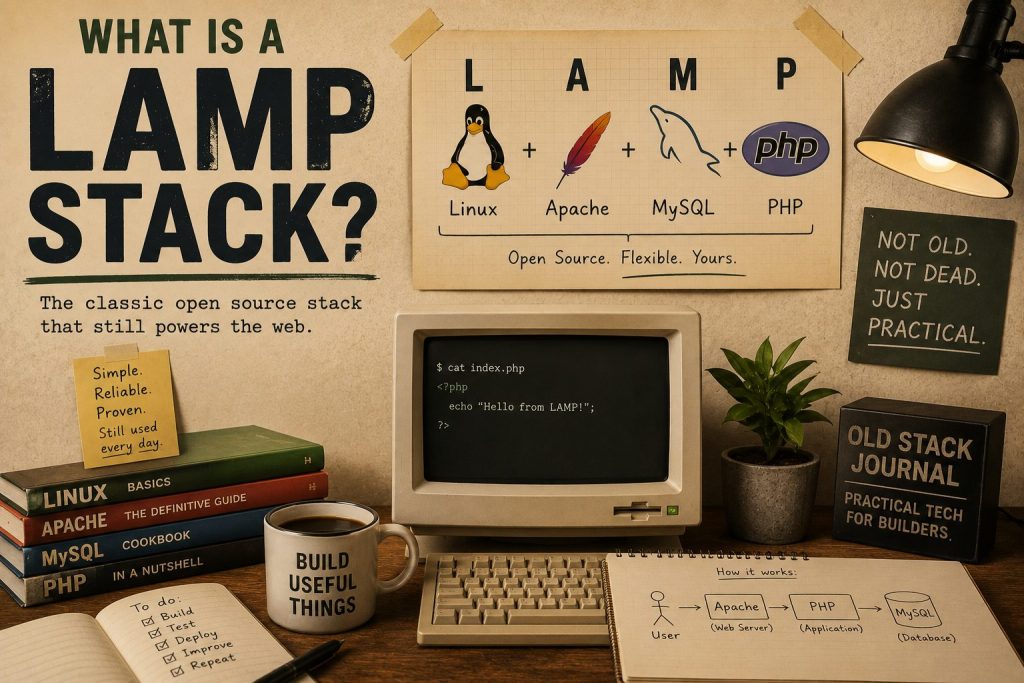
A LAMP stack is a classic web server setup made from Linux, Apache, MySQL or MariaDB, and PHP. Those four parts work together to serve websites and web applications: Linux runs the server, Apache handles web requests, MySQL or MariaDB stores data, and PHP runs the application code. It remains a practical choice for WordPress sites, small web apps, dashboards, admin tools, APIs, and solo-builder projects.
What does LAMP stand for?
- Linux is the server operating system.
- Apache is the web server that receives browser requests and serves pages.
- MySQL or MariaDB stores the application data.
- PHP runs the server-side application code.
A browser requests a page, Apache passes the request to the application, PHP runs the relevant code, the application reads or writes data in MySQL, and the server returns HTML or another response. That is the basic model.
The acronym is old, but the components are still widely used. WordPress is the obvious example, though LAMP can also run custom apps, internal tools, API endpoints, admin panels, calculators, and dashboards.
Why do people still use a LAMP stack?
People still use LAMP because it is understandable, widely supported, inexpensive to host, and suitable for a large amount of normal web work.
For solo builders and small teams, that clarity matters. You can rent a modest server, install the components, create a database, put the application files in a predictable place, and have a working site without assembling a large platform first.
I make the broader case in LAMP Is Still Enough for Most Web Projects. The practical distinction is simple: this article explains what the stack is; that article argues where it is still enough.
What is a LAMP stack used for?
- WordPress sites
- blogs and publishing tools
- small server-rendered web applications
- internal dashboards and admin systems
- forms and customer portals
- small APIs and webhook endpoints
- private business tools
- automation receipt pages
- solo-builder experiments
Most small projects need logins, forms, database tables, admin views, uploads, scheduled jobs, and pages that load reliably. LAMP can handle those requirements without much ceremony.
It also provides a useful foundation for understanding web application development. The pieces are visible, the request path is fairly direct, and the application can often be inspected without a large build system.
Is LAMP only for WordPress?
No. WordPress is one familiar LAMP application, but the stack is not tied to a particular content management system.
You can build a custom PHP application directly, use a PHP framework, expose an API, run scheduled scripts, or create a small private tool. WordPress is useful when you need its publishing system, user roles, admin screens, media library, plugins, revisions, taxonomies, and REST API. A custom application may be a better fit when the project has a narrower job and does not need the rest of WordPress.
That choice is part of ordinary WordPress development: deciding when WordPress is a useful base and when a smaller custom application makes more sense.
Is LAMP the same as XAMPP or MAMP?
Not quite. LAMP describes the underlying stack. XAMPP, MAMP, and similar packages are convenient local-development bundles that install comparable components on a desktop computer.
You might use XAMPP on Windows or MAMP on macOS while developing locally, then deploy the finished project to a Linux server running Apache, MariaDB, and PHP. The local package is the development environment; LAMP is the server-stack pattern.
Why LAMP works well with AI coding tools
LAMP can be a good fit for AI-assisted development because the stack is common and the files are often easy to reason about.
If the application is small and organised, you can give an AI assistant a PHP file, a table schema, and a specific task. The assistant does not have to infer a complex build system before it can help. You still need to review, test, and understand the result, but the work is inspectable.
AI does not remove the need for judgement. It tends to work better when the project context is easy to explain and the resulting patch is easy to check.
When is LAMP not the right choice?
LAMP is not always the right choice. A heavy real-time application, complex browser-based interface, native mobile product, or system with unusual scaling requirements may suit a different architecture. Your team’s existing skills also matter.
The point is not that LAMP beats every alternative. The point is that many projects do not need every possible moving part. A small application becomes better when it solves the problem and remains understandable, not when it collects the largest stack.
Is LAMP still worth learning?
Yes, especially when you want to understand how a straightforward server-rendered web application works.
You do not have to use LAMP for everything, but it gives you a useful baseline: web server, application code, database, request, and response. Once you understand that baseline, newer tools become choices you can evaluate rather than defaults you accept without question.