In this article
- The plugin was already doing half the job
- The first version was too dumb, but still useful
- Making AI generate video fields, not just social posts
- The fallback still matters
- The small bug that caught me
- Why the box is shared between TikTok and YouTube
- Cleaning up the old video brief fields
- Why this belongs in WordPress
- The actual production flow now
- What the AI is allowed to do
- What still feels clunky
- What this is good for
- What this is not good for
- Why this feels like an OSJ kind of solution
- Final thought
After I got the HTML video template working, the next annoying bit became obvious.
The template itself was useful. I could take an Old Stack Journal article, drop the title into the HTML, write a hook, add three points, record it in OBS, trim it in Clipchamp, and end up with a clean vertical promo video for TikTok or YouTube Shorts.
That was already better than fighting Canva every time I wanted to promote a post.
But it still left me doing the same copy-and-paste job manually.
Every new article needed the same handful of things:
article title
article date
hook line
three useful points
main takeaway
supporting line
footer topic
None of that’s difficult. That’s the trap with these jobs. They’re not difficult enough to feel like a real project, but they are repetitive enough to become friction.
And friction is where solo-builder workflows go to die.
So the next step was obvious: plug the promo video template into the WordPress plugin I already use for Old Stack Journal social posts.
The plugin was already doing half the job
I have a private WordPress plugin called OSJ Social Desk.
it’s not an auto-poster. I went down that road for a while, then backed away from it because social APIs are a swamp. X has costs and limits. Meta has permissions and review gates. Some platforms are awkward. Some are not worth touching. And even when the API works, I still want to do a final human pass before posting.
So OSJ Social Desk is more practical than clever.
The plugin sits on the WordPress post edit screen and helps me turn one article into platform-ready drafts. It gives me text for X, Threads, Facebook, Bluesky, LinkedIn, Mastodon, Quora, TikTok, YouTube Shorts, and so on. I can review the drafts, copy them, open the platform manually, post them myself, and mark the work as done.
That’s the right shape for me.
AI helps write the draft. I still decide what gets posted.
Once the HTML video template existed, it made no sense for that to live as a separate manual system. The article is already in WordPress. The Social Desk already reads the title, excerpt, categories, tags, permalink, and full article body. It already has an AI generation flow. It already stores the social drafts against the article.
The video template needed to become just another output.
Not a new app. Not a separate workflow. Just another box inside the same publishing desk.
The first version was too dumb, but still useful
The first integration was deliberately simple.
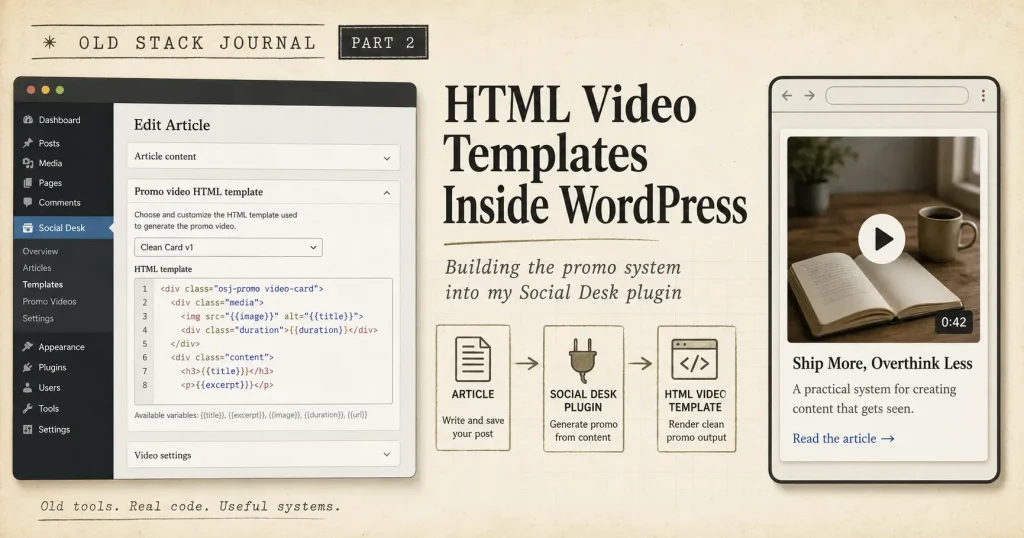
I added one shared box to the post edit screen:
Promo video HTML template — TikTok + YouTube ShortsInside that box was the full HTML template, ready to copy.
That alone was a useful improvement because I no longer had to go hunting for the base template file, duplicate it, and start replacing placeholders by hand. The plugin could fill the obvious fields straight from WordPress:
article title
article date
excerpt
categories
tags
canonical URL
So when I opened a post, the promo HTML was already there.
The problem was that this first version was only article-aware in the basic WordPress sense. It could use the title. It could grab the first sentence of the excerpt. It could create some fallback lines. It could put category and topic text into the footer.
That’s fine for a placeholder. It’s not good enough for the final video.
A promo video needs a bit more judgement. The three bullet points should come from the article. The hook should sound like the article. The main takeaway should feel like the point of the post, not like a generic summary line written by a sleepy intern.
So the fallback version stayed, but it became the backup plan.
The real version needed the AI generator.
Making AI generate video fields, not just social posts
The Social Desk already had an AI generation button for social platform posts. That button reads the article and generates the social drafts.
The cleanest next step was to make that same generation pass return a second block of data:
{
  "drafts": {},
  "promo_video": {}
}
The normal drafts object is for platform posts.
The new promo_video object is for the HTML template.
That promo block includes the exact fields the template needs:
hook_line
point_1
point_2
point_3
main_takeaway_quote
supporting_line
footer_topics
That’s a nice little boundary. The AI isn’t designing the template. It isn’t choosing colours. It isn’t touching layout. It isn’t trying to become a video editor. It is doing the bit it is actually useful for: reading the article and choosing the words that should go into the video.
The HTML and CSS stay fixed. That was important because I don’t want every article promo to look different. The whole point of a reusable template is that the visual system is already decided. The only thing that changes is the article-specific content.
The fallback still matters
I like having the template filled before the AI runs.
When I open a post, I don’t want an empty box staring at me. It should show something useful immediately, even if that version is not final.
So the plugin now has two layers.
First, it builds a fallback promo template from the WordPress post data. That means the box can always show a working HTML file. If I have a title, date, excerpt, and category, I can get a rough promo template.
Second, when I click the AI regenerate button, the plugin asks for the proper promo video fields and saves them to post meta.
After that, the HTML template uses the saved AI fields instead of the fallback text.
That gives me a practical workflow:
open article
see basic template immediately
click AI regenerate all
review updated promo HTML
copy HTML
save as local file
record in OBS
trim/export
post to TikTok and YouTube Shorts
The fallback is there so the system never feels broken.
The AI version is there so the final output is better.
The small bug that caught me
This part is worth mentioning because it’s exactly the kind of practical little integration bug that shows up when you bolt AI output onto a real tool.
The prompt asked the AI to return a promo_video block, but the structured JSON schema only allowed the normal platform draft fields.
So the AI was being told, “please return these video fields,” while the schema was effectively saying, “there is nowhere valid for those fields to go.”
The result looked confusing from the UI. The normal social drafts regenerated. The promo video box didn’t change. If I left the post and came back, the HTML was still using the old fallback version based on the post title and excerpt.
At first glance, that feels like a save bug. Or an AJAX refresh bug. Or a caching issue. The real problem was simpler: the schema and the prompt disagreed.
Once the schema allowed both drafts and promo_video, the whole thing started behaving properly. The AI could return the video fields. The plugin could save them. The HTML box could rebuild itself with the new values. Refreshing the WordPress edit screen kept the updated version.
That’s a good reminder with AI-assisted features: the prompt is not the whole system.
The prompt, schema, parser, save logic, and UI refresh all have to agree.
Why the box is shared between TikTok and YouTube
I originally thought about TikTok, YouTube Shorts, and Instagram together because they all live in that vertical short-form world.
But the workflow changed as I tested it. Instagram is now image-only for me, at least for this system. I don’t need the HTML video template sitting inside the Instagram section, because I am not using this template for Instagram Reels right now.
TikTok and YouTube Shorts can share the same generated video asset. That keeps the UI cleaner.
Instead of having one video brief under TikTok, another under YouTube, and another under Instagram, the plugin now has one shared promo HTML box for TikTok and YouTube Shorts.
The video file can be the same. The caption or description can still change per platform. YouTube might need a title and description. TikTok might need a shorter caption. But the HTML promo itself does not need to be different just because the upload destination changes.
This is one of those small workflow decisions that saves future clutter.
One box. One HTML file. One recorded video. Post it where it fits.
Cleaning up the old video brief fields
Before this change, the plugin had a “Video / visual post brief” style setup with several boxes.
It had fields for things like:
hook
caption
hashtags
pinned comment
video idea
That made sense when the plugin was trying to produce a general visual content brief. But once the HTML promo template became the actual system, those fields became extra noise.
I don’t need five boxes telling me how to make a video. I need the video template.
So those old fields were removed from the TikTok, YouTube, and Instagram visual brief area. Instagram moved back toward image post use. TikTok and YouTube got the shared promo HTML template box.
The goal was not to add another content section to the edit screen. The goal was to replace a fuzzier idea with the actual working production asset.
That’s usually a good sign in a workflow tool. If a field represents something you might do someday, it’s probably clutter. If a field contains the actual thing you need to copy, save, record, or post, it’s probably worth keeping.
Why this belongs in WordPress
I could have kept the HTML template as a local file workflow and that would have worked, but putting it into WordPress makes the whole process feel more like publishing and less like rummaging around in folders.
The article is already in WordPress. The permalink is already there. The title is already there. The excerpt is already there. The categories are already there. The plugin is already where I do the social copy work.
So the post edit screen becomes the control panel for that article’s promotion.
That’s the part I like.
Not because it’s fancy, but because it keeps the work close to the source.
I don’t have to open a separate prompt, paste the article, ask for video copy, open another file, replace placeholders, and hope I didn’t miss a bracket somewhere. I can generate the social drafts and the video template from the same place.
For a solo workflow, that matters more than people think. The individual steps are small. The context switching is the killer.
The actual production flow now
The workflow now looks like this:
- Write and publish the Old Stack Journal article.
- Open the WordPress edit screen.
- Use OSJ Social Desk to generate or regenerate the social drafts.
- Review the platform drafts and adjust anything that sounds off.
- Copy the promo video HTML from the shared TikTok + YouTube Shorts box.
- Save it locally as an
.htmlfile besideosj-logo.png. - Open the file in Chrome.
- Record the animation with OBS.
- Trim the recording in Clipchamp.
- Export the vertical MP4.
- Upload the same video to YouTube Shorts and TikTok.
- Use the platform-specific caption/link text from the Social Desk.
That’s still not one-click publishing. I don’t want one-click publishing. I want a repeatable system that removes the dull setup work while leaving me in control of the final output.
What the AI is allowed to do
This is also where the plugin needs boundaries.
The AI can read the article and suggest a hook. It can pull out three useful points. It can write a short takeaway. It can make the video text more specific than a generic fallback.
That’s useful, but it shouldn’t invent a stronger claim than the article makes. It shouldn’t pretend I tested something I didn’t test. It shouldn’t add made-up results, numbers, timelines, customer reactions, or fake authority.
The promo video is supposed to represent the article, not improve it into something else.
That’s why the plugin is pointed at the full article content and the OSJ context guidance. The output needs to sound like the site. Practical, plain, specific.
For me, that’s the right place for AI in this workflow. It’s not the author. It’s the publishing assistant.
What still feels clunky
The workflow is much better, but it’s not perfect. I still have to save the generated HTML as a local file. I still have to make sure the logo image is next to it. I still have to open it in Chrome. I still have to record it with OBS and trim it in Clipchamp.
That’s fine for now because those steps are reliable and easy to understand.
Could the plugin eventually export the HTML file directly? Yep.
Could it create a downloadable ZIP with the HTML and logo together? Probably.
Could there be a preview button in WordPress that opens the template in a clean full-screen view? That would be useful.
Could a server-side process render the video automatically? Maybe, but that also starts to make the system heavier than I want it to be right now.
For now, I like the split. WordPress generates the content and template. The browser renders it. OBS records it. Clipchamp trims it.
Each tool is doing a simple job.
That’s usually where my workflows hold together best.
What this is good for
This setup is a good fit if you already publish articles in WordPress and want a repeatable way to turn them into short promo clips.
It’s especially useful if you are more comfortable with HTML and CSS than timeline-based design tools. If you can look at a template and understand roughly where the title, panels, colours, spacing, and animation timing live, this kind of workflow feels much more natural than dragging layers around in a visual editor.
It also works well when you want consistency. Every OSJ promo video has the same structure. The article changes. The message changes. The template does not wander off and become a different brand every time I make a new post.
That’s important for a small site. You don’t need a full brand department. You just need a few repeatable patterns that make the work recognisable.
What this is not good for
This is not a replacement for proper video production. If I wanted talking-head videos, detailed tutorials, screen recordings with voiceover, complex motion graphics, platform-native captions, or anything that feels like a real edited video, this wouldn’t be enough obviously.
It’s also not the best workflow for someone who hates code. The whole trick works because the template is HTML and CSS. That’s the advantage, but it’s also the filter.
If Canva makes sense to you, use Canva. If CapCut is your natural habitat, use CapCut.
The point is not that every social video should be made with HTML. The point is that for this particular job — clean, repeatable article promos from a WordPress site — HTML turned out to be the least annoying tool in the room.
Why this feels like an OSJ kind of solution
The thing I like about this setup is that it connects a few ordinary tools into a workflow that actually fits how I work.
WordPress holds the article.
The Social Desk reads the article.
AI suggests the platform drafts and promo video text.
The HTML template handles the design.
The browser renders it.
OBS records it.
Clipchamp does the final trim.
None of those pieces are especially exotic. The useful part is the glue between them. That’s a recurring theme for Old Stack Journal. A lot of the best solo-builder tools are not giant platforms. They are small bits of workflow glue that remove just enough friction to make the next step happen.
Before this, making a social video felt like a separate creative task. Now it feels like part of publishing the article. That’s the win.
Final thought
The first version of the HTML promo template solved the design problem.
This plugin integration solves more of the workflow problem.
I still have to review the output. I still have to record the video. I still have to post it manually. That’s fine. I want those parts to stay human. What I don’t want is to rewrite the same hook fields, copy the same placeholders, rebuild the same template, and fix the same link mistakes every time I publish something.
That’s exactly the kind of work a small WordPress plugin should absorb.
Not because it’s impressive.
Because it means I’m more likely to actually make the video.