In this article
- Start with the problem, not the app
- Choose the tool based on the job
- Don’t build the whole house before you’ve checked the front door
- Use app builders for prototypes, not proof
- Keep changes small enough that you can explain them
- Make the AI inspect the current code before changing anything
- Be careful with database changes
- Test in the browser after every change
- Save working versions before chasing the next idea
- Don’t ask it to “make it better” unless you know what better means
- Treat security as a checklist, not a vibe
- Use plain names and clear structure
- Make the AI explain what changed
- Know when to get a real developer involved
- A simple workflow that actually works
- A starter prompt for non-programmers
- Who this helps
- Who should be careful with it
- The takeaway
Question: How can non-programmers use vibe coding without making a mess?
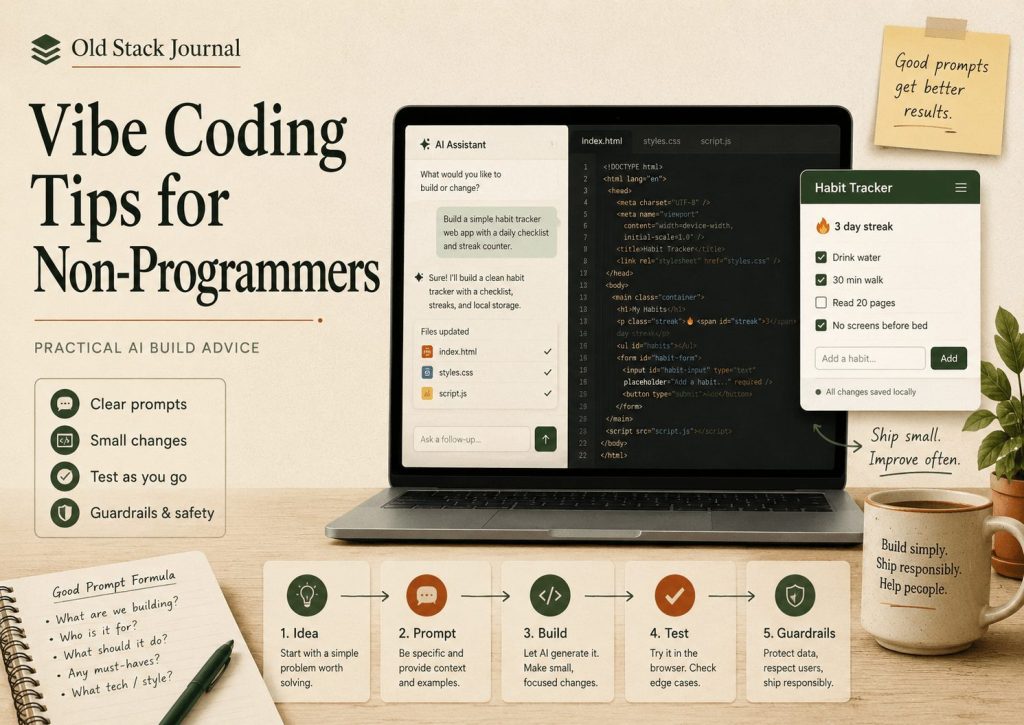
Non-programmers can use vibe coding well if they treat AI coding tools like fast, slightly overconfident junior developers rather than magic app machines. The useful workflow is to start with a real problem, build the smallest version, keep changes small, make the AI inspect the current code before editing, test in the browser after every change, save working versions, and get human help when the project touches real users, money, private data, or business-critical workflows.
Vibe coding can be genuinely useful for non-programmers, but only if you keep enough control over the process to understand what changed, test what matters, and stop the project from turning into a pile of mystery code. The interesting part is not that everyone suddenly becomes a software engineer overnight, because they do not. The interesting part is that more people can now build useful first versions of tools they would not have been able to touch a few years ago.
That is where a lot of the hype around AI coding misses the point. A form, dashboard, WordPress plugin, landing page, customer notes tool, small admin panel, or internal automation helper is much more reachable now, but reachable does not mean risk-free. The same tools that make it easy to start can also make it very easy to create a mess, especially if you ask for too much at once, accept every patch, skip testing, and do not know where the files live or what the code is supposed to be doing.
So this is not an article about how non-programmers can build anything with one prompt. That line is mostly bait. This is about using AI coding tools in a way that keeps you in control long enough to get something useful built. You do not need to know everything about programming before you start, but you do need a workflow that keeps the AI in a sensible lane.
Start with the problem, not the app
A common mistake is opening ChatGPT, Codex, Cursor, Windsurf, Bolt.new, Replit, or whatever tool you are using and typing something like, “Build me an app.” That feels natural because the app is what you want, but it is usually the wrong starting point because the AI has to fill in too many blanks. It will invent the structure, screens, database tables, feature set, naming, layout, and sometimes even the problem it thinks you are solving.
Once that happens, you are not really steering the project. You are reacting to whatever the tool generated. That can feel productive for an hour, but it often leaves you with a project that looks like software while solving a slightly different problem from the one you actually had.
The better starting point is the annoying problem you are trying to fix. Maybe you want to track customer replies because they are getting lost in email, or maybe you want a form that saves job notes because a spreadsheet has become painful. Maybe you want to collect newsletter signups without bolting on a giant marketing platform, or maybe you want a private admin page that lets you paste a chunk of text, categorise it, and find it again later. That is the useful starting point because it is rooted in a real workflow instead of a vague product fantasy.
AI tools are much better when you give them a job with edges. If you can describe who the tool is for, what they need to do, what data needs to be saved, and what the smallest useful version should handle, you will get a better result than you will get from asking for a whole app and hoping the model guesses correctly.
A better prompt might be:
I want a simple PHP/MySQL tool where I can paste a customer email, choose a category, save it, and view previous replies. Before writing code, outline the smallest useful version and the files you would create.
That kind of prompt does not require you to be a programmer. It requires you to understand the problem, which is often the part you already know better than anyone else.
Choose the tool based on the job
Not every vibe coding tool belongs in the same bucket. A chat assistant is good for planning, explaining, debugging, and turning messy thoughts into a smaller first version. A browser-based AI app builder like Bolt.new, Lovable, Replit, or v0 can be useful when you want to see a prototype quickly. A repo-aware coding assistant is better when you already have a real codebase and need focused changes inside the existing project.
This matters because non-programmers can get pulled toward whichever tool has the most impressive demo. That is understandable, but it is not a reliable way to choose. If you need clarity, use chat first. If you need to see the shape of an app, use a prototype builder. If you need to modify real files, use a tool that can inspect the project. If you need to launch something public, slow down and think about hosting, backups, data, security, and support.
I covered the broader tool-selection problem in What Are the Best Vibe Coding Tools for Non-Developers?. The short version is that the best tool is the one that makes the next step clearer. If a tool gives you a pretty screen but less understanding, it has not helped enough.
Don’t build the whole house before you’ve checked the front door
Non-programmers are especially vulnerable to feature creep because AI makes every extra feature feel cheap. Login sounds easy, billing sounds easy, dark mode sounds easy, and admin dashboards, charts, exports, email notifications, AI summaries, user roles, API keys, settings pages, onboarding screens, and clever little animations all sound like they are only one more prompt away. Technically, some of them might be, but that does not mean they belong in the first version.
The first version should prove the core workflow. If the core workflow does not work, the extra features do not matter. A contact form that saves enquiries properly is more useful than a half-broken platform-shaped object with a dashboard nobody can trust. A small tool that does one job clearly is better than a fake SaaS with ten screens and no working centre, especially when you are still figuring out what the project actually needs to become.
This is where you need to be firm with the AI because it will happily keep adding things if you let it. A useful instruction is:
Build the smallest useful version first. Keep the design simple. Do not add login, billing, dashboards, email notifications, or extra settings unless I ask for them. I want to test the core workflow before adding more.
That prompt does not make the product smaller forever. It just stops the first version from collapsing under features you have not tested yet. Once the basic version works, you can add the next thing and then the next thing, which is not as exciting as pretending you built a company in an afternoon, but it is much closer to how useful software gets made.
Use app builders for prototypes, not proof
Tools like Bolt.new and Lovable are useful because they can turn an idea into a working-looking app quickly. That can be a big deal for non-programmers because seeing the thing changes the conversation. A vague idea becomes a set of screens, fields, labels, buttons, and flows you can actually react to.
The trap is treating that first working preview as proof that the app is ready. A prototype that loads in the browser still needs review. You need to know where the data goes, what happens when input is empty or wrong, whether the code can be maintained, whether authentication is real, whether deployment makes sense, and whether someone else could understand the project later.
I wrote more about this in What Is Bolt.new Actually Good For?. Bolt is useful when it helps you get the first shape of an idea onto the screen. It becomes risky when you mistake that speed for readiness.
That is a good rule for the whole AI app-builder category. Use these tools to make an idea visible, test the flow, and learn what you forgot to specify. Do not let a polished preview convince you that the hard parts have disappeared.
Keep changes small enough that you can explain them
This is probably the most important vibe coding tip for non-programmers: do not let the AI make changes so large that you cannot explain what happened afterwards. If it changes twenty files and you do not know why, the project is now ahead of you. That might feel fine while the app still loads, but the moment something breaks you will be stuck trying to debug a system you never really understood.
Small changes keep you in control because they give you a chance to understand the shape of the work. One page, one form, one button, one field, one layout issue, one bug, or one database change is much easier to review than a giant patch that touches routing, templates, CSS, JavaScript, database helpers, and authentication in one go. You do not need to understand every line of code, but you should understand the behaviour that changed.
A good target is being able to explain the change in normal language. You should be able to say, “this added a status field to the jobs table, showed it on the edit screen, and saved it when I clicked update.” That level of understanding is enough to keep moving without flying blind, and it gives you a better chance of spotting when the AI has changed something unrelated.
When I am using AI for coding work, I have had much better results from asking for targeted changes than from asking it to improve a whole area. The bigger the prompt, the more likely it is to tidy things that did not need tidying, rename things that did not need renaming, or introduce a second way of doing something the project already did.
A good working prompt is:
Make the smallest targeted change needed. Before editing, tell me which files you will change and why. Do not refactor unrelated code.
That does not remove all risk, but it puts the AI in a narrower lane, and narrow lanes are useful when you are not writing every line by hand.
Make the AI inspect the current code before changing anything
A lot of AI coding mess starts because the model guesses how the project works. It invents a file path, assumes a helper function exists, creates a new database connection even though the project already has one, writes a second version of a feature instead of editing the real one, or adds a new CSS file because it did not notice the existing layout file. The output can look convincing, especially if you are not a programmer, but the project slowly fills with duplicate ideas and unused code.
That is why inspection matters. Before the AI changes anything, make it look at the existing files, identify the right place for the change, and explain the plan in plain English. Ask it to follow the existing structure, naming style, database helpers, layout patterns, and error handling, especially if you are using a tool with repo access, because those tools can move quickly and touch real files.
Speed is useful, but speed without context is how you end up with duplicate functions, broken routes, and mystery folders called new-version-final-fixed. A good instruction is:
Inspect the existing code before changing anything. Follow the current file structure and coding style. Tell me where the change belongs before you make it.
That step can feel slightly slow in the moment, but it saves time later because you want the AI to work with the project, not around it. For an example of this more controlled approach, I use a similar pattern in The Safer AI Coding Workflow I’m Using to Build Terralog.online.
Be careful with database changes
Database changes are where vibe coding can get expensive in a hurry. Breaking a bit of CSS is annoying, and misplacing a button is annoying, but wiping a table, changing a column badly, losing records, or breaking old data is a different level of problem. Non-programmers need a simple rule here: the AI does not get to casually drop, recreate, or reset database tables.
If a database change is needed, the AI should explain why it is needed, which table is affected, what happens to existing data, and how the change can be applied safely. For a real project, or even a semi-real project with test users or valuable data, you want a safe migration. That usually means an ALTER TABLE statement or a small update script rather than “import this new schema” or “run reset.sql.”
This matters because AI will often take the shortest path if you do not set boundaries. If the local development database is empty, it might suggest dropping and recreating tables because that is simple, but the same habit on staging or production can wreck real data. A good instruction is:
Do not wipe or recreate existing tables. If a database change is needed, give me a safe migration using
ALTER TABLEor data-preserving SQL, and explain what it does.
You do not need to become a database expert to use that rule, but you do need to pause before running anything destructive.
Test in the browser after every change
The AI saying “done” does not mean done. It means the code was changed, and those are not the same thing. Done is when you have opened the page, followed the workflow, entered the data, clicked the button, checked the result, tried the empty field, tried the wrong input, refreshed the page, and confirmed the thing still behaves how you expected.
A non-programmer does not need to read code like a senior developer, but they do need to test like someone who cares whether the tool works. After every change, ask the AI for a short manual testing checklist written in normal language. Not a vague “test the form” note, but actual steps: open this URL, enter this value, click this button, expect this result, and then check this edge case.
This is also where screenshots help. If something looks wrong, do not just say “fix it,” because that gives the AI almost nothing to work with. Send the screenshot and explain what you expected to see, such as “the save button should sit under the form on mobile, but it is floating beside the input.” You are not trying to impress the AI. You are trying to give it enough context to fix the right thing.
For anything public, I would pair this habit with a proper launch checklist. I wrote about that in SaaS Pre-Shipping Checklist I Run Before Letting Real Users In, because the moment real people can use the app, the standard should be higher than “it worked once for me.”
Save working versions before chasing the next idea
This is one of those plain habits that saves projects, especially when AI makes it very easy to keep prompting. When something works, save it before asking for the next thing. Use Git if you can, but if you are not using Git yet, at least keep dated ZIP backups of known-good versions so you have somewhere safe to return to.
The danger with AI coding is that you get one feature working, then you think of the next one, and then the next one after that. Three hours later, something breaks, and you realise the last working version only exists in your memory. That is a bad place to be because the AI will not necessarily know which change broke it either, especially if you stacked ten changes on top of each other without checking the whole workflow.
The rule is simple: working version first, new idea second. If the app works at 7pm and you keep prompting until midnight without committing, backing up, or testing properly, you can lose the clean version without noticing when it happened. A commit that says “working signup form before adding email confirmation” is enough to give you a return point, and that return point is worth more than it feels like in the moment.
Don’t ask it to “make it better” unless you know what better means
“Make it better” is one of the most dangerous lazy prompts because the AI has to invent what better means. It might decide better means a restyled UI, a refactor, a new folder structure, extra animations, renamed functions, or some clever abstraction nobody asked for. Sometimes the result looks more impressive, but impressive is not the same as useful.
Better needs a direction. It might mean fewer clicks, clearer labels, better mobile spacing, stronger validation, more useful error messages, faster loading, simpler navigation, or safer handling of uploaded files. Those are real improvements because they can be checked, while “make it modern” is often where generic sludge starts creeping in and your normal admin page suddenly wants to become a fake startup dashboard with cards, gradients, icons, animations, and half the useful information hidden behind clever spacing.
Most people are not building Figma, Slack, Uber, or Netflix. They are building normal web tools that need to work, which means “Improve the mobile layout of this form without changing the desktop design or backend logic” is a much better prompt than “make it look better.” It gives the AI a job, a boundary, and a way for you to judge the result.
Treat security as a checklist, not a vibe
Security should not be handled with vibes, especially when you do not fully understand the code yet. That does not mean every prototype needs enterprise-grade everything from day one, but the basics cannot be ignored once the project starts touching real users, private data, file uploads, payments, API keys, admin screens, or customer records.
The practical move is to ask for a security pass on specific areas. Are admin pages protected, are form inputs validated, is output escaped before it is shown in the browser, are SQL queries safe, are uploaded files restricted, are secrets kept out of the repo, and are users allowed to access only what they should access? You do not need to turn the project into a security textbook, but you do need to stop pretending this stuff will magically sort itself out.
A useful prompt is:
Review this change for basic security issues: authentication checks, permissions, input validation, output escaping, SQL safety, file uploads, and secret exposure.
If the project has an .env file, API keys, payment tokens, SMTP credentials, or private config, be extra careful. Do not paste secrets into public chats, do not commit them to GitHub, and do not let the AI simplify configuration by hardcoding keys into a PHP file just because it worked locally. Security is one of those areas where you need steady discipline, not panic or theatre.
Use plain names and clear structure
Clear naming is one of the easiest ways non-programmers can help themselves. A table called newsletter_subscribers is understandable, a field called confirmed_at tells you what it probably does, and a file called admin-subscribers.php is easier to find than something abstract and clever that sounded good in the moment.
This matters because you are going to come back to the project later. You might be tired, you might have forgotten what the AI did, you might be asking another AI tool to inspect the code, or you might be trying to fix a bug quickly before work. Clear names make all of that easier, and they also make it easier for a real developer to review the project later if you get to that point.
AI tools sometimes drift toward architecture that sounds more serious than the project needs. They will suggest services, managers, factories, adapters, handlers, clients, controllers, modules, providers, and abstractions, and some of those patterns are useful in the right project. But if you are a non-programmer building a small tool, you are usually better served by names that match the real thing being built. If it is a subscriber, call it a subscriber. If it is a receipt, call it a receipt. If it is a confirmation token, call it a confirmation token.
The project can grow later, and the structure can improve later, but early on clarity matters more than cleverness. You are not trying to win an architecture argument. You are trying to build a tool you can understand next month.
Make the AI explain what changed
One of the best ways to learn while using AI is to make it explain every patch after it is done. Not a giant technical essay, just a plain-English summary of which files changed, what behaviour changed, and how to test it. This slowly builds your mental map of the project, which matters because AI tools can sound equally confident when they are right, wrong, or somewhere awkwardly between the two.
Over time, you will start to know where pages live, where forms submit, where database changes happen, which files control layout, which files are risky to touch, and which parts of the app are still fragile. That does not make you a traditional programmer overnight, but it does make you less dependent on the AI’s confidence, and that is a big step toward actually owning the thing you are building.
A good prompt is:
Explain what changed in plain English. Tell me which files changed, what the user can do now, and how I should test it.
This is also useful when you come back to the project later. If you keep summaries in your notes, commit messages, or project log, you create a trail of what happened. That trail is easy to ignore when everything works and very useful when something breaks.
Know when to get a real developer involved
AI coding tools are powerful, and non-programmers can absolutely build useful things with them, but some areas deserve a human developer review. Payments, authentication, user data, private files, uploads, production deployments, legal workflows, compliance-heavy tools, and anything business-critical should not be shipped blindly because the AI sounded confident.
Getting a developer involved is not a failure. A non-programmer who builds the first working version, understands the workflow, proves the idea, and then gets help hardening the project is in a much better position than someone who never starts. You can use AI to get from idea to working draft, then use a real developer’s experience to make sure the thing is safer, more maintainable, and ready for real use.
The danger is not that non-programmers are building. The danger is pretending there is no difference between a prototype that works on your machine and a product that can safely handle real people, real data, and real money. Vibe coding does not remove the need for judgement, but it does give more people a way to get something working before they need the next level of help.
A simple workflow that actually works
The best workflow I have found is simple enough to repeat: describe the problem clearly, ask for the smallest useful version, make the AI inspect the code before changing anything, ask for one targeted change, test it in the browser, ask for a plain-English summary, save the working version, and then move to the next piece. That is not as flashy as telling everyone you built a SaaS in one prompt, but it is a much safer way to build something you can keep.
The important part is that every step gives you a chance to stop, check, and understand. You are not letting the AI sprint away into a giant patch, and you are not treating coding as a slot machine where you keep pulling the lever until something looks right. You are using the AI to move the project forward in chunks you can verify.
That is how non-programmers should think about AI coding. Not as one giant prompt that creates an app, but as a series of small, checked steps. It is slower than the fantasy version, but it is much faster than getting lost in a broken codebase you do not understand.
A starter prompt for non-programmers
Here is a prompt I would use as a starting point, not because it is magic, but because it sets the tone before the AI starts touching files:
You are helping me build a small web app, and I am not a programmer. Keep changes small, explain them clearly, and do not refactor unrelated code. Before changing anything, inspect the existing files and tell me what you plan to change. Do not make destructive database changes, do not touch secrets or environment-specific settings, and after each change give me a plain-English summary plus a browser testing checklist.
That prompt will not solve everything, but it gives you good defaults. It says you want small changes, clear explanations, safe database handling, no secret-touching, and testing steps, which is much better than letting the AI guess how careful it should be.
You can adjust it for whatever you are building. If it is a WordPress plugin, tell it to follow WordPress conventions. If it is a PHP/MySQL app, tell it to use the existing database helper. If it is a front-end layout issue, tell it not to touch backend logic. If it is a live project, tell it not to make destructive changes. The more useful context you provide, the less the AI has to invent, and that is usually where the quality improves.
Who this helps
This approach is for non-programmers, founders, writers, consultants, small business owners, content people, operators, and practical tinkerers who have ideas for tools but do not want to wait until they can hire a developer or learn everything from scratch. It is also for people who know enough tech to be dangerous and want a safer way to work with AI coding tools.
I do not think this group should be talked down to. A lot of non-programmers understand workflows, customers, admin pain, business rules, and real-world problems better than the average developer dropped cold into a project. They know where the friction is because they live with it, and that knowledge matters.
AI coding tools can help turn that knowledge into software, but only if the builder keeps enough control over the process. Otherwise, the tool starts solving a slightly different problem in a slightly weird way, and the person with the actual context gets pushed into the passenger seat.
Who should be careful with it
This approach is not right for every project. If the work is heavily regulated, payment-heavy, security-sensitive, or critical to someone’s business operations, AI-assisted prototyping can still help, but it should not be the only review layer before launch. It is also not a great fit for people who want to blindly generate a complicated SaaS without understanding any of it.
AI can produce a lot of code quickly, but owning a product means more than having files on a server. You need to understand the workflow well enough to test it, explain it, and know when something feels wrong. That does not mean non-programmers should stay away from building; it means they should build with guardrails.
There is a big difference between using AI to create a first working version and using AI to avoid all responsibility for what the software does. The first one is useful, and the second one is where things get messy.
The takeaway
Vibe coding works best when the vibe has guardrails. Non-programmers can build useful things with AI, and that is a real shift. I do not think that should be dismissed just because the phrase “vibe coding” got overused and turned into a meme, because there is something real underneath it: people who understand a problem can now get much closer to a working tool without waiting for permission.
But the winning move is not to ask for huge magical outputs and hope for the best. The winning move is smaller and more practical. Describe the problem clearly, build the smallest useful version, keep changes understandable, make the AI inspect the code, test in the browser, save working versions, treat security seriously, and ask for help when the risk gets real.
That is not as flashy as “I built a SaaS in one prompt,” but it is much closer to how useful software actually gets made. For non-programmers, that is the version of vibe coding worth taking seriously.
One comment