In this article
Question: What are the best vibe coding tools for non-developers?
The best vibe coding tool for a non-developer is the one that matches the job in front of them. Use a chat assistant for planning and debugging, a browser-based app builder for quick prototypes, a repo-aware coding assistant for real code changes, and a simple deployment path for anything you want to keep. The tool matters, but the workflow matters more because a good tool used too broadly can still leave you with a confusing half-built app.
Don’t start with a leaderboard
A lot of “best tools” articles turn into shopping lists. That is not very useful if you do not already know what you are trying to build. For non-developers, the better question is not “which tool is best?” It is “what kind of help do I need right now?”
You might need help turning a messy idea into a smaller first version. You might need a quick prototype to see if an interface makes sense. You might need someone to explain an error message without making you feel stupid. You might need careful code changes inside an existing project. Those are different jobs, and they should not all be handed to the same tool in the same way.
This is where a lot of non-developer vibe coding goes wrong. One tool can feel amazing for the first hour and painful after the fifth change. Another tool may look less magical in a demo but do a better job with a real project folder, repeatable patches, and review. The best tool is the one that keeps you in control of the next step, not the one that generates the most impressive first screen.
Four buckets that matter
For non-developers, I would think about vibe coding tools in four buckets. This keeps the choice practical and stops every decision from becoming a vague comparison between products that are trying to do different jobs.
1. Planning and explaining tools
This is where a general chat assistant is useful. Use it before you build, especially if the idea is still fuzzy. Ask it to turn an idea into a smaller first version, write a feature checklist, explain database tables in plain English, or create a test plan. This is low-risk and high-value because you are not asking it to silently change code yet.
A good planning prompt is specific about the job and honest about what you do not know. For example:
I want to build a simple private tool for tracking client follow-ups. Ask me the missing questions, then suggest a tiny first version.
That prompt is much safer than asking for a complete SaaS on the first message. It slows the work down just enough to define the shape of the project before a tool starts inventing screens, tables, roles, dashboards, and settings you never really asked for.
A general assistant is also useful when something breaks. Paste the error, describe what you were trying to do, and ask for an explanation before asking for a fix. That habit matters because non-developers can accidentally approve changes they do not understand, and a quick explanation can stop a small bug from turning into a mystery codebase.
2. Prototype builders
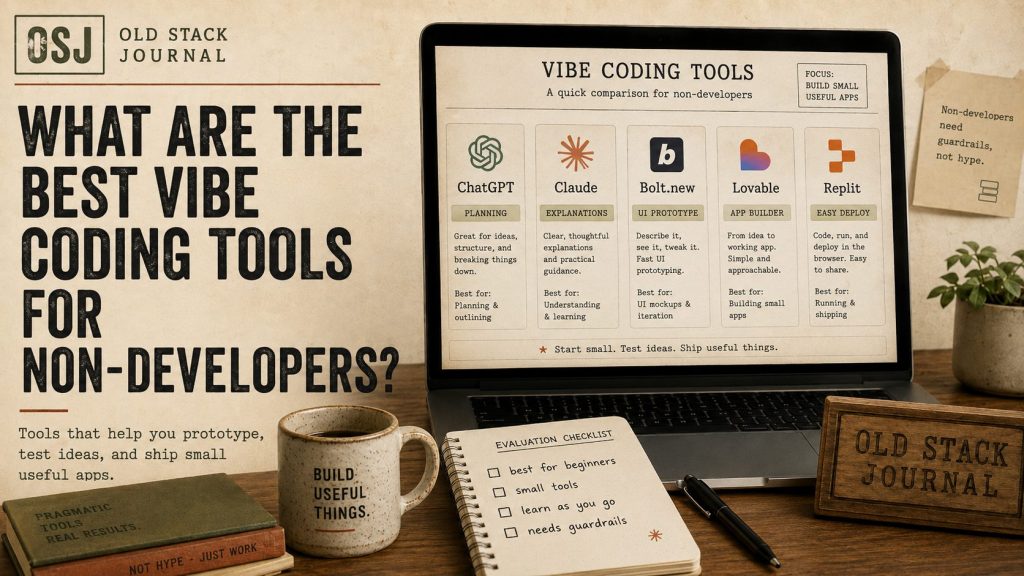
Prototype builders are useful when you want to see an idea quickly. Tools like Bolt.new, Lovable, Replit, v0, and Firebase Studio all sit somewhere in this broader AI app-builder space, although they do not all feel the same. Some are strongest for fast product sketches, some lean more toward real app environments, and some make the most sense if you already know the ecosystem they belong to.
Bolt.new is a good example of the fast-prototype category. It is useful when you want to describe a landing page, dashboard, form-based tool, or small app idea and get something working-looking in the browser. I’ve written separately about what Bolt.new is actually good for and in more detail in my Bolt.new review, but the practical point is simple: Bolt is strongest when the job is getting the first shape of an idea onto the screen.
Lovable belongs in a similar conversation because it is aimed at people who want to turn plain-English ideas into apps, websites, and digital products. Replit is different because it has a stronger development-environment feel, which can be useful when you want a small app to live closer to real code and deployment. v0 is more interesting when the work is mostly modern web UI, and Firebase Studio makes more sense when the project belongs near Firebase services and a fuller app platform.
That can all be genuinely useful, but prototype builders can also create false confidence. A preview that loads in the browser still needs review, testing, data handling, and deployment judgement before it becomes something real. I treat these tools as idea accelerators, not proof that the product is finished.
3. Repo-aware coding assistants
Once you have a real codebase, context matters. A coding assistant that can inspect the actual files, propose focused changes, and work from the current project is usually more useful than a blank chat. This is where tools like Cursor, Claude Code, GitHub Copilot-style workflows, Codex-style agents, or other repo-aware assistants can make more sense than a pure prompt-to-app builder.
This is the workflow I use in The Safer AI Coding Workflow I’m Using to Build Terralog.online: give the assistant the latest code, ask for focused patches, test manually, and commit only what works. The point is not that AI writes perfect code. The point is that the work is small enough to inspect.
For non-developers, this still requires care. You do not need to understand every syntax detail, but you do need to test the result and keep the change small enough to review. “Fix this one broken filter” is a safer request than “refactor the whole app and improve the architecture,” especially if you do not have a clear way to test what changed.
4. Hosting and deployment tools
This is the bucket people skip. A tool that helps you generate an app is only part of the problem. Where does it run? How do you update it? Where does the data live? What happens if something breaks? Can you export the code? Can someone else help you later?
For small private tools, simple hosting and a boring stack may be better than a glamorous setup you do not understand. A generated app that only works while the AI builder’s preview is open is not the same thing as a reliable tool. Deployment, backups, environment variables, database access, email sending, and error logs are not exciting, but they decide whether the app is usable after the demo.
This is where non-developers should be especially careful. The easiest builder is not always the easiest app to maintain. Before you trust anything public, ask how it is deployed, who controls the account, what happens if you stop paying for the tool, and whether a developer could take over without starting from nothing.
What I’d choose for common jobs
For planning a small app, I would use a chat assistant first. That is the cheapest and safest place to clarify the idea. Ask for missing questions, a tiny first version, a list of screens, a rough data model, and a test checklist before you generate anything that looks like software.
For seeing whether an interface idea makes sense, I would use a prototype builder. Bolt.new or Lovable can be useful when you need something visible quickly. v0 can be useful when the problem is mostly modern web UI. Replit can make sense when you want the work to sit closer to a real app environment. The right choice depends on the job, not on which product has the loudest demo this week.
For improving a real project, I would use a repo-aware coding tool and ask for small changes. The assistant should see the actual files, propose a narrow patch, explain what changed, and give you a way to test it. That workflow is less flashy than generating a whole app in one prompt, but it is much safer once the project matters.
For anything public, I would add a manual checklist before launch. I wrote one in SaaS Pre-Shipping Checklist I Run Before Letting Real Users In. That checklist matters more than the tool name because it forces you to look at user flow, security, billing, onboarding, emails, support, and failure cases before a real person depends on the app.
How I’d pick between Bolt, Lovable, Replit, v0, and Firebase Studio
If you are choosing between the current wave of AI app builders, I would start with the kind of output you need. Bolt.new is a good first stop when you want a fast working-looking prototype and you are still testing the idea. Lovable is also worth considering for product-shaped app and website ideas where a non-developer wants to move from plain English to a clickable first version.
Replit is more interesting when you want to build inside a real app environment rather than only sketch a polished first pass. That can be useful for small tools, experiments, and learning projects, but it also means you may need to deal with more of the machinery. Files, packages, logs, deployment settings, and environment variables are not bad things, but they are still things you need to understand eventually.
v0 is the one I would look at when the main task is modern web UI, especially if the project points toward a React, Next.js, or Vercel-shaped workflow. Firebase Studio makes more sense when the project belongs close to Firebase services and you are thinking beyond a simple interface sketch. That extra capability can be useful, but it is probably more than you need for a first low-risk experiment.
The practical rule is to pick the tool that makes the next step clearer. If the tool gives you a pretty screen but less understanding, it has not helped enough. If it gives you a small working draft that you can test, question, revise, and explain, it has done something useful.
The wrong tool is often too powerful too soon
The danger for non-developers is not that AI tools are useless. It is that they can make too much too quickly. A tool can generate authentication, roles, payments, dashboards, email flows, and database tables before you understand the first feature. That feels like progress until something breaks and you have no map.
A better workflow is slower at the start, even if the tool could technically move faster. Define the tiny first version, build one screen, test it manually, ask for an explanation of the files, add one feature, and test again. That is not as flashy as asking for the whole product in one prompt, but it keeps you in control.
- Define the tiny first version.
- Build one screen or one core flow.
- Test it manually with normal and awkward inputs.
- Ask the tool to explain the files, data, and moving parts.
- Add one feature only after the first flow makes sense.
- Test again before trusting the result.
This workflow is less exciting, but it is also less likely to leave you with a mystery app. If you are not a developer, the goal is not to pretend you understand everything. The goal is to keep the project small enough that you can still ask sensible questions and know when to get help.
A simple tool map for non-developers
Here is the plain-English map I would use:
| Job | Tool type to try | What to watch |
|---|---|---|
| Clarify an idea | Chat assistant | Do not let it turn a small idea into a giant fake SaaS plan. |
| See a quick app shape | Prototype builder like Bolt.new or Lovable | A working preview is still only a draft. |
| Explore modern web UI | UI-focused builder like v0 | UI is not the whole app. |
| Build a small hosted experiment | Replit or a similar app environment | You still need to understand files, data, and deployment. |
| Work on an existing codebase | Repo-aware coding assistant | Keep changes small and test manually. |
| Launch something public | Deployment plus review checklist | Security, data, billing, and support matter more than the demo. |
This table is deliberately boring. That is the point. Vibe coding works better when the tool choice follows the job instead of the other way around.
What I’d avoid
I would avoid starting with a big prompt that asks for a complete business. Do not ask an AI app builder to create a multi-user SaaS with billing, roles, dashboards, admin tools, analytics, email sequences, and integrations before you have tested the first useful workflow. That kind of prompt feels efficient, but it mostly asks the tool to invent a lot of product decisions on your behalf.
I would also avoid using real private data during early experiments. Use mock data until you understand where information is stored, who can access it, how the app is deployed, and whether the generated code is safe enough to keep. The first version should be allowed to fail without causing a real problem.
The last thing I would avoid is endless prompting when the project is clearly stuck. If the tool has tried to fix the same bug three times and the app is still broken, stop and ask for an explanation. Sometimes the right next step is a smaller change, a fresh prototype, a manual code review, or admitting that the project has moved beyond what a non-developer should safely push alone.
What I’d do next
If you are a non-developer choosing a vibe coding tool, do not ask which one is best in the abstract. Pick the tool based on the next job. Need clarity? Use chat. Need a quick demo? Use a prototype builder. Need a careful change? Use a coding assistant with project context. Need to let real users in? Slow down, test, and review.
The tool can help you build, but it cannot be the adult in the room. That part is still the workflow: small scope, clear prompts, manual testing, review before launch, and enough judgement to stop when the generated app starts looking more confident than it deserves to be.