In this article
- The problem wasn’t video, it was repeatable video
- Why deck-style video makes sense
- What TextToDeck does right now
- Why HTML templates still feel right
- First sales change the pressure in a good way
- Autoposting is on the table, but carefully
- A WordPress plugin is probably coming
- What TextToDeck isn’t trying to be
- Who it should help
- What comes next
- The takeaway
Every product starts with some version of the same annoying sentence: I’m tired of doing this the slow way.
For TextToDeck, that sentence came from the publishing side of Old Stack Journal. I’d finish an article, sort the featured image, write the social copy, then hit the part of the workflow where I knew I should make a short vertical promo video as well. Not a full video essay, not a talking-head edit, not anything that needed a proper timeline and half a night of fiddling, just a simple vertical video that could announce the post on TikTok, YouTube Shorts, Instagram Reels, and wherever else short-form content keeps eating the web.
The frustrating part was that I already knew what the video needed to say. It needed a hook, a few cards explaining the point of the post, maybe a takeaway, and a simple call to action. The problem wasn’t thinking up a video from scratch each time. The problem was the production drag around turning written content into something that moved.
That’s what TextToDeck is built to fix.
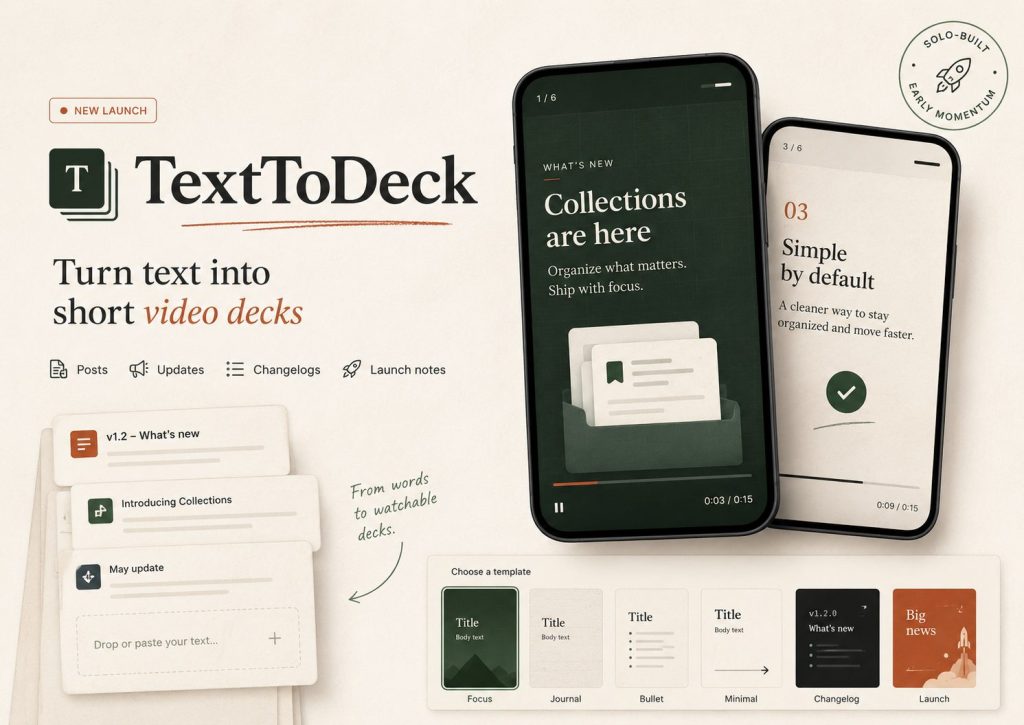
TextToDeck turns written updates, articles, launch notes, changelogs, reminders, and other text-first content into short vertical video decks. You pick a template, fill in the words, render the video, and get an MP4 you can post. It’s not trying to be a full video editor, and it’s not trying to pretend every solo builder suddenly needs a studio workflow. It’s meant for the much more common job where you’ve already got the message and you just need a clean, reusable way to package it for short-form platforms.
The nice part is that it’s not just an internal experiment anymore. TextToDeck is live, and we’ve made our first sales now, which changes the feeling of the project quite a bit. A tool can look useful on your own desk, but the first time someone else pays for it, even in a small way, it becomes harder to dismiss it as just another side project.
The problem wasn’t video, it was repeatable video
I’ve already written about the original version of this workflow on Old Stack Journal, where I got tired of fighting Canva and started making promo videos from HTML templates instead. That first system worked better than I expected because HTML is actually very good at the parts of video layout I needed: text, spacing, timing, simple animation, reusable structure, and predictable output.
The early workflow was practical, but still too manual. I’d generate an HTML template for an article, open it locally, record it in OBS, trim it in Clipchamp, add music if needed, export it, then upload it to the social platforms. That was fine for proving the idea, and it was much better than manually rebuilding the same kind of Canva design over and over, but it still had enough friction that I could feel myself wanting to skip the video step whenever I was tired or busy.
That’s usually a good sign that the workflow is close, but not finished.
The annoying part wasn’t OBS by itself, or Clipchamp by itself, or even the template generation. It was the little chain of repeated actions that made the whole thing feel heavier than the content deserved. When you’re working on a content site, a product, a plugin, customer bits, marketing, Stripe setup, templates, testing, and everything else that comes with solo-builder life, a “simple” extra task can quietly become the thing you stop doing.
TextToDeck came from wanting that workflow to be productised properly. Written content goes in, a short vertical video comes out, and the steps in between shouldn’t require pretending you’re running a media department.
Why deck-style video makes sense
The name TextToDeck came from the way a lot of short-form promo videos already behave.
Plenty of these videos are basically decks. There’s a hook card, a few supporting cards, a takeaway card, and a call-to-action card. Sometimes there’s a background, sometimes there’s music, sometimes the text animates between scenes, but the underlying structure is closer to a slide deck than a traditional edited video.
That’s not a weakness. It’s the format doing what it needs to do.
If I’m announcing a new article on Old Stack Journal, I don’t need footage, complex transitions, or a timeline full of layers. I need the article title, the reason someone should care, a few points from the post, and a clean ending that sends people back to the site. If I’m sharing a product update, I need to explain what changed without making the viewer work too hard. If I’m turning a changelog into a social post, I need clarity more than cinematic flair.
That’s why deck-style video is a good fit for text-first creators and builders. Most of the material already exists in written form, so the job is really about packaging and pacing rather than inventing a video concept from nothing.
TextToDeck leans into that instead of fighting it.
What TextToDeck does right now
The current version of TextToDeck is focused on the core render workflow: choose a template, enter the content, render the video, and download the output. The videos are built for vertical 9:16 and 4:5 short-form use, which means the output is aimed at TikTok, YouTube Shorts, Instagram Reels, and the other places where vertical clips make sense.
The template library already covers more than just article promos, because limiting this to blog posts would make the product too narrow. Article promos are useful for Old Stack Journal, but they’re only one version of the bigger problem. A lot of people and small teams need to turn plain text into visual posts without building the same layout again and again.
That includes product updates, launch notes, changelogs, feature announcements, booking reminders, greetings, newsletter teasers, simple explainers, build notes, quote cards, and practical tips. Those aren’t all the same type of content, so the templates shouldn’t all feel like the same design with different words jammed into it.
That’s one of the next areas I want to keep improving. We’ve already got a decent spread of templates, but there’s still a lot more variation to add. More layout types, more pacing options, more visual styles, more use cases, and better defaults for different kinds of written content will matter a lot, because a renderer is only as useful as the templates sitting behind it.
The goal isn’t to create an overwhelming template marketplace where you spend twenty minutes choosing a design. The goal is to have enough practical variation that a launch note doesn’t feel like an article promo, a changelog doesn’t feel like a birthday greeting, and a build diary doesn’t feel like a generic startup ad.
Why HTML templates still feel right
The original system used HTML because I wanted layout control without turning the workflow into design software, and that decision still feels right now that TextToDeck is becoming a product.
HTML and CSS are excellent for structured visual content. They handle text, spacing, typography, backgrounds, reusable components, animation timing, and fixed-ratio frames without needing a custom design engine. For the kind of videos TextToDeck creates, that’s a very practical foundation.
It also fits the way I like to build. I’d rather have a transparent template system I can inspect, tune, and improve than a mysterious black box that produces something flashy but awkward to control. If a title needs more room, I can understand the layout. If a safe area needs adjusting because TikTok or YouTube overlays are covering the top of the frame, that can be accounted for in the template. If a template needs a different rhythm, the animation rules can be changed without rebuilding the whole product idea.
That’s the old-stack part of this project that I still enjoy. It uses ordinary web layout ideas to solve a modern content problem, and that feels much more durable than chasing whatever the current video-tool trend happens to be.
First sales change the pressure in a good way
Making the first sales doesn’t mean the product is “done”, and I don’t want to overstate the milestone like it’s some grand launch moment. It does matter, though, because money is a different kind of feedback from encouragement.
People can like an idea, bookmark a post, reply nicely, or say they’d use something later. That’s all useful in its own way, but it’s not the same as someone deciding the tool is worth paying for now.
The first TextToDeck sales tell me the problem is real enough to keep pushing. They don’t prove every part of the product is right, and they don’t remove the need to improve the renderer, templates, onboarding, pricing, output quality, and workflow around publishing. They just move the project from “this solves my own problem” to “this might solve the same problem for other people as well.”
That’s the stage I like, because it’s still close enough to the ground that every improvement is obvious. There’s no big organisation, no product committee, and no abstract roadmap built for investors. There’s just a working tool, early customers, a list of things that need to be better, and enough signal to keep going.
Autoposting is on the table, but carefully
One obvious question with a product like TextToDeck is whether it should stop at rendering videos or continue into publishing them.
Autoposting is something we’re looking at, but I’m cautious about it because social platform APIs are a mess of permissions, costs, restrictions, review processes, changing rules, and account-specific surprises. I’ve already run into enough of that while working on social workflows for Old Stack Journal to know that “just post it automatically” sounds much simpler than it usually is.
That doesn’t mean autoposting is off the table. It means it needs to be added in a way that makes the product more useful without turning it into a fragile pile of platform integrations. The sensible version might start with scheduling support, export-ready captions, platform-specific notes, or a limited set of integrations where the API situation is stable enough to justify the work.
There’s a real value in letting someone render a video and then push it into their posting workflow without copying files and captions around manually. There’s also a real danger in spending months building integrations that break the moment a platform changes a policy or starts charging more for basic access.
So yes, autoposting features are being explored, but I want to be careful about where that line gets drawn.
A WordPress plugin is probably coming
A possible WordPress plugin is also in the works, and that one makes a lot of sense because WordPress is where so much written content already lives.
The useful version wouldn’t need to be complicated. Imagine writing or publishing a post in WordPress, then generating a short TextToDeck video from the article title, excerpt, headings, categories, or a manually edited prompt. The plugin could send the structured content to TextToDeck, let you choose a template, render the video, and keep the result attached to the post or available for download.
That would fit Old Stack Journal nicely, but it would also fit a lot of normal WordPress sites that publish updates, guides, product notes, local business posts, tutorials, newsletters, or announcements. WordPress still powers a huge amount of the web, and many of those sites have written content that never becomes video because the workflow is too annoying.
A TextToDeck WordPress plugin could make that path much shorter.
I don’t want to overload the first version with too many moving parts, but the plugin idea keeps coming back because it connects the product directly to the place where the source material already exists. That’s usually a better workflow than asking people to copy and paste everything into yet another tool.
Edit: I have a basic plugin talking to the API at TextToDeck now, works great but a few things to sort before submitting to WP:)
What TextToDeck isn’t trying to be
TextToDeck isn’t trying to replace proper video editing.
If you need footage, voiceover, cuts, B-roll, detailed timing, multi-track audio, camera work, colour work, or full creative control, you’ll still want a proper editor. CapCut, Premiere, DaVinci Resolve, Final Cut, Canva, and other tools all have their place, and I’m not interested in pretending a template renderer replaces them.
TextToDeck is for the more common and less glamorous job where you need to turn written material into a presentable vertical video quickly. That’s a narrower promise, but it’s also a more useful one.
It also isn’t an “AI replaces your marketing team” product. I don’t like that framing, and it doesn’t match how I use AI in real workflows. AI can help shape hooks, shorten copy, suggest variations, and convert an article into a few video-ready scenes, but the final judgement still matters. You still need to know what you’re saying, who it’s for, and whether the output is actually worth posting.
The useful product is not magic. It’s a practical bridge between text and video. There’s no AI involved at TextToDeck (although there is in the upcoming WP plugin).
Who it should help
TextToDeck should help people who already create written updates but don’t have a clean way to turn those updates into short-form video.
That includes bloggers, solo founders, indie hackers, WordPress site owners, plugin developers, small SaaS builders, newsletter writers, content marketers, agencies, local businesses, and anyone publishing regular text-based material that could work better as a short visual post.
It’s especially useful when the source material is structured. A changelog, launch note, article excerpt, feature update, build diary, practical tip, or newsletter summary already has the bones of a deck inside it. TextToDeck just gives that structure a video format.
It’s probably not the right tool for someone whose content is already video-first. If your workflow starts with filming, personality, footage, and editing, then you’ll probably want tools built around that. TextToDeck is more useful when the content starts as words and needs a faster path into motion.
What comes next
The next stage is mostly about making the product more useful without making it heavier.
More template variation is high on the list, because the output needs to feel suitable for different jobs rather than one design stretched across everything. Better onboarding, clearer examples, stronger template previews, and smoother render feedback will all help people understand what they can make before they spend time entering content.
Autoposting and scheduling features are being looked at, but they need to be handled with care rather than bolted on just because they sound good on a feature list. The possible WordPress plugin is one of the more interesting directions because it connects directly to the kind of written content that TextToDeck is made to repurpose.
The first sales make all of this feel more grounded. This isn’t just me scratching my own itch inside Old Stack Journal anymore. It’s still early, but there’s enough real-world signal now to keep improving it as a product.
The takeaway
TextToDeck started as a way to stop rebuilding simple article promo videos by hand, but it has turned into a broader tool for turning written content into short vertical video decks.
That’s the shape I want to keep: practical, template-driven, text-first, and useful for people who need more visual output without adding another overgrown production workflow to their week.
It won’t make weak updates interesting, and it won’t replace proper video editing when proper video editing is what you actually need. It should make a very common job easier, though: taking something you’ve already written and turning it into a clean, shareable vertical video.
TextToDeck is live now, the first sales are in, and the next job is making the templates, workflow, and publishing options better without losing the simple idea that made the tool worth building in the first place.
You can check it out at TextToDeck.com.
Appreciate the practical examples, they made the abstract points easier to grasp, and lars added more of the same, this site clearly understands that real examples beat empty theory every single time which is the mark of a writer who knows their audience well and respects their time.
Worth your time, that is the simplest endorsement I can give osj, this is one of those increasingly rare places that delivers on what it promises rather than over selling the content and under delivering on substance every time which I find frustrating elsewhere.
Now appreciating that I did not feel exhausted after reading, and you extended that energising quality, content that leaves me with more attention than it consumed is rare and the gap between draining and energising content is real over the course of a typical day spent reading widely online.
Will recommend this to a couple of friends who have been asking about this exact topic, and after iogen I have even more reason to do so, the kind of site that earns word of mouth rather than chasing it through aggressive marketing or paid placements is always a treat to find online.