In this article
- Hermes was installed. That wasn’t the same as having a system.
- The first experiment is SearchTriage
- product.md: what are we actually selling?
- customer.md: who might realistically care?
- offer.md: what are we actually asking someone to try?
- Building a very small GrowthOS Control Room
- Why AGENTS.md matters
- I also wrote down what Hermes is not allowed to do
- First test: does Hermes actually understand the project?
- Switching from the proof-of-life model
- My first Terra context test failed for a surprisingly useful reason
- Next problem: web search existed but didn’t work
- I chose DDGS because I only needed search
- The backend was configured, but the package wasn’t installed
- Then I discovered Hermes’ venv didn’t have pip
- Installing DDGS into the environment Hermes actually uses
- The first real GrowthOS job: find possible SearchTriage prospects
- Another permissions lesson: search could search, but it couldn’t read the product files
- Five candidates became three, then two
- Kaizen SEO came out strongest
- Taylor Scher was also a strong fit, with the same problem
- Workflow fit is not buying intent
- Outreach was prepared, but not sent
- This is the first GrowthOS loop that actually feels useful
- What I deliberately did not build
- The technical state at the end of Part 2
- What I learned from the boring failures
- Where GrowthOS stands after the second session
Question: Once Hermes is installed, how do I turn it into something that can actually help with marketing work rather than just answer prompts?
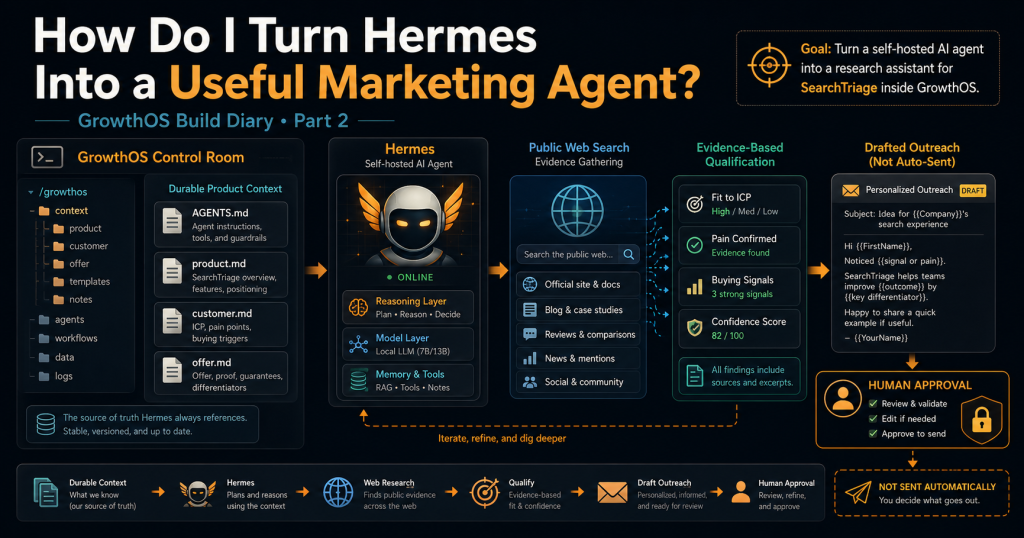
The first useful step wasn’t adding more agents. It was giving Hermes durable product context, clear operating boundaries, a stronger reasoning model, working web search, and one real commercial task to perform. By the end of my second working session, Hermes could understand SearchTriage from files on my server, research potential prospects, distinguish stronger candidates from weak ones, and prepare outreach without being allowed to send anything. None of that required an orchestrator, an agent fleet, a CRM integration, or another application around the agent.
Hermes build diary — Part 2, you can find Part 1 here.
Hermes was installed. That wasn’t the same as having a system.
Part 1 ended with Hermes installed on my Ubuntu server, Nous Portal working, persistent-memory infrastructure present, WhatsApp configured, and the gateway disabled after failing with a configuration error. That was enough to establish that Hermes itself was basically there, but it wasn’t enough to answer the question I actually care about: can I build a persistent local marketing agent system around my products?
On August 7, I started trying to answer that by treating Hermes as the runtime for a broader working system I’ve started calling GrowthOS. The name is probably grander than the current implementation deserves because, at this stage, GrowthOS is mostly a directory of Markdown files, Hermes, a model API, and some operating rules, and that simplicity is deliberate.
I don’t want GrowthOS to become another software project that consumes weeks of development before it does anything commercially useful. The goal is to help the products I already have find buyers, opportunities and useful marketing actions, so the rule I’m working to is simple: don’t automate a workflow until it has proved useful manually.
That meant the first job wasn’t building an orchestrator or spinning up five specialist agents. It was making one Hermes session understand one product well enough to perform one useful task.
The first experiment is SearchTriage
I used SearchTriage as the first GrowthOS product because it gave me a concrete commercial workflow to test. SearchTriage takes Google Search Console data and site context and turns them into a prioritised SEO action queue covering things worth writing, updating, linking, fixing, ignoring, or sending for human review.
That description is enough for a human conversation, but it isn’t enough context for an agent that is supposed to research potential customers and prepare commercial actions responsibly. Hermes also needs to know who the product might help, how it should be positioned, what it does not do, what its limitations are, and which claims must never be invented.
So before touching any more agent configuration, I created three files:
product.md
customer.md
offer.md
Those files became the durable commercial context for SearchTriage, which was the first important move away from product knowledge living in whichever chat happened to contain the latest explanation.
product.md: what are we actually selling?
The first file describes the product itself. It records the product URL, current commercial stage, the job SearchTriage performs, how the workflow works, free and paid offers, important capabilities, current limitations, differentiation, available proof, and the first commercial milestone.
The working positioning says that SearchTriage turns Google Search Console data plus site context into a prioritised SEO action queue covering what to write, update, link, fix, ignore, or send for human review. The more important part of the file, though, is what comes after that positioning.
I explicitly recorded what SearchTriage is not. It isn’t a complete technical crawler, a live rank tracker, an automatic publisher, an automatic website editor, a ranking guarantee, or a replacement for human judgement, and those constraints later became important when Hermes started researching possible customers.
Without that negative definition, it would be very easy for an agent to drift into claims that make the product sound more capable than it is. Durable context needs to include limits as well as selling points.
customer.md: who might realistically care?
The second file describes the buyer hypothesis. For this first experiment, the working ICP was small SEO/content agencies and independent SEO consultants, and the file records likely buyers, workflow signals, stronger intent signals, secondary customer types, bad-fit prospects, claims that must never be inferred, and a practical qualification checklist.
One rule in the file became especially important: prefer five candidates with strong evidence over fifty generic agencies. I also wrote down a second rule that became even more useful once live research started: public evidence that someone does SEO is not evidence that their SEO is broken, that they are losing traffic, that their reporting is inefficient, or that they need SearchTriage.
That distinction sounds obvious when written down, but it is exactly the kind of gap an automated prospecting system can fill with invented confidence. If a business publishes articles about Search Console, that is evidence that it uses or understands Search Console; it is not evidence that it is struggling with it.
offer.md: what are we actually asking someone to try?
The third file defines the offer. The main version says that SearchTriage should turn the Google Search Console data a customer already has into a short, evidence-backed list of SEO and content actions worth doing next, while the first call to action is deliberately low-friction: try one real GSC export through the free analyzer and see whether the recommendations are useful.
I also used the file to record likely objections, response principles, positioning, success signals and prohibited claims. SearchTriage must not promise rankings, traffic or ROI, GrowthOS must not invent an SEO problem it hasn’t observed, and the system must not imply that SearchTriage replaces a full technical audit or that AI recommendations are automatically correct.
Together, the three files gave Hermes something much more useful than a giant prompt. They gave it durable product context that could live alongside the project and be updated independently as my understanding of the product and customer changes.
Building a very small GrowthOS Control Room
I created the first GrowthOS directory under my normal Linux user account and verified the environment first:
whoami
echo "$HOME"
pwd
The result was:
larsborg
/home/larsborg
/home/larsborg
Then I created the Control Room:
mkdir -p ~/growth-os/control-room/products/searchtriage
mkdir -p ~/growth-os/control-room/shared
The first version was deliberately small:
~/growth-os/control-room/
├── AGENTS.md
├── products/
│   └── searchtriage/
│       ├── product.md
│       ├── customer.md
│       └── offer.md
└── shared/
    └── approval-policy.md
I checked it with:
cd ~/growth-os/control-room
pwd
find . -maxdepth 3 -type d | sort
There was no database, UI, service layer, CRM connector or agent registry, and I didn’t use sudo. One of the easiest ways for this project to go off course would be to start building infrastructure simply because an agent platform makes infrastructure possible, so I wanted the first Control Room to stay small enough that every file had an obvious job.
Why AGENTS.md matters
The product files contain detailed SearchTriage knowledge, but I didn’t want all of that copied into a giant startup prompt. Instead, I added a short root-level AGENTS.md that acts more like the operating constitution for GrowthOS.
It tells Hermes that GrowthOS exists to help turn existing products into revenue, that commercial outcomes matter more than agent counts or reports generated, and that SearchTriage is the current experiment. It also contains rules such as preferring five strong candidates to fifty weak ones, never inventing SEO faults or commercial pain, automating preparation before sending or publishing, avoiding an orchestrator or scheduled fleet before the workflow proves useful, and asking whether extra architecture helps an existing product make money sooner.
The detailed product facts stay in the product directory, while AGENTS.md gives Hermes the behavioural frame it should carry into the work. The useful feature here is that Hermes can automatically load project context based on the directory it is launched from, so I start it from the Control Room:
cd ~/growth-os/control-room
hermes
That makes the project itself part of the working context without needing to paste the same commercial background into every session.
I also wrote down what Hermes is not allowed to do
Before prospect research, I wanted an explicit human approval boundary in the project rather than relying on me to remember to add “don’t send anything” to every prompt. That went into shared/approval-policy.md, which divides actions into things Hermes can prepare or perform without extra approval and things that still require me.
Research, public website inspection, analysis, scoring, qualification, drafting, local reports, task organisation and non-destructive work inside approved GrowthOS directories are allowed. Sending emails or DMs, publishing content, modifying production sites, deploying, changing DNS, changing billing, buying things, using sudo, exposing ports, installing persistent services, deleting meaningful data, modifying production databases or cron jobs, and adding or changing production credentials all require explicit approval.
The same file says raw secrets don’t belong in the Control Room. That separation lets Hermes prepare useful work without quietly turning a research system into an execution system with broad permissions.
First test: does Hermes actually understand the project?
Once the files existed, I launched Hermes from the Control Room and gave it a read-only context test. I wanted it to tell me what GrowthOS exists to do, which product is currently being tested, the first ICP hypothesis, what shouldn’t yet be automated, the basic SearchTriage offer, and the approval boundary.
Hermes passed. It correctly identified SearchTriage as the current focus, small SEO/content agencies and independent consultants as the initial customer hypothesis, the free analyzer as the initial CTA, and the rule that infrastructure and automation should not get ahead of a useful workflow.
That was the first point where GrowthOS started feeling like something more than notes in another chat window. The context now lived on the server where the agent itself could read it and use it repeatedly.
Switching from the proof-of-life model
Hermes was still using the Nous model I had used to get the installation working:
{
  "default": "tencent/hy3:free",
  "provider": "nous"
}
That was fine for proving that the installation worked, but I wanted a stronger model for commercial judgement. Before changing anything, I checked whether an OpenAI API key was already configured:
grep -q '^OPENAI_API_KEY=' ~/.hermes/.env 2>/dev/null \
  && echo "OpenAI API key is configured" \
  || echo "No OpenAI API key configured"
It wasn’t, so I created a dedicated API key outside Hermes and added it to ~/.hermes/.env as OPENAI_API_KEY=.... I didn’t print the key back into the terminal session or put it anywhere inside the GrowthOS Control Room, and I verified only that the variable existed:
grep -q '^OPENAI_API_KEY=' ~/.hermes/.env \
  && echo "OpenAI API key is configured" \
  || echo "OpenAI API key is missing"
Then I checked the existing model configuration:
hermes config get model --jsonand used:
hermes modelto select OpenAI and choose gpt-5.6-terra. The resulting config was:
{
  "default": "gpt-5.6-terra",
  "provider": "openai-api",
  "base_url": "https://api.openai.com/v1"
}
I’m deliberately not building multi-model routing yet. For now, Terra is the main judgement model, and if GrowthOS eventually has enough real workloads to justify separate models for research, drafting, classification or cheaper background work, I can solve that problem when it exists.
My first Terra context test failed for a surprisingly useful reason
I wanted a simple one-shot test after changing models, so I ran:
hermes chat --safe-mode -q \
"Do not call tools or modify anything. Based only on the GrowthOS project context automatically loaded at startup, answer in one sentence: what is the current commercial focus and first ICP hypothesis?"
Hermes told me the automatically loaded context did not contain that information, which briefly made it look as though switching providers had broken the Control Room. The problem was actually my command, because --safe-mode disables Hermes customisations, including the normal project-context injection, so I had accidentally disabled the exact thing I was trying to test.
The corrected version removed --safe-mode:
hermes chat \
  --provider openai-api \
  --model gpt-5.6-terra \
  -q \
"Do not call tools or modify anything. Based only on the GrowthOS project context automatically loaded at startup, answer in one sentence: what is the current commercial focus and first ICP hypothesis?"
Hermes correctly replied that SearchTriage was the commercial focus and that the first ICP hypothesis was small SEO/content agencies and independent SEO consultants. That gave me an important Hermes distinction: safe mode is not the same thing as giving the agent a safe set of tools, and tool permissions are the better control when I want project context while still restricting what Hermes can do.
Next problem: web search existed but didn’t work
The first real GrowthOS task needed public web research, so I gave Hermes a read-only search prompt using --toolsets safe. Hermes replied that no web-search tool was available in the session, even though the broader Hermes tooling appeared to include web functionality.
I checked the actual configuration:
hermes config get web --jsonThe result was:
{
  "backend": "",
  "search_backend": "",
  "extract_backend": "",
  "extract_char_limit": 15000
}
This was one of those useful self-hosted-agent lessons where the AI part of the stack wasn’t the interesting failure. The tool was enabled, but the provider behind the tool was not configured, and those are different things.
I chose DDGS because I only needed search
Hermes supports richer web backends, but I didn’t want to add a paid search service, browser service, crawler infrastructure or another account simply to prove the first prospecting workflow. I only needed search, so I set the search backend to DDGS:
hermes config set web.search_backend ddgsThen I verified the setting:
hermes config get web --jsonwhich returned:
{
  "backend": "",
  "search_backend": "ddgs",
  "extract_backend": "",
  "extract_char_limit": 15000
}
That looked right, so I tried a deliberately tiny search test:
hermes chat \
  --provider openai-api \
  --model gpt-5.6-terra \
  --toolsets safe \
  -q \
"Use web_search once. Search for SearchTriage SEO and return the top three search result titles and URLs only. Do not modify files or take any other action."
It still failed, and Hermes fell back to an error suggesting that no usable Firecrawl service or Nous Portal search credits were available. The config said DDGS, but the runtime clearly wasn’t using it, which meant I had another layer to check.
The backend was configured, but the package wasn’t installed
My first instinct was to check the normal system Python, which turned out to be the wrong environment. Hermes has its own managed Python virtual environment under ~/.hermes/hermes-agent/venv/, and the actual Python executable was ~/.hermes/hermes-agent/venv/bin/python.
So I tested DDGS in the environment Hermes actually uses:
~/.hermes/hermes-agent/venv/bin/python - <<'PY'
import sys
print("Python:", sys.executable)

try:
    import ddgs
    print("DDGS: installed")
    print("DDGS location:", ddgs.__file__)
except Exception as e:
    print("DDGS: NOT usable")
    print(type(e).__name__ + ":", e)
PY
The result was:
DDGS: NOT usable
ModuleNotFoundError: No module named 'ddgs'
That finally explained the failure. Setting web.search_backend = ddgs doesn’t put the ddgs Python package into Hermes’ environment, and this became a useful reminder to debug the runtime the application is actually using rather than whichever Python happens to be first on the shell path.
Then I discovered Hermes’ venv didn’t have pip
The obvious next command was:
~/.hermes/hermes-agent/venv/bin/python -m pip install ddgsThat failed with No module named pip. I checked for uv as another possible package installer, but it wasn’t installed either, and the server suggested a sudo snap install route that I deliberately ignored because there was no reason to add Snap, use root access, or introduce another package manager simply to install one optional dependency into one user-owned virtual environment.
Instead, I checked whether Python’s own ensurepip was available:
~/.hermes/hermes-agent/venv/bin/python -m ensurepip --versionIt reported pip 24.0. Hermes was also configured to allow lazy installs:
hermes config get security.allow_lazy_installs --jsonwhich returned true, so I bootstrapped pip inside the Hermes venv:
~/.hermes/hermes-agent/venv/bin/python -m ensurepip --upgradeThen I verified it:
~/.hermes/hermes-agent/venv/bin/python -m pip --versionThe result showed pip installed inside /home/larsborg/.hermes/hermes-agent/venv/lib/python3.11/site-packages/. No system Python was modified and no sudo was required, which was exactly the sort of small, contained fix I wanted.
Installing DDGS into the environment Hermes actually uses
With pip available, I installed the missing DDGS dependency into that same venv and verified it directly:
~/.hermes/hermes-agent/venv/bin/python - <<'PY'
import ddgs
print("DDGS: installed")
print("DDGS location:", ddgs.__file__)
PY
This time the result was:
DDGS: installed
DDGS location: /home/larsborg/.hermes/hermes-agent/venv/lib/python3.11/site-packages/ddgs/__init__.py
Now both sides matched: Hermes was configured with web.search_backend = ddgs, and the Hermes runtime actually contained the ddgs package. I reran the minimal web test and it worked, returning SearchTriage search results from the public web.
The plumbing was finally complete:
GrowthOS Control Room
        ↓
Hermes
        ↓
OpenAI / GPT-5.6 Terra
        ↓
web_search
        ↓
DDGS
        ↓
public search results
None of that was particularly glamorous, but it is exactly the kind of detail I want to keep in the build diary because a self-hosted agent can have an excellent model and still fail because a Python package is missing.
The first real GrowthOS job: find possible SearchTriage prospects
With search working, I finally gave Hermes a real commercial task. The prompt asked it to search across multiple query patterns for smaller SEO agencies and independent consultants showing public evidence of work involving Google Search Console, recurring SEO reporting, content SEO, content refreshes, audits, retainers, internal linking and ongoing SEO work.
The instructions were deliberately evidence-heavy. Hermes had to distinguish what it could actually observe from what it was merely inferring, reject weak matches rather than fill a quota, return no more than five strong candidates, explain the evidence, propose an outreach angle, and take no external action.
For that first run I used:
--toolsets searchHermes ran more than twenty searches across variations including:
"Google Search Console" "SEO reporting" "agency"
"content refresh" "SEO agency" "Google Search Console"
independent SEO consultant "Google Search Console" audit
"ongoing SEO" "Google Search Console" consultant
"SEO retainers" "Google Search Console" agency
It returned five candidates: Bootstrap Creative / Jacob Lett, Taylor Scher Consulting, Azra Khan, Kaizen SEO, and Adam Berry SEO. More importantly, it also listed businesses it had rejected and explained why, which is much closer to what I want from GrowthOS than a giant scraped spreadsheet.
A useful research agent should be able to say that the evidence isn’t strong enough rather than treating output volume as success. That mattered more to me than whether it could produce a long list quickly.
Another permissions lesson: search could search, but it couldn’t read the product files
There was a flaw in that first run because Hermes reported that the detailed SearchTriage commercial files were not accessible through the tools exposed in the session. The reason was simple: --toolsets search gave it web search but did not give it file access.
The top-level AGENTS.md context was still available because Hermes had loaded the project context at startup, but the agent couldn’t open products/searchtriage/product.md, products/searchtriage/customer.md, or products/searchtriage/offer.md when it wanted more detail. The fix was simply:
--toolsets search,fileThat became another useful design rule. Tool permissions aren’t only about preventing dangerous actions; they also determine what kind of reasoning the agent can actually perform, and for this workflow search provides public evidence while file provides the durable product context needed to judge that evidence properly.
Five candidates became three, then two
I didn’t treat the first five names as qualified leads just because an AI agent returned them. I reviewed them manually and judged Taylor Scher as strong, Bootstrap Creative and Kaizen SEO as worth deeper investigation, Azra Khan as weaker, and Adam Berry as a reject for now.
That reduced the next pass to three candidates. This time I explicitly instructed Hermes to read all three SearchTriage files in full before researching:
products/searchtriage/product.md
products/searchtriage/customer.md
products/searchtriage/offer.md
and ran the qualification with:
--toolsets search,fileThe second pass looked for whether the business appeared active, recurring client SEO work, Search Console usage, reporting, content or prioritisation work, internal-link workflows, the likely buyer or operator, the exact part of their workflow SearchTriage might help, the strongest reason they might not need SearchTriage, whether the free analyzer was a believable CTA, confidence, KEEP or REJECT, and whether the candidate was genuinely worth fifteen minutes of my time.
That last test matters because the goal isn’t to create a lead database. The goal is to identify opportunities worth me doing something about.
Kaizen SEO came out strongest
Hermes found strong workflow evidence around Kaizen SEO, including recurring retainers, GA4 and Search Console reporting, Search Console impressions and clicks, content improvements, internal linking, prioritised task lists, and an identifiable operator. It marked Kaizen as a KEEP, but the more interesting part was the caveat it included: workflow relevance was exceptionally strong, while there was no evidence that Kaizen’s current process was deficient or burdensome.
That is exactly the distinction I want GrowthOS to make. A business performing the sort of work SearchTriage supports does not automatically mean the business needs SearchTriage, and qualification becomes much more useful when the agent is required to state that uncertainty instead of turning relevance into assumed pain.
Taylor Scher was also a strong fit, with the same problem
Taylor Scher Consulting also came back as KEEP. Hermes found public evidence around B2B SaaS SEO consulting, three-to-six-month roadmaps, Search Console audit material, GSC keyword research, internal linking, existing-page optimisation and content briefs.
Again, the counterargument was at least as important as the matching evidence. Taylor’s published expertise suggests he may already have a refined process and might not need another analysis layer, which makes him highly relevant to the workflow while potentially being a weak buyer.
Workflow fit is not buying intent
This was probably the best marketing lesson from the entire session because my first qualification logic was effectively rewarding prospects for looking like expert SearchTriage users. If someone does lots of Search Console work, content updates, internal linking and prioritisation, they score highly, but those same signals may indicate that they already have mature internal tools, established reporting, refined manual processes, a preferred stack, and very little reason to switch.
I now think future GrowthOS qualification needs at least two separate concepts. Workflow fit asks whether the business performs the type of work SearchTriage helps with, while adoption or unmet-need fit asks whether there is any public reason to believe SearchTriage could improve that work enough for them to try it.
Those two scores may move in opposite directions, and that is a much more useful qualification model than one generic percentage labelled “fit”. It is also a marketing lesson rather than an agent-engineering lesson, which is exactly the kind of thing I want GrowthOS to surface if it is going to be commercially useful.
Outreach was prepared, but not sent
Once I had the strongest prospects, I asked Hermes to prepare outreach. It was told to reread the SearchTriage files, refresh the public evidence, draft one email under 90 words, create a shorter alternative under 50 words, provide the exact CTA, and list anything I should verify manually before sending.
It was also explicitly told not to invent pain, not to imply that an existing process was broken, to position SearchTriage as a possible complement rather than a replacement, and not to send anything. The basic framing it arrived at described SearchTriage as a way to upload a GSC export and receive an evidence-backed queue of content, update, internal-link or ignore decisions, positioned as a test alongside the prospect’s judgement and existing tools rather than as a replacement for them.
The CTA stayed simple: would the prospect be open to running one real GSC export through the free analyzer and seeing whether any findings were useful? Nothing was sent, and that wasn’t an unfinished automation; it was the intended approval boundary working as designed.
This is the first GrowthOS loop that actually feels useful
At the end of the session, I had something much more interesting than “Hermes can answer a prompt”. The working loop now looked like this:
durable product context
        ↓
Hermes project context
        ↓
strong reasoning model
        ↓
public web research
        ↓
candidate discovery
        ↓
evidence-based qualification
        ↓
human review
        ↓
focused re-qualification
        ↓
drafted next action
        ↓
human approval
That is much closer to the architecture I want than installing an AI agent, connecting everything, automating everything, and hoping something useful happens. The valuable part of the system is not autonomy for its own sake; it is improving the quality of the next human decision.
What I deliberately did not build
This list may be more important than the feature list because I deliberately did not add a GrowthOS UI, an orchestrator, multiple specialist agents, cron jobs, autonomous outreach, automatic publishing, a database, a CRM integration, Gmail integration, Google Workspace integration, browser automation infrastructure, Firecrawl, Tavily, Exa, SearXNG, Docker isolation, a dedicated GrowthOS production VPS, or custom lead-generation skills.
Some of those things may become useful later, but none was necessary to prove this workflow. One Hermes session with good context, a capable model, web search, file access and clear approval boundaries was enough to get from an installed agent to a useful commercial research assistant, which feels like a much better place to start.
The technical state at the end of Part 2
The GrowthOS Control Room currently lives at:
/home/larsborg/growth-os/control-roomwith this structure:
control-room/
├── AGENTS.md
├── products/
│   └── searchtriage/
│       ├── product.md
│       ├── customer.md
│       └── offer.md
└── shared/
    └── approval-policy.md
Hermes is configured to use:
Provider: openai-api
Model: gpt-5.6-terra
Base URL: https://api.openai.com/v1
Web search is configured as:
search_backend: ddgs
extract_backend: none
The ddgs Python package is installed inside ~/.hermes/hermes-agent/venv/ after bootstrapping pip there with:
~/.hermes/hermes-agent/venv/bin/python -m ensurepip --upgradeThe human approval boundary remains in place for email, messaging, publishing, production changes, credentials, purchases, sudo, persistent services and destructive actions. Nothing was sent or published during this session, which is the intended operating posture rather than a temporary limitation.
What I learned from the boring failures
Most of the useful problems weren’t particularly futuristic. --safe-mode disabled the project customisation I was trying to test, the web-search tool was enabled but had no backend, DDGS was configured but its dependency wasn’t installed, I initially checked the wrong Python environment, the correct venv had no pip, and the first prospecting toolset could search the web but couldn’t read the product files.
Those are normal software problems, and that is part of what makes this experiment interesting to me. Once you run an agent on your own server and expect it to interact with files, models, search providers and real project context, a lot of “AI engineering” turns back into ordinary systems work: paths, permissions, package environments, configuration, and knowing which process is actually using which dependency.
The smallest fixes were usually the best ones. I didn’t need Snap to get DDGS working, I didn’t need another web-search service, and I didn’t need another agent to fix the missing context; I needed ensurepip, one Python package, and the correct combination of toolsets.
Where GrowthOS stands after the second session
At the end of August 7, GrowthOS is still tiny, which I consider a good result. SearchTriage has durable commercial context on disk, Hermes can load that context, use GPT-5.6 Terra, search the public web through DDGS, read the detailed product files, discover possible prospects, qualify them using explicit evidence, reject weaker candidates, and draft a next action while respecting a human approval boundary.
I still don’t have an agent swarm, and I haven’t built an orchestrator, scheduled a fleet, connected a CRM, created autonomous outreach, or taught multiple product agents to coordinate with each other. What I do have is one manual commercial loop that is useful enough to inspect and improve, and that feels like the right order.
Before I turn any of this into reusable skills, scheduled tasks or additional agents, I want the workflow itself to prove that it deserves automating. That is where Part 2 stops: not with a finished marketing machine, but with a small working system that can finally do useful commercial research without being given permission to run ahead of me.