In this article
- The real cost isn’t the token itself
- The internet has already debugged the older stuff
- Familiar stacks make smaller prompts possible
- New technology carries a novelty tax
- Every layer is another thing the AI has to understand
- Old doesn’t mean careless
- Modern tech should still win when it earns the job
- The stack the machine already understands
- The practical rule I’m using
I keep coming back to this whenever I use AI coding tools on real projects, because the stack choice doesn’t only affect hosting, deployment, maintenance, and whether future me can still understand the thing after work. It also affects how much explanation the AI needs before it can give me a useful answer, and that cost shows up as longer prompts, more pasted files, more corrections, more retries, and more credits burned on getting from nearly working to actually working.
That doesn’t mean PHP, MySQL, WordPress, Apache, jQuery, or any other older technology is automatically the right answer, and I don’t want this to turn into another tired old-stack-versus-new-stack argument where everyone pretends the other side is stupid. The point is narrower and more useful than that: in AI-assisted development, a mature and widely used stack can be cheaper to build with because the internet has already explained it, broken it, fixed it, argued about it, documented it, and left a long public trail of what went wrong.
The cheapest stack for AI-assisted development may not be the newest one, or the one with the nicest launch page, or the one that makes you feel like you’re building inside the current moment. It may be the one with the most public scar tissue, because that’s the stack the machine has seen before, the one the forums have already debugged, and the one you can still reason about when the error log starts being unpleasant at midnight.
The real cost isn’t the token itself
A token is a token, so I’m not saying a PHP token gets billed differently from a React token, or that MySQL comes with some kind of old-web discount because it’s been around long enough to have opinions about character sets. The cost I’m talking about is the total cost of the job, and with AI coding that means the whole messy loop around the answer, not just the final patch that eventually works.
You’re paying for the prompt where you explain the project, the file you paste because the assistant guessed the structure wrong, the documentation you include because the library changed recently, the first attempt that almost works but misses the local convention, the second attempt that fixes one thing and breaks another, and the third message where you paste the exact error because the model confidently reached for a pattern from an older version.
That cost isn’t really about tokens in isolation, because it’s about uncertainty. The more uncertain the stack, the more context the AI needs before it can do useful work, and the more likely you’re going to spend the next half hour steering it away from plausible nonsense instead of reviewing a small clean change.
When I’m working on a normal PHP/MySQL admin screen, a WordPress plugin page, a simple cron job, a server-rendered dashboard, or an Apache config issue, I can usually give the AI a fairly contained job and expect it to understand the shape of the problem. There are still mistakes, and I still read the diff, but the conversation starts closer to the work because the stack has decades of patterns sitting behind it.
The internet has already debugged the older stuff
One of the quiet advantages of mature stacks is that they’ve been humiliated in public for years, which sounds like an insult until you realise how useful it can be. PHP has had its bad tutorials, WordPress has had its strange plugin conflicts, MySQL has had its character set disasters, Apache has had its rewrite rule pain, and vanilla JavaScript has been copy-pasted into every corner of the web since roughly the dawn of time.
That long messy history creates a huge public knowledge surface. There are Stack Overflow answers, old forum posts, GitHub issues, Reddit threads, support tickets, blog walkthroughs, plugin examples, error messages, migration notes, hosting guides, and half-broken code samples where the surrounding article is useless but the one line you needed is still sitting there like a little fossil of someone else’s bad afternoon.
AI coding tools are pattern machines as much as they’re code generators, so that public trail matters more than people sometimes admit. When a stack has been used by millions of people across millions of ordinary projects, the assistant doesn’t have to invent as much, because it can lean on patterns that have already survived contact with normal web work.
A WordPress admin settings screen isn’t an exotic request. A PHP endpoint with validation, a prepared statement, a redirect, and a flash message isn’t a research project. A MySQL table with status, created_at, updated_at, user_id, and a couple of indexes isn’t a grand architectural event. These are ordinary web shapes, and ordinary web shapes are exactly where AI assistance tends to feel useful instead of theatrical.
Familiar stacks make smaller prompts possible
The more familiar the stack, the less ceremony I need before the assistant can help. I can say “inspect this plugin file and add a dashboard widget using the existing helper functions,” or “add pagination to this admin table without changing the query logic,” or “write a safe migration that adds this nullable column and doesn’t destroy existing data,” and that often gets me a useful first pass because the surrounding conventions are already obvious enough.
That doesn’t remove my responsibility, and it definitely doesn’t mean I trust generated code just because it looks tidy. I still check SQL injection risks, permission checks, nonce handling, escaping, file paths, redirects, edge cases, and whether the patch changed anything it had no business touching. The point is that I spend more of the session reviewing work and less of the session explaining what a normal small web app is supposed to look like.
This is where older stacks can feel strangely refreshed by AI. A PHP file, a MySQL query, a form post, an admin table, a cron command, and a log entry are all visible enough that I can point at the thing that needs changing and keep the job contained. The assistant has less room to wander off into a new architecture because the shape of the project doesn’t invite it to solve a simple problem by inventing a festival of tooling.
That’s important for solo builders because a lot of our work isn’t heroic new-computer-science work. It’s adding a page, cleaning up a table, making a workflow safer, turning a rough prototype into something usable, improving the copy on an admin screen, tracking a status, exporting a CSV, wiring a webhook, reviewing a diff, or making sure the thing still runs after the change.
New technology carries a novelty tax
New tech isn’t bad just because it’s new, and I’d be lying if I pretended I only ever want to build with old tools. There are plenty of cases where a modern frontend, TypeScript, a mobile stack, a managed backend, or a newer framework is absolutely the right call because the product needs it, the user experience benefits from it, or the business case is stronger with it.
The problem is when novelty gets treated as free. A young framework might have fewer examples, thinner documentation, changing APIs, old answers that are already wrong, a Discord full of half-context answers instead of searchable public fixes, and a community that’s still deciding which conventions are actually going to stick.
That uncertainty doesn’t stay abstract once AI enters the workflow. It turns into longer prompts, more pasted docs, more version notes, more “no, that’s the old API” corrections, more generated code that looks sensible but doesn’t match the current release, and more sessions where the assistant is technically helping but also dragging you through the cost of being early.
Every immature stack carries a novelty tax. Sometimes that tax is worth paying because the new thing gives you a real advantage, but it’s still a tax, and pretending it doesn’t exist is how solo builders end up spending their limited build time babysitting tools instead of shipping useful features.
Every layer is another thing the AI has to understand
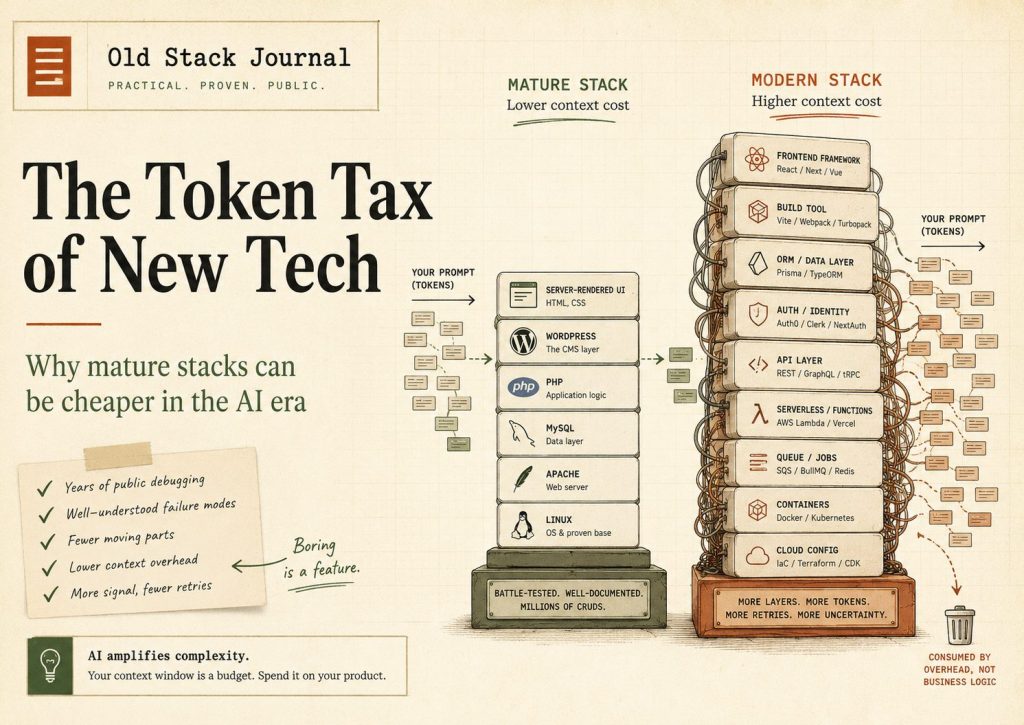
Modern stacks can be powerful, but the cost multiplies when the stack becomes a pile of layers that all need to be held in context at once. A frontend framework, a router, a build tool, a component library, an API layer, an ORM, an auth provider, a serverless runtime, an object store, a job runner, a queue, a container setup, and a deployment platform can all make sense individually while still turning one bug into a treasure hunt across the whole architecture.
When something breaks in that kind of setup, the assistant has to work out where the problem even lives. Is it a client state issue, a server route issue, an auth middleware issue, an ORM query issue, a build config issue, a missing environment variable, a deployment platform quirk, a cache issue, or a mismatch between what the docs say and what the current package actually does?
That doesn’t mean those layers are wrong, because sometimes they’re exactly what the product needs. It does mean each extra layer increases the amount of context the AI has to hold, and when the assistant has to hold more context, you spend more tokens and more attention keeping it lined up with reality.
This is one of the reasons I still like plain server-rendered apps for a lot of normal software. Not Figma, Slack, Uber, Google Docs, or Netflix, but the normal web apps a solo builder actually ships: admin dashboards, workflow tools, reporting pages, directories, WordPress plugins, customer portals, receipt trails, content tools, route planners, and the kind of internal utilities that need to answer one question clearly rather than prove the stack is fashionable.
Old doesn’t mean careless
The worst version of this argument is the one where “old stack” becomes an excuse for mess, because that’s not what I’m arguing for and it’s not how I want to build. A PHP/MySQL app can be structured, secure, readable, and maintainable, and a WordPress plugin can respect permissions, nonces, escaping, sanitisation, cron behaviour, database updates, and all the other details that separate a useful tool from a future cleanup disaster.
Using mature technology doesn’t mean stuffing everything into one file and hoping Apache will raise the child. It means choosing tools with known behaviour, obvious deployment, searchable failure modes, and conventions that don’t need to be rediscovered every time you ask for help.
That becomes especially useful with AI coding because you can ask for smaller and safer changes. You can tell the assistant to inspect the current files, explain the smallest patch, avoid new dependencies, preserve existing data, write the migration separately, and list the testing steps before you even let it touch the code.
That’s a very different workflow from asking a model to build half a product from a vague idea. I don’t want the tool to impress me with a huge rewrite, because I want it to help me move a real project forward without quietly expanding the amount of stuff I need to understand and maintain.
Modern tech should still win when it earns the job
I’m not interested in turning this into a loyalty test where old tools are virtuous and new tools are suspicious. If a modern stack gives the product a clear advantage, I’ll use it, and that could mean TypeScript, React, a mobile app, a proper component system, a managed backend, or whatever else actually improves the odds of building the right thing.
The key phrase there should be “clear advantage.” If the modern stack makes the app better, makes the experience possible, reduces future risk, opens the right market, improves maintainability for that kind of product, or lets me ship something I couldn’t sensibly ship otherwise, then the extra context cost may be completely justified.
What I’m less interested in is paying the novelty tax just to feel current. A stack shouldn’t get picked because the landing page looks confident, because everyone on X is performing certainty about it, or because the project feels more serious when the folder tree has twelve layers and a build process that needs emotional support.
For a solo builder trying to get useful software out the door, every layer needs to earn its keep. That was already true before AI, but it’s more obvious now because every extra layer also becomes something the assistant has to understand, explain, debug, and occasionally hallucinate around.
The stack the machine already understands
The practical question isn’t “what’s the best stack,” because that’s too broad to be useful and usually turns into a comment section pretending to be a philosophy department. The better question is “what stack gives this product enough power without creating unnecessary context overhead for me and the AI tools I’m using?”
For a lot of my current work, the answer is still some version of PHP, MySQL, WordPress, Apache, server-rendered pages, cron jobs, simple queues, and clean admin screens, because those tools are enough for the job and they’re easy to inspect when something goes wrong. I can build Automation Receipts-style workflow records, OSJ WordPress tools, admin dashboards, content systems, reporting pages, and practical utilities without turning every project into a miniature cloud platform.
That doesn’t make the work unserious. If anything, it makes the product work more visible because the stack isn’t constantly demanding attention. The useful question stays closer to “does this solve the user’s problem?” instead of drifting into “does this architecture make me look like I attend the right conferences?”
AI has made that tradeoff sharper. A familiar, mature stack doesn’t just save hosting cost and deployment friction; it can also reduce the cost of thinking with AI because the assistant has more public examples, fewer moving pieces to infer, and a better chance of producing a patch that matches how the project already works.
The practical rule I’m using
The rule I’m trying to use now is simple enough: pick the least surprising stack that can still do the job properly, then only add modern pieces when they pay for themselves in product value, user experience, maintenance, or revenue. That doesn’t mean avoiding new tools, but it does mean treating novelty as a cost that has to be justified rather than a default upgrade path.
If the product is a complex interactive app, a modern frontend may be worth every bit of extra context. If the product is a mobile-first experience, a proper mobile stack may be the sensible choice. If the product is a normal web tool with accounts, forms, reports, admin pages, webhooks, exports, and background jobs, then a mature server-rendered stack may give you more speed, more control, and less AI friction than people expect.
That’s the bit I think more solo builders should factor into the decision. Your tech stack doesn’t only have a hosting budget, a maintenance budget, and a learning budget anymore. It has an AI context budget too, and every unfamiliar pattern, unstable dependency, fast-moving API, and unnecessary layer can spend that budget faster than you notice.
The best stack isn’t always the one that impresses developers. Sometimes it’s the one the machine already understands, the internet has already debugged, and you can still reason about after a long day when the only thing you really want is a clean error message, a small patch, and a working deploy.