In this article
- Why I wanted this in the first place
- n8n made the idea feel more real
- The product lives around the webhook
- A receipt needs to explain what happened
- AI makes the record more useful
- “Receipt trail” fits better than “audit trail”
- The receipt shouldn’t be trapped inside the app
- The next loop is sending decisions back
- The docs are not optional decoration
- Making it feel real is the awkward middle bit
- The scope is already enough
- n8n Users come at me!
I’ve been building Automation Receipts for a while now, and the more I work on it, the clearer something has become: the first working endpoint was useful, but it wasn’t the product. It was the first little bit of proof. A workflow could send JSON to /api/v1/runs, the app could store it, and a receipt could appear on a page. That felt good, obviously, because any time a thing talks to another thing and doesn’t immediately fall over, you take the win. But it was still only the doorway into the idea.
A webhook endpoint by itself isn’t especially magical. Neither is a database table, or a page that displays whatever got stored in that table. Plenty of people could build a rough version of that, especially now we’ve all got coding assistants ready to generate half an app before we’ve finished explaining what we actually want. The interesting part is not receiving the payload. The interesting part is turning that payload into something a person can read six weeks later and understand without opening the workflow builder, digging through logs, or trying to remember why they named one node “final_final_really_this_time”.
That’s the bit I keep coming back to. Automation Receipts isn’t really about the endpoint. It’s about the system around the endpoint: the readable record, the timeline, the review state, the export, the examples, and the small decisions that make an automation run feel like a piece of work someone can understand afterwards.
Why I wanted this in the first place
Automation tools are now very good at doing actual work. They can draft replies, classify leads, summarise documents, update CRMs, send Slack messages, create tasks, move files, call APIs, run on schedules, and glue together a surprising amount of business logic with a few nodes and some JSON. Add AI into those workflows and they become even more useful, but they also become slightly harder to explain after the fact.
Most automation platforms already have some form of logging. n8n has execution history. Zapier has task history. Make has scenario runs. A custom script can write to a log file, assuming you remembered to add that before everything got exciting. So the problem isn’t that logs don’t exist. The problem is that most logs are built for the tool, not for the person who needs to understand what happened later.
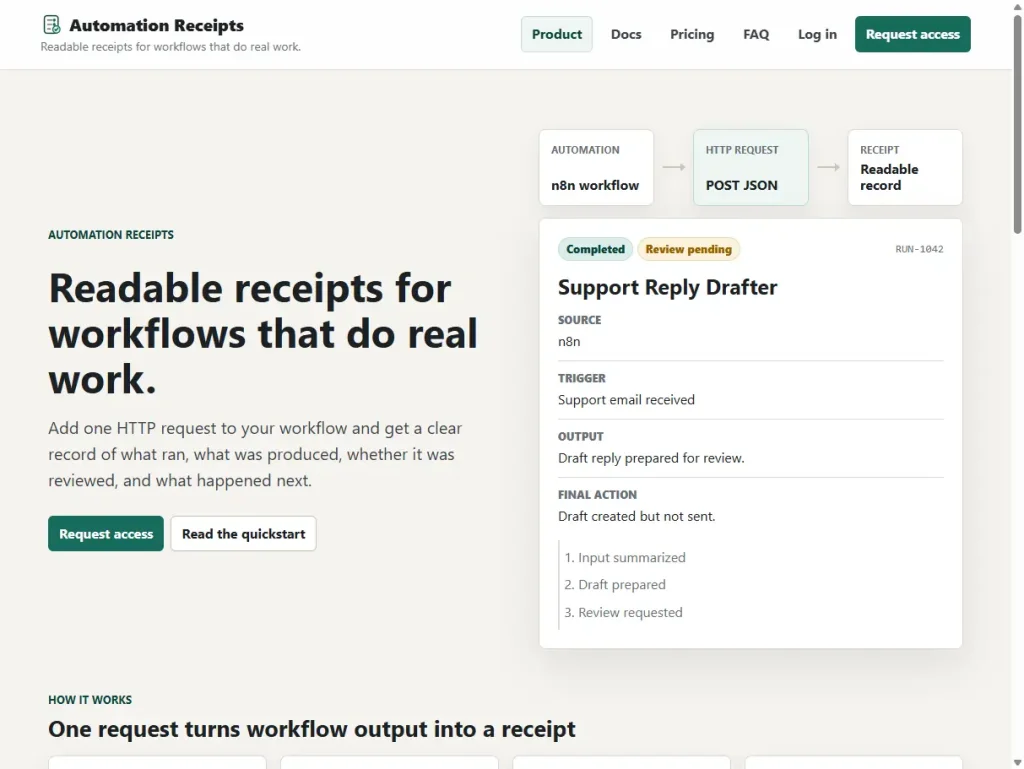
I wanted something more plain-language than that. A receipt should answer normal questions: what ran, what triggered it, what information came in, what came out, whether anyone reviewed it, what final action happened, and which steps mattered along the way. That’s a different job from raw logging. Raw logs are for inspecting the machinery. A receipt is for understanding the work.
That starts to matter once automations move beyond harmless little demos. If a workflow posts a test message into a private Slack channel, nobody is going to lose the afternoon over it. But if it drafts a customer reply, prepares a client summary, classifies a lead, updates a CRM field, or sends something after a human approval step, the record becomes more important. At some point someone will ask, “What happened here?” and “it’s probably buried somewhere in the execution history” is not the most comforting answer in the world.
n8n made the idea feel more real
The first n8n test helped the shape of the product click because it was boring in a useful way. I didn’t start with Gmail, real customer data, a complicated AI workflow, or an approval chain that needed a whiteboard and emotional support. I started with a manual trigger, a few fields, an HTTP Request node, and a receipt appearing in Automation Receipts.
That was enough to prove the important thing. n8n didn’t need a custom node, and Automation Receipts didn’t need to become an n8n plugin. The workflow only had to send a normal JSON payload to a normal HTTP endpoint. That feels like the right sort of integration to me, because both tools get to keep their jobs. n8n runs the workflow. Automation Receipts records what happened in a way that’s easier to read later.
n8n also feels like the right first platform to document properly. It attracts exactly the sort of people I imagine using this: automation builders, solo devs, consultants, small teams, and technically curious people who are stitching together useful workflows without a giant software department behind them. But the app itself won’t be too attached to n8n. Make should be able to send a receipt. Zapier should be able to send a receipt. A cron job, PHP script, Python script, or random little internal tool should be able to send one too.
That’s where the idea gets stronger. Automation Receipts doesn’t need to own the workflow, and it definitely doesn’t need to become yet another workflow builder. It just needs to sit beside the work and give that work a readable record.
The product lives around the webhook
The simple demo is easy to explain: a workflow sends a payload to /api/v1/runs, Automation Receipts stores it, and the user gets a receipt page. That was a good first version, but was not enough to make the thing feel like a real tool. The product starts to appear when you build the less glamorous pieces around that endpoint.
Receipts need to belong to an account, so you need login. External tools need a safe way to send data in, so you need API keys. Those keys need to be handled properly, because storing raw API keys forever is the sort of decision that waits patiently and then ruins your week later. Then you need a receipt list, a useful detail page, event timelines, approval states, final actions, validation, markdown export, duplicate handling, and enough guardrails that a workflow retry doesn’t create three versions of the same thing and make everyone quietly resent computers.
Then there’s the wording, which sounds minor until you try to explain the product to someone who hasn’t been living inside your head. Words like “run”, “event”, “approval status”, “input summary”, “output summary”, and “final action” have to make sense to a real person, not just to the database schema. It should feel like a record of work that happened.
The examples matter for the same reason. A generic API reference won’t carry the whole product. Someone sitting inside an n8n HTTP Request node needs to know what to send, what should be static, what should come from earlier workflow steps, how to generate a unique run ID, and how much detail to include without accidentally turning the receipt into a private-data dumping ground. Good examples make the tool feel obvious. Weak examples make even a simple product feel strangely difficult.
A receipt needs to explain what happened
One trap I’m trying to avoid is letting the schema become the interface. That’s very easy to do with a PHP/MySQL app. You create the tables, build the screens, display the fields, and before long the “product” is just a tidy way to look at rows in a database. That can be fine for some admin tools, but it’s not enough here.
A receipt has to be shaped around the question someone actually has: what happened? If the workflow drafted a support reply, the receipt should make the chain of events clear. A customer email came in, the workflow summarised it, the AI drafted a reply, a human review was requested, someone approved it, and the reply was sent. That’s the human version of the run, and that’s what the receipt needs to make obvious.
The underlying workflow may have a lot more going on. There might be formatting nodes, filters, variables, retries, branching logic, helper steps, and other bits of plumbing that matter when something breaks. Automation Receipts doesn’t need to replace that. If someone needs to debug the machine, they can still open n8n and inspect the wires. But if they just need to understand the work, the receipt should be enough.
That distinction is the product. Automation Receipts is not the system of execution. It’s the readable record that sits beside the system of execution.
AI makes the record more useful
Automation Receipts doesn’t have to be only for AI workflows, but AI makes the need easier to see. If a script copies a file or sends a simple notification, the record might not need to be much more than “it worked” or “it failed”. But once a workflow uses AI to draft, summarise, classify, recommend, score, rewrite, or suggest what should happen next, the record becomes a lot more valuable.
You start needing answers to slightly different questions. What did the AI produce? Was that output reviewed? Did a human approve it? Did the workflow stop, continue, or ask for changes? What happened after someone looked at it? These aren’t theoretical product-strategy questions. They’re the sort of questions that start appearing when AI moves from neat demo territory into boring everyday work.
I’m careful with this part because it would be very easy to over-position the product. Automation Receipts is not a compliance suite. It’s not an AI governance platform. It’s not claiming to turn a messy workflow into a legally tidy audit system with one webhook and a nice font. That would be daft, and also asking for trouble.
But the direction is obvious enough. More businesses are going to use AI and automation inside processes that involve customers, staff, records, approvals, support, reporting, and money. Some of those workflows will stay low-risk and informal. Some won’t. Either way, more people are going to want a readable record of what automated work happened and what a human did with it.
That’s the lane that interests me. Not “we solve compliance”. More like: workflows are doing real work now, and real work often needs a record someone can actually understand.
“Receipt trail” fits better than “audit trail”
I keep coming back to the phrase receipt trail because it feels closer to what the product actually is. “Audit trail” carries heavier baggage. It sounds formal, legal, and slightly like someone from procurement is about to ask for a spreadsheet no one wants to make. I don’t want the wording to imply more than the product currently does.
“Receipt trail” feels more practical. A workflow did something, left a receipt behind, and maybe that receipt connects to other receipts when the work moves through multiple stages. A single receipt says one run happened. A receipt trail says a piece of work moved from one step to another, and here’s the path it took.
You can imagine a lead form triggering classification, a CRM update, a Slack notification, a human review, and a follow-up task. Or a support email triggering a summary, a drafted reply, an approval step, the final reply, and a closing note. A scheduled report might gather data, generate a summary, send it for review, and archive the result. In each case, “it ran successfully” is only part of the story.
Not every automation needs that kind of history. Some jobs should run quietly and disappear, which is frankly the dream for a lot of background work. But some workflows matter enough that completion status isn’t the interesting bit. The useful questions are what the automation did, what it produced, and what happened next.
The receipt shouldn’t be trapped inside the app
At the moment, the main surface is the web receipt. A workflow sends data, Automation Receipts stores it, and the user can open a receipt page with the summary, status, timeline, and export options. That already gives the tool a useful loop, especially with markdown export, because people can paste receipts into notes, support tickets, client updates, documentation, or whatever half-organised system they currently use to remember their working life.
But receipts don’t have to stay inside the app forever. A receipt can become a PDF. It can be sent to Slack after a workflow finishes. It can be emailed to someone, attached to a support ticket, linked from a client report, and stored beside an approval note. It can even trigger a text message when something needs review. Once the receipt exists as a useful object, the next question is where it should go.
That’s important because the person who needs the receipt is not always the person who built the automation. A consultant might want to show a client what a workflow did. A small team might want a basic approval record. A solo builder might want a trail of important scheduled jobs. Future-you might want to know why something happened six weeks ago without spelunking through logs and pretending you remember the ancient reasoning behind a workflow you built while tired.
Future-you is not usually in a generous mood. Future-you wants the receipt to make sense immediately.
The next loop is sending decisions back
The next part I’m working on is letting Automation Receipts send a decision back to the workflow. Recording what happened is useful on its own, but some workflows need a human review step before the final action happens. In those cases, the receipt can become more than a passive record.
Imagine an n8n workflow that drafts a customer reply. It sends Automation Receipts the input summary, AI output, risk level, timeline, and current approval state. A human opens the receipt, reads the draft, and chooses approve, reject, or needs changes. Automation Receipts then sends that decision back to n8n through a webhook, and n8n continues based on the result.
That keeps the roles clean. n8n still runs the workflow. Automation Receipts handles the readable record and review state. The human gets a clear review page instead of being thrown into the guts of the automation tool and asked to make sense of nodes, payloads, and tiny bits of JSON at the worst possible moment.
If the draft is approved, the workflow can send it. If it’s rejected, the workflow can stop. If it needs changes, the workflow can route it somewhere else. That turns the receipt into part of the loop without trying to replace the workflow builder. It stays HTTP, practical, and understandable, which is exactly where I want it.
The docs are not optional decoration
For this kind of tool, documentation is part of the product. It’s not a separate chore to bolt on later once the interesting coding is done. The user is probably inside another tool when they need help. They’re looking at n8n, Make, Zapier, a cron job, or a custom script, and they need to know exactly what Automation Receipts expects from them.
That means the docs need more than endpoint names and required fields. They need examples that look like real workflows. They need to explain which values usually stay the same, which values should come from earlier steps, why run_uid matters, how duplicate receipts are avoided, how events can be appended later, and how to write summaries that are useful without exposing more private data than necessary.
Recipes feel like the right format for that. A support reply drafter recipe teaches one pattern. A lead classifier teaches another. A document summary workflow, content approval flow, CRM update assistant, cron job report, and custom script example each show a different way the receipt layer can fit beside real work. Those examples aren’t just nicer-looking docs. They’re how people recognise where the product belongs.
A good recipe lets someone look at their own workflow and think, “Right, I see how I’d use this.” That’s the moment the product becomes much easier to understand.
Making it feel real is the awkward middle bit
A working demo can get away with a lot. It can have rough wording, placeholder payloads, thin docs, awkward empty states, and all sorts of developer assumptions quietly baked into the interface. That’s fine for proving the idea, but it can’t last forever, especially when the promise of the product is making automation activity easier to understand.
The app has to explain itself at the points where people actually get stuck. The API key page needs to make the next step obvious. The receipt list needs to show what happened recently without making the user decode internal language. The receipt page needs to tell the run story without overwhelming them. The docs need to match the real interface, and the payload examples need to feel like something a person would send from an actual automation rather than a lifeless sample object written by someone who has never met context.
This is the work that comes after the fun first build. Anyone can build a surface-level version of the idea. Turning it into something people can understand, trust, and reuse is the slower, less glamorous part.
That doesn’t mean making the app huge. It means making the focused version complete enough that the idea lands properly.
The scope is already enough
I don’t want to inflate Automation Receipts into something it isn’t. It’s not a workflow builder. It’s not an observability platform. It’s not a formal compliance product. It’s not a giant system trying to sit in the middle of every process and act more important than it needs to be. That sort of positioning would make the product fuzzier, not stronger.
The scope is already real without pretending. Automation Receipts has login, API keys, run ingestion, receipt pages, timelines, review state, markdown export, duplicate handling, practical examples, n8n documentation, and the beginning of a recipe system. The next direction includes better platform docs, PDF receipts, Slack delivery, text notifications, chained receipts, and review decisions sent back to tools like n8n.
That’s plenty. It’s a focused product with a clear job, and that job gets more useful as workflows do more meaningful work. The goal is not to own the whole automation stack. The goal is to give automated work a readable record wherever that work happens.
That’s what I’m building with Automation Receipts: not a clone of the workflow tool, not a dashboard for everything, and not a fake enterprise platform in a hoodie. Just a receipt layer for workflows that do real work.
n8n Users come at me!
Use n8n? Want to test Automation Receipts for free? Head on over to https://automationreceipts.com and register for access. I’d love to get your feedback!