In this article
- TL;DR
- What Terralog.online is
- The problem with casual AI coding
- The source-of-truth rule
- Why I ask for full replacement files
- Why small patches beat big AI sessions
- The local and production setup
- The fresh ZIP loop
- Why I don’t let AI directly edit the repo
- Comments and markers are useful breadcrumbs
- Manual testing catches what syntax checks don’t
- Example: the wallet-aware routing bug
- Example: login tracking and character switching
- What AI is good at in this workflow
- What AI is not allowed to do
- Why this suits solo builders
- The reusable workflow template
- The checklist version
- Why this is safer than loose vibe coding
- Final takeaway
TL;DR
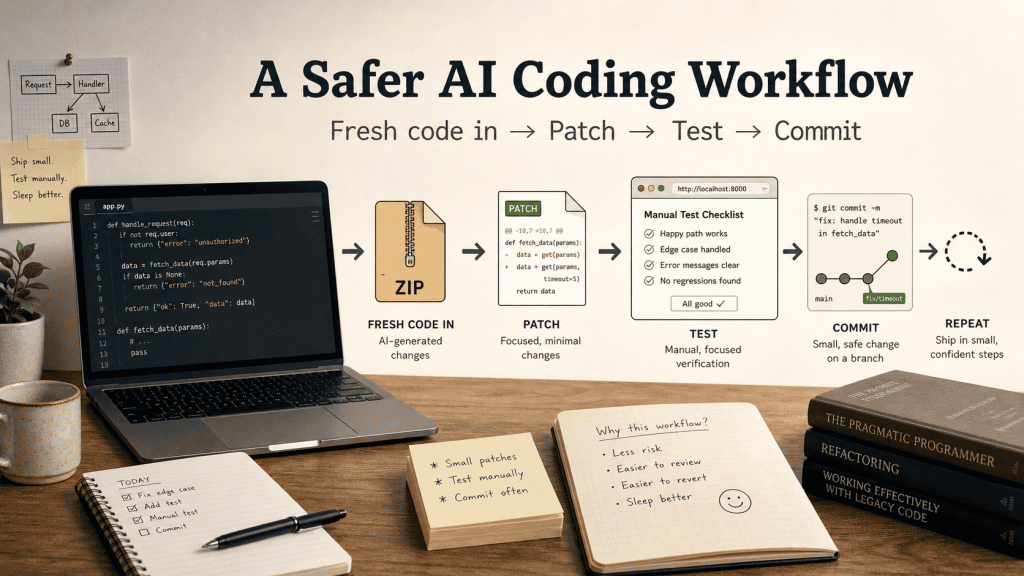
The safest AI coding workflow I’ve found for building terralog.online is simple: give the assistant the latest real code, ask for one focused change, get full replacement files back, test the app yourself, then commit only if it works. AI is useful as a fast coding assistant, but only when it’s boxed in by a boring process that keeps you in control.
I’ve been building and improving terralog.online with AI help, mostly around the current main app: EVE Profit Routes.
This is not an “AI built my app while I drank coffee” story.
It’s more boring than that, which is exactly why the workflow works.
The basic loop looks like this:
- I give ChatGPT the latest real code.
- ChatGPT edits only that code.
- ChatGPT gives me full replacement files or a patch ZIP.
- I overwrite the files in the working directory.
- I test the app myself.
- If it works, I commit and push with GitHub Desktop.
- If it breaks, I roll back or give ChatGPT the exact current file again.
That’s the whole system.
The important part isn’t that AI writes code. The important part is that the AI is never allowed to guess what the codebase looks like.
That one rule has saved me from a lot of quiet chaos.
What Terralog.online is
Terralog.online is a small self-hosted web app project. The main app right now is EVE Profit Routes, a decision-first tool for EVE Online hauling.
The app is built around one practical question:
What should I haul right now to make ISK?
It’s deliberately not trying to be a giant analytics suite, spreadsheet replacement, market dashboard, or “everything tool”. The goal is much narrower:
Open → See the best run → Execute → Profit → Repeat
That focus matters because it shapes both the product and the workflow. I’m not trying to build a huge platform in one heroic AI session. I’m trying to add useful layers to a small app without losing control of it.
The stack is intentionally boring:
- Apache
- PHP
- MySQL
- HTML/CSS/JavaScript
No big framework. No container setup. No complex CI/CD pipeline. No magic deployment platform.
Partly because I like understanding what is actually running. Partly because the project is still in a careful build-and-test stage. I don’t need enterprise architecture for a small app that I’m actively shaping.
What I do need is a way to move quickly without destroying the thing every second night.
That’s where this workflow came from.
The problem with casual AI coding
AI coding tools are very good at producing plausible code.
That’s useful, but it’s also the problem.
A coding assistant can confidently return code that looks clean, sensible, and complete, while quietly being based on the wrong version of your app.
That happened to me with HomeController.php.
The real file had grown into something much larger, with working logic already in place. The AI-generated replacement was basically a tiny stub. It looked tidy, but applying it would have wiped out most of the actual app behaviour.
That’s the trap.
The assistant may understand the general idea of your project, but that doesn’t mean it knows the exact current state of your files. Small apps change quickly. A file that was 200 lines yesterday might be 750 lines today. A controller might have new helper functions. A view might now contain PHP, HTML, JavaScript, localStorage behaviour, filter state, route cards, and execution mode logic all tangled together in one place.
If the AI works from an old mental model, it can give you something that is technically plausible and completely wrong for the real app.
So I changed the rule:
Always give the AI the latest real code.
Not the chat history. Not an old patch. Not “you remember what we did earlier”. The actual current file or codebase.
That is the source of truth.
It sounds obvious, which is always how the best mistakes disguise themselves.
The source-of-truth rule
The biggest practical difference between using AI casually and using AI safely is this:
The current codebase is the source of truth.
Not memory. Not assumptions. Not the plan. Not a previous ZIP. Not what the assistant thinks the file probably looks like.
The actual file is the truth.
If I manually changed app/Views/home/index.php, ChatGPT needs to see that new file before editing it again. If I tweaked the CSS by hand, the next patch needs the updated CSS. If I reverted a patch, the assistant needs to know that by seeing the current ZIP.
This sounds obvious, but it’s easy to skip when you’re moving quickly. You think, “It only changed a little, the assistant probably remembers.”
That’s how you lose good changes.
For this project, I usually upload a fresh ZIP of the app before asking for a code change. If we’re only touching one file, I upload or paste that exact file. The ZIP or file becomes the checkpoint.
Current working app → fresh ZIP → AI patchThat simple loop keeps the assistant grounded in reality.
Reality is a useful place to keep code.
Why I ask for full replacement files
The second big rule is:
Full replacement files only.
I don’t usually want snippets. I don’t want “replace the block around line 327” unless the change is tiny and obvious.
I want the complete modified file, or a ZIP containing the complete modified files with the correct folder structure.
For example:
app/Views/home/index.php
public/css/app.css
app/Controllers/HomeController.php
Then I can overwrite those exact files in the working directory.
This avoids a lot of copy-paste mistakes. It also avoids the nightmare of trying to manually splice AI-generated code into a large PHP view with mixed HTML, PHP, JavaScript, route card attributes, form state, and localStorage behaviour.
That doesn’t mean the AI gets to rewrite the whole app. It means the files it modifies are returned in full, so I can safely replace those files.
The edit still needs to be small.
The pattern is:
Small change
Full replacement file
Manual test
Commit if good
Not:
Huge refactor
Hope it works
Spend three hours fixing random breakage
Full-file replacement gives me a clean application step. Small patch scope gives me a clean testing step.
Both matter.
Why small patches beat big AI sessions
A lot of AI coding goes wrong because the requested change is too big.
The assistant tries to improve everything at once. It changes structure, style, naming, logic, and formatting in one pass. Sometimes it even “cleans up” code that was already working.
That’s not helpful when you’re building a live small app.
With terralog.online, the better pattern has been:
One feature
One patch
Test
Then next feature
That’s how features have been added over time:
- Add Run This mode → test
- Hook Run This into Execution Mode → test
- Add local behaviour tracking → test
- Add Run Memory panel → test
- Fix Not for Me recommendation cycling → test
- Add wallet-ready filter → test
- Fix CSS layout → test
- Add login tracking → test
- Fix character switch detection → test
This sounds slower, but it’s usually faster because each change is understandable.
When something breaks, I know which patch caused it. When something works, I can commit it. The app grows in small controlled layers instead of one big AI-generated landslide.
That’s the rhythm I trust.
Not because it’s exciting. Because it’s hard to ruin everything in one go.
The local and production setup
The app lives on my own Ubuntu server, and the working directory is the actual app directory.
The structure is roughly:
/var/www/eve
    app/
    config/
    database/
    public/
    scripts/
    storage/
Apache serves:
/var/www/eve/publicThat matters because anything outside public is not directly web-accessible. The PHP app can have controllers, models, config, scripts, storage, and migrations outside the public root.
That’s basic web hygiene, but it’s easy to get wrong when you’re building quickly with AI.
The workflow is currently server-first:
- edit files on the server
- test the live app
- commit and push from the working copy
I use VS Code Remote SSH and file overwrite methods depending on what I’m doing. For bigger patches from ChatGPT, I usually download the patch ZIP, extract it, and copy the included files into the matching paths on the server or working directory.
The important bit is that there’s one current working copy.
No mystery folder. No half-current local version. No guessing which file is real.
That matters more than the tooling.
Tooling is useful. Knowing which version is real is more useful.
The fresh ZIP loop
Here’s the workflow in more detail.
1. Export or upload the latest app code
Before asking for a code change, I give ChatGPT the current ZIP or exact file.
This is important even if ChatGPT worked on the previous patch, because I may have made manual edits after that.
Maybe I fixed a small CSS issue myself. Maybe I changed wording in a view. Maybe I applied a patch and then adjusted a form layout by hand.
If I don’t upload the fresh version after that, the next AI patch may overwrite my manual change.
So the ZIP is the checkpoint:
Current working app → fresh ZIP → next patch2. Describe the exact next change
A vague request creates room for AI invention.
Bad request:
Improve the app.Better request:
Add a wallet filter dropdown to the route control panel with two options:
All viable runs and Wallet-ready only.

Default should remain All viable runs.
Logged-out users should see the filter disabled.
That request gives the assistant a job. It also tells it what not to break.
3. Ask for a focused patch
The patch should contain only the modified files, not the whole app.
Something like:
eve-wallet-ready-filter-patch.zip
    app/Controllers/HomeController.php
    app/Views/home/index.php
    public/css/app.css
I like the patch ZIP to preserve the folder structure. That way I can copy it into the working directory and know where everything goes.
4. Overwrite the files manually
This is why full replacement files matter.
I’m not hunting for line numbers. I’m not manually applying partial diffs.
I’m replacing:
app/Views/home/index.phpwith the patched:
app/Views/home/index.phpThat makes the application step simple and repeatable.
5. Test immediately
This part is non-negotiable.
I don’t assume the patch worked. I open the app and test the actual behaviour.
For PHP files, ChatGPT may syntax-check before giving the patch, but that only proves the PHP parses. It doesn’t prove the product works.
So I test the user flow:
- Does the page load?
- Do routes still show?
- Does the button click?
- Does the filter preserve query params?
- Does the route count make sense?
- Does the scanner autocomplete actually return items?
- Does logging in as another character show the correct wallet?
- Does the database event get written?
Many real bugs are behaviour bugs, not syntax bugs.
6. Check the database when needed
For behaviour tracking, login tracking, or event logging, clicking around isn’t enough. I want to see what the app actually recorded.
For example:
mysql -u eve_user -p eve -e "
SELECT
    id,
    event_type,
    character_name,
    previous_character_name,
    switched_character,
    created_at
FROM eve_login_events
ORDER BY id DESC
LIMIT 15;
"
That tells me what happened in the database.
Not what the UI implied. Not what I thought happened. The actual rows.
For a small app, direct MySQL checks are often faster than building an admin panel too early.
Boring works.
7. Commit only after testing
Once the patch is tested, I use GitHub Desktop to commit and push.
GitHub Desktop is not doing anything magical here, which is why I like it. It lets me see which files changed, what changed, and whether the patch touched more than expected.
That’s useful with AI-generated code because I don’t want silent surprises.
If the AI was supposed to modify two files and GitHub Desktop shows six changed files, I know something is wrong. If I made a manual CSS tweak after applying a patch, GitHub Desktop shows it. If I need to undo a file before committing, I can.
The workflow is simple:
Apply patch
Test app
Review changed files in GitHub Desktop
Commit with a plain message
Push
The commit messages don’t need to be clever:
- Add Run This mode
- Hook Run This into execution mode
- Add scanner autocomplete
- Refine wallet filtering
- Add EVE login event tracking
- Fix character switch detection
Just enough to know what happened later.
Future-you does not need poetry. Future-you needs clues.
8. If it fails, don’t keep patching blindly
If a patch fails, I don’t want the AI guessing what happened.
I give it the actual broken file or the latest ZIP.
That avoids the classic problem:
patch on top of a patch
on top of a patch
that may not have been applied correctly
Debug the real app, not an imaginary one.
Why I don’t let AI directly edit the repo
There are tools that let AI connect directly to GitHub or run as an autonomous coding agent.
I’m not against that. For this project, I prefer a more manual loop.
The reason is trust.
The app is small enough that I can understand the important pieces, and I want to stay in control of what changes. The AI is useful as a fast coding assistant, not as an unsupervised developer.
My rule is:
AI can prepare the patch. I decide whether it goes in.
That separation matters.
It keeps me close to the product. It also stops the app drifting away from the original idea because a model decided to “improve” a bunch of things I didn’t ask it to touch.
For a solo builder, that control is valuable.
Speed is useful. Permission is better.
Comments and markers are useful breadcrumbs
One practical habit that has helped is adding markers around new feature blocks.
For example:
// === START: PHASE 3.2 LOCAL BEHAVIOR TRACKING ===
// code here
// === END: PHASE 3.2 LOCAL BEHAVIOR TRACKING ===
Or in HTML:
<!-- === START: RUN THIS MODE === -->
...
<!-- === END: RUN THIS MODE === -->
This is not perfect architecture. It’s not meant to be.
It’s a practical breadcrumb system for a fast-moving small app.
Later, if I need ChatGPT to modify or remove a feature, I can say:
Look for the PHASE 3.2 LOCAL BEHAVIOR TRACKING block.That’s much easier than trying to describe a random bit of JavaScript inside a large PHP view.
In a bigger project, I’d want cleaner separation. In a small project that is changing quickly, markers help me and the assistant find the right section without guessing.
Not elegant. Useful.
Useful wins a lot around here.
Manual testing catches what syntax checks don’t
When I say “test after each patch”, I don’t mean automated tests, although those may come later.
I mean testing the product like a user immediately after applying the patch.
For this app, that might mean:
- open the homepage
- change From to Jita
- change Cargo to Small
- switch wallet filter
- check route count
- click Run This
- check Execution Mode
- click Not for me
- check recommendation changes without jumping
- log in as Lars
- log out
- log in as Busta
- check the login events table
That matters because many bugs aren’t syntax bugs.
They’re behaviour bugs.
For example:
- a button worked, but jumped to the wrong section
- a filter worked, but took up too much space in the control panel
- a route list worked, but low-wallet characters only saw one route
- a login event was stored, but previous character detection was missing
A PHP syntax check won’t catch those.
You catch them by using the app.
Deeply old-fashioned, I know.
Also extremely effective.
Example: the wallet-aware routing bug
The wallet-aware routing issue is a good example of why this workflow works.
The app had wallet-aware routing. Technically, it worked.
Then I tested different characters:
Logged out: 55 routes, 4 recommended
Lars with 227m ISK: 34 routes, 4 recommended
Busta with 2.3m ISK: 1 route, 1 recommended
Hattori with 1.25m ISK: 1 route, 1 recommended
At first, it looked like maybe character data wasn’t loading correctly.
But the numbers told a better story.
The app was treating personal wallet balance as a hard gate. That’s not right for EVE, because a character may have access to corporation wallets, alts, or other funding sources.
So the product rule changed:
Wallet is a signal, not a gate.
We patched the code so routes were not hidden by default just because the personal wallet was low.
But then another real user need appeared: new players may actually want to see only what they can afford.
So the better solution wasn’t one mode. It was two modes:
- All viable runs
- Wallet-ready only
That’s a good example of AI being useful as part of a product conversation, not just as a code generator.
The workflow was:
Notice the issue
Check the real behaviour
Clarify the product rule
Patch the app
Test again
Refine the UI
That’s much better than asking AI to “fix wallet logic” and hoping it understands the game, the user, and the product decision.
It won’t unless you steer it.
Example: login tracking and character switching
The multi-character login tracking work is another good example.
The goal was to prepare for server-side behaviour tracking. Before tracking actions like run, skip, and complete, I needed to know which EVE character was active.
So we added login events:
login_startedlogin_successlogout
Then I tested directly in MySQL.
At first, the events worked, but character switching didn’t. The table showed:
Busta logout
Lars login_success
But it didn’t show that Lars had followed Busta.
So we patched it.
Then it still didn’t work because logout cleared the session before the next OAuth login. The fix was a short-lived cookie storing only the last character ID and name.
No tokens. No wallet. No sensitive data.
After that, the table correctly showed character transitions like:
Lars Jansen → Busta Knutt        switched_character = 1
Busta Knutt → Commander Hattori  switched_character = 1
Commander Hattori → Lars Jansen  switched_character = 1
This is exactly why the workflow is patch-test-patch-test.
The first patch didn’t fully solve it. The database output showed why. The next patch fixed the actual problem.
A vague test would have missed it.
The rows told the truth.
What AI is good at in this workflow
Used this way, AI is genuinely useful.
It’s good at:
- reading a ZIP and finding where logic lives
- suggesting the safest patch scope
- generating full replacement files
- writing small controllers or services
- updating PHP views
- adding JavaScript behaviour
- writing SQL migrations
- explaining test commands
- turning product decisions into code
It’s also useful for spotting sequencing issues.
For example:
If behaviour tracking comes next, character switching needs to be correct first.
That kind of thing matters. It stops you from building analytics on top of bad identity data.
The useful role for AI here is not “magic builder”.
It’s closer to:
fast junior developer who can read the current files and prepare a focused patch
That’s very useful, as long as you keep reviewing the work.
What AI is not allowed to do
This workflow also works because the assistant has boundaries.
For terralog.online, the AI is not allowed to:
- invent the current codebase
- replace huge files from memory
- silently change unrelated architecture
- touch
.envfiles unless explicitly asked - skip testing logic
- assume a patch was applied correctly
- decide that a working feature should be rewritten
The assistant can recommend.
I decide.
That boundary keeps the project understandable.
It also protects the product from becoming whatever the model thought sounded sensible that day.
Models are helpful. They are not immune to wandering off with a hammer.
Why this suits solo builders
A solo builder usually has three problems:
- not enough time
- not enough hands
- too many ideas
AI helps with the second problem. It gives you another pair of hands.
But if you let it run wild, it creates a fourth problem:
a codebase you no longer understand
This workflow avoids that.
It lets me move faster while still knowing what changed. The app remains mine. The AI is helping me build it, but it isn’t taking over the project.
That distinction matters.
For a small project, speed is useful. Control is more useful.
Especially when you are the person who will have to fix the thing later, probably tired, probably muttering, and probably wondering why past-you was so optimistic.
The reusable workflow template
This is the version I’d recommend to other solo builders using AI coding tools on small web projects.
1. Keep the app boring
Use a stack you understand.
For me, that’s:
- PHP
- MySQL
- Apache
- plain HTML/CSS/JS
Your stack can be different. The important bit is that you understand what is running and where the files live.
2. Keep one working copy
Don’t have five mysterious versions of the app.
Know which folder is current.
3. Before each AI coding task, package the latest code
Give the assistant the current reality:
- fresh ZIP
- or exact file
4. Ask for one change at a time
Keep the scope small enough that you can test it properly.
5. Demand full replacement files
Avoid fragile snippets unless the change is tiny.
6. Apply the patch manually
Overwrite the files yourself so you know exactly what changed.
7. Test the actual app
Click the feature. Check the database. Look at the UI. Try the edge case.
8. Commit and push only after testing
GitHub should be the record of what worked, not a dumping ground for every experiment.
9. If it breaks, give the AI the actual current broken file
Don’t debug imaginary code.
10. Repeat
Small boring cycles.
That’s the system.
The checklist version
Here’s the same workflow as a practical checklist:
- Decide the next small feature or fix.
- Export or upload the latest code ZIP or exact file.
- Explain the desired change clearly.
- Ask for full replacement files only.
- Download the patch ZIP or copy the full file.
- Overwrite files in the working directory.
- Test the page or feature manually.
- Run CLI/database checks if needed.
- Review changed files in GitHub Desktop.
- Commit with a clear message.
- Push to GitHub.
- Start the next small change from a fresh ZIP.
It’s not complicated.
That’s why I trust it.
A workflow does not need to be clever to be useful. It needs to reduce the number of ways you can accidentally ruin your own evening.
Why this is safer than loose vibe coding
“Vibe coding” is fun for demos.
For an app you actually want to keep alive, you need a boring process.
The danger with AI code isn’t that it can’t write code. The danger is that it can write code too confidently. It can produce something that looks right but is based on the wrong file, wrong assumptions, or an old version of the project.
This workflow reduces that risk by forcing every change through a simple gate:
Does it work in the real app?
If yes, commit.
If no, fix or revert.
That’s not as flashy as letting an agent run wild across your repo, but it’s a lot easier to trust.
For small web projects, trust beats theatre.
Every time.
Final takeaway
The biggest lesson from building terralog.online this way is that AI coding works best when it’s boxed in by process.
The assistant can be fast, but the workflow has to be careful.
For me, the winning pattern has been:
fresh code in
focused patch out
manual overwrite
real testing
GitHub commit
repeat
It’s not glamorous, and it doesn’t feel like the future in a sci-fi way. It feels more like having a very fast junior developer sitting beside me, as long as I keep handing them the right file and checking their work before it goes live.
And honestly, for building small things on the web, that’s more useful than magic.
Magic is impressive.
A repeatable workflow is what keeps the app alive.