In this article
- Stack choice should follow the job
- The modern stack is not the enemy
- What simple stacks are still good at
- AI coding tools work better with clear constraints
- Boring stacks can make deployment less mysterious
- Good side projects are usually decision-first
- When a modern JavaScript stack does make sense
- A simple checklist for choosing your side project stack
- Small apps that probably don’t need a heavy stack
- Ask AI for simplicity on purpose
- Simplicity can be a feature
- Practical takeaway
There’s a weird pressure now where every side project feels like it needs to become a “proper” modern app.
You start with a simple idea.
A small directory. A calculator. A habit tracker. A dashboard for one annoying thing. A tiny tool that saves you opening the same spreadsheet every week.
Then, before the poor little idea has even had a cup of coffee and worked out what it wants to be, the stack starts swelling.
Next thing you’re thinking about React, Next.js, Tailwind, Prisma, serverless functions, auth providers, edge deployment, queue systems, observability, and whether your button component should live in /components/ui or somewhere more emotionally stable.
And look, that stuff has its place.
I’m not anti-modern web tools. React is useful. Next is useful. Modern hosted platforms are useful. Tailwind has probably saved a lot of us from writing CSS while muttering dark expletives into a half-empty mug.
But for a lot of solo project builders, I think the better question is much less fashionable:
What is the smallest, fastest, and most efficient stack that can make this thing useful?
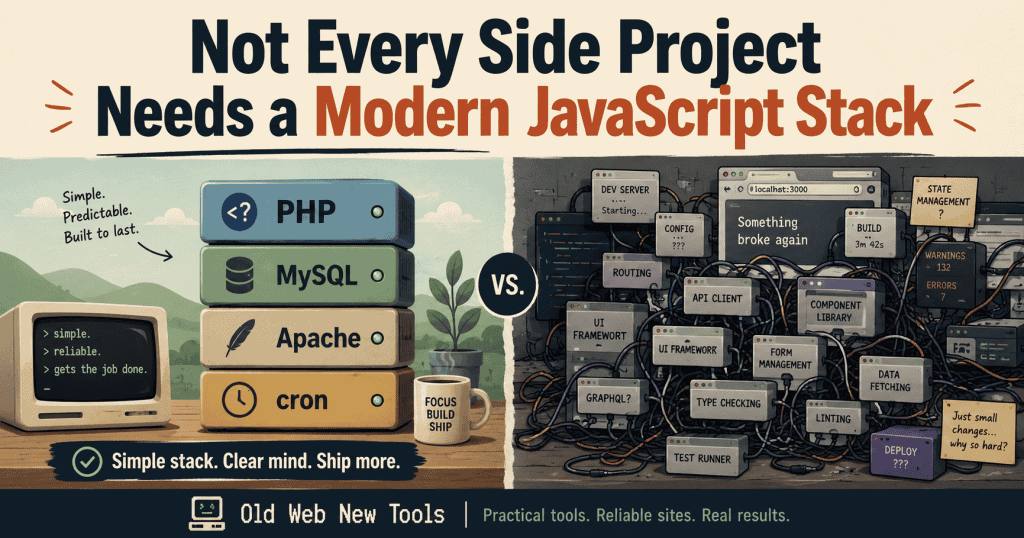
For many small web apps, the answer might still be PHP, MySQL, Apache, a few server-rendered pages, a cron job, and maybe one admin screen.
Not glamorous.
Still useful.
And if you’re using AI coding tools, a boring stack can actually be a strength. The constraints are clearer, the project is easier to reason about, and there are fewer opportunities for the AI to “helpfully” turn your tiny app into a haunted software cathedral.
Stack choice should follow the job
The point here isn’t that old stacks are always better.
They aren’t.
The point is that stack choice should follow the job.
If the job is “build a polished SaaS product with a rich interactive UI, real-time updates, and a frontend that behaves more like desktop software,” then yes, use the tools that make sense for that. A modern JavaScript stack may be exactly the right call.
But if the job is “collect some data, store it, process it, and show me the useful result,” you might not need a heavy frontend setup at all.
A lot of useful solo builder tools are basically this:
- Take input.
- Save it.
- Process it.
- Show a useful view.
- Repeat on a schedule.
That’s not exciting on a landing page, but it’s the shape of many real tools.
A PHP/MySQL app with a couple of clean pages and a cron job can do a surprising amount. It can run reports, update data, send alerts, generate lists, track changes, and help you make a decision.
That’s more than enough for a lot of the small internet projects I build.
Useful software doesn’t always need a fashionable stack. Sometimes it needs a form, a database, a scheduled script, and one screen that answers the right question.
The modern stack is not the enemy
I don’t think modern JavaScript stacks are bad.
They’re good for plenty of things. If you’re building something interactive, collaborative, highly dynamic, or frontend-heavy, modern tools can make a lot of sense. React, Next, Svelte, Astro, Supabase, serverless platforms, and managed auth can all be useful.
The problem starts when the stack becomes the project.
That’s where solo, part-time, and hobby builders get stuck.
You wanted to build a useful tool, but now you’re spending three nights wiring up build tools, package versions, auth flows, deployment settings, environment variables, and a design system before the app has answered one useful question.
We won’t talk about the fact that this is sometimes half the fun.
That might be fine if the goal is to learn those tools. Learning is a perfectly valid reason to overbuild something. We’ve all done it. Some of us have done it repeatedly, because apparently pain is educational.
But if the goal is to ship a small utility, the modern stack can become a trap.
A side project does not automatically become more serious because the stack is more complex.
Sometimes it just becomes harder to finish.
What simple stacks are still good at
Simple stacks are good when the app has a clear core action.
For example, if the app mostly needs to submit a form, save a record, list results, update data every hour, generate a report, compare prices, track links, manage a small directory, show an admin table, or send a basic notification, you may not need much ceremony.
That’s not very glamorous web work.
It’s also most of what a lot of useful tools need.
A basic server-rendered app can be easier to understand because the path from request to response is obvious. The user visits a page, the server gets some data, renders HTML, and sends it back.
There’s less magic. There are fewer moving parts. There are usually fewer places for a solo builder to lose the thread.
It is also usually easier to debug.
That matters when you’re building alone because you don’t have time. You are the product person, developer, tester, designer, deployment person, and support desk. You are also probably the person who has to remember why you named a database column status_flag_2 at 11:43pm three weeks ago.
Anything that reduces the number of things you need to hold in your head is worth considering.
Simple stacks are not automatically better. But they often make the shape of the app easier to see.
And when the shape is easy to see, it’s easier to build, debug, deploy, and explain to an AI assistant without it wandering off into the bushes.
AI coding tools work better with clear constraints
This is where AI comes in.
AI coding assistants can produce a lot of code quickly, but they’re not always great at protecting the shape of your project.
If you ask for something vague, they may happily introduce a framework, change the structure, add dependencies, rewrite files you didn’t ask them to touch, and quietly make your app more complicated.
That’s not always because the AI is bad. Sometimes the instruction was too open.
A simple stack gives you clearer rules.
You can say:
Build this as a PHP/MySQL app. Use server-side rendered pages. No framework. Keep the public entry point in
/public/index.php. Use full replacement files only. Do not introduce new dependencies unless asked.
That kind of constraint makes AI more useful.
The goal is not to let AI decide the architecture. The goal is to use AI as a helper inside a structure you understand.
AI is very good at filling in details once the shape is clear. It can help create CRUD screens, explain errors, generate SQL queries, tidy up repeated code, write small helper functions, and scaffold boring admin pages.
But it’s much less reliable when it is allowed to invent the shape, workflow, database, UI, and deployment model all at once.
That’s when “vibe coding” turns into “vibe archaeology,” where you spend the next two evenings digging through generated files trying to work out what ancient civilisation built this thing and why it needs seven config files to display a list of bookmarks.
Clear constraints keep you in control.
Boring stacks can make deployment less mysterious
One underrated advantage of simple stacks is deployment.
Deployment is not always easier with a simple tech stack, but it is often more understandable.
A traditional PHP/MySQL/Apache app has a fairly direct mental model. Files live on the server. Apache serves the site. PHP runs on request. MySQL stores the data. Cron runs scheduled scripts.
Logs tell you what broke, usually in a tone that suggests this is somehow your fault.
There are still annoying problems. File permissions, environment variables, timezones, SSL, database users, public document roots, and cron paths can all break things.
But the problems are usually concrete.
With a more complex stack, the failure modes can become harder to understand. Is it the build step? The serverless function? The route handler? The package version? The edge runtime? The hydration issue? The deployment platform? Some mysterious cache that has decided today is its villain arc?
Again, modern tools have their place.
But when a small app breaks, boring infrastructure can be easier to debug.
This is especially true when AI helped write the code. AI can generate code, but it doesn’t always understand your actual server. It doesn’t know your hosting quirks, your cron paths, your Apache config, or the weird timezone mismatch that makes your “fresh” data look like it last updated during Covid.
Local development and production are different again. Simple stacks don’t remove that problem, but they can make the gap easier to reason out.
And when you’re building small tools by yourself, understandable beats impressive more often than people admit.
Good side projects are usually decision-first
A lot of solo builder projects fail because they start as dashboards.
Dashboards feel productive because they show lots of information. You get tables, filters, charts, widgets, colour-coded things, and the comforting illusion that more data equals more usefulness.
But useful tools often don’t need to show everything.
They need to answer the next question.
Not:
Here is every possible market signal.
Better:
Here is the best thing to do next.
Not:
Here are 50 charts about your subscriptions.
Better:
Here are the three subscriptions you probably forgot about.
Not:
Here is every bookmark you ever saved.
Better:
Here are the five links worth revisiting this week.
This is where stack choice becomes less important than product judgement.
A simple server-rendered app can be more than enough for a decision-first tool because the hard part is not the framework. The hard part is deciding what the user actually needs to know.
The code matters, obviously.
But the tool becomes useful when it has a point of view. When it says, “Here’s what matters. Here’s what changed. Here’s what you should look at next.”
A lot of small apps don’t need a fashionable frontend.
They need a clear answer.
When a modern JavaScript stack does make sense
I’m not trying to drown you in old-stack nostalgia here.
I like simple and efficient tools, but I’m not trying to bring back spacer GIFs and table layouts like some sort of dial-up Gen X caveman.
Ahem.
There are plenty of times when a modern JavaScript stack makes sense.
I’d definitely consider it if the project needs lots of client-side interaction, real-time updates, collaborative features, complex frontend state, polished app-like UX, reusable component-heavy interfaces, or a frontend that might later become a larger product.
I’m not saying “never use modern JavaScript.”
I’m saying “don’t start there automatically.”
For a solo or hobby builder, every tool choice has a maintenance cost. The question is whether that cost buys you something the project actually needs.
Sometimes it does.
Sometimes it doesn’t.
If the stack helps you ship the useful version faster, great. Use it.
If the stack mainly makes the project feel more official while quietly doubling the number of things that can break, maybe take a breath and ask whether a boring version would do the job.
A simple checklist for choosing your side project stack
Before choosing a stack, ask a few blunt questions.
What is the core action?
If the app is mostly forms, tables, simple views, and scheduled updates, keep it boring.
Does the user need a rich interactive interface?
If not, server-rendered pages may be enough.
Will this need real-time features?
If the answer is no, you probably don’t need to add that complexity yet.
Can I deploy and debug this myself?
The best stack is not just the one you can build with. It’s the one you can fix when it breaks.
Will AI make this easier or more chaotic?
AI works better when the project has clear rules. If the stack is already complicated, AI may worsen the mess.
What is the smallest version that proves the idea?
Build that first. Upgrade later if the app earns it.
This is probably the most practical way to think about it:
Start with the simplest stack that can deliver the useful behaviour.
Not the simplest stack in theory. The simplest stack for you.
That difference matters. A tool is only simple if you can actually use it, deploy it, and repair it without driving yourself to drink.
Small apps that probably don’t need a heavy stack
Here are a few examples where a simple stack might be enough.
A personal bookmark directory could start as a small app where you save links, add titles, write notes, tag things, and search later. Maybe you add AI summaries at some point. Maybe you don’t. The useful version is probably just a database and a few decent views.
A subscription cost tracker doesn’t need to begin life as a SaaS platform with onboarding flows and team accounts. It can start with a form for name, amount, billing cycle, renewal date, notes, monthly total, and upcoming renewals. That’s enough to solve the first problem.
A local “what changed this week?” tracker could monitor council pages, roadworks, events, closures, or business updates. The value is in curation and freshness, not fancy UI. A simple admin screen, source list, change log, and public page can already be useful.
A niche price tracker for a hobby category could be product name, source URL, current price, last checked date, alert threshold, and price history. A cron job and a database can do a lot there.
A tiny admin dashboard for one recurring task may only need to ingest data, process it, show the useful result, and include freshness or trust signals. Not a full business intelligence platform. Just one page that stops you manually checking the same annoying thing every week.
A lot of useful software is just that pattern repeated:
Input. Store. Process. Display. Repeat.
It’s not glamorous, but it works.
See the Small App Ideas section for more inspiration.
Ask AI for simplicity on purpose
When using AI to build small tools, I’m very direct about wanting simple code.
Something like this:
I want to build a small PHP/MySQL web app.

Keep the stack simple and easy to deploy on Apache.
Use server-side rendered pages.
No frontend framework.
No Composer dependencies unless I ask.

Prioritise clear file structure, readable code, and easy debugging over clever abstractions.
That prompt does two useful things.
First, it stops the AI from “helpfully” modernising the project into something bigger than needed.
Second, it keeps you in control of the architecture.
You can always make the app more sophisticated later. You can add an API. You can add a richer frontend. You can move hosting. You can introduce queues, components, background workers, or whatever else the project earns.
But it’s much harder to recover from starting too big, especially when the idea itself is still unproven.
Small tools should prove their usefulness before they earn complexity.
Simplicity can be a feature
Not every side project needs a modern JavaScript stack.
Some do.
Most don’t.
A lot of useful solo or hobby builder apps are still just forms, tables, scheduled scripts, simple admin screens, and a clear answer to a real problem. That doesn’t make them less serious. It often makes them a hell of a lot more shippable.
Modern tools and AI coding assistants are at their best when they solve real problems within clear constraints, without adding complexity before it has earned its place.
For small web projects, simplicity can be a feature.
PHP, MySQL, Apache, and a cron job won’t impress the hype crowd, but they might get the tool built, deployed, and used.
That sounds like the better outcome to me.
Practical takeaway
Use the stack that gets the useful version built with the least unnecessary complexity or friction.
For many solo builder projects, that might be a boring server-rendered app with a database and a scheduled script.
You can always modernise later.
You can’t use an app that never ships.