In this article
- What I’m actually trying to build
- So what is Hermes Agent?
- “Local” needs a qualification
- I’m not installing this on a clean test machine
- Day one started with Ubuntu doing Ubuntu things
- I chose the Nous Portal quick setup
- What actually got installed
- The memory system existed, but it hadn’t learned anything yet
- WhatsApp configured surprisingly early
- Then the gateway fell over
- I stopped treating it as one giant installation problem
- hermes doctor was more encouraging than the gateway
- Installed is a very long way from useful
- What I want to find out over the next few weeks
- Where Part 1 leaves the experiment
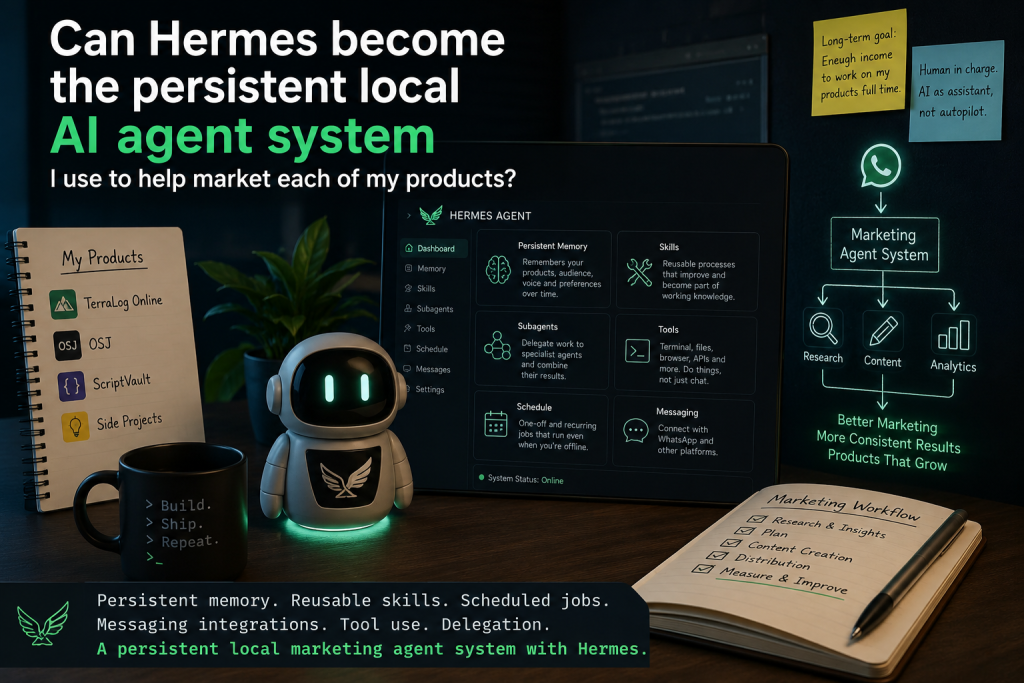
Question: Can Hermes become the persistent local AI agent system I use to help market each of my products?
That’s what I’m trying to find out. Hermes Agent has several of the pieces I’ve been looking for in one place: persistent memory, reusable skills, scheduled jobs, messaging integrations, tool use and the ability to delegate work to separate subagents. My longer-term idea is to give each of my products its own persistent marketing setup rather than starting from a blank chat every time I need research, planning, content or other marketing work done. Eventually I’d like that system to help the products generate enough income for me to work on them full time, but I’m nowhere near proving that yet. On the first day I got Hermes installed on my Ubuntu server, authenticated it through Nous Portal and configured WhatsApp, while also finishing the night with its messaging gateway disabled after it repeatedly exited with a configuration error.
What I’m actually trying to build
I keep using the word “swarm”, although I’m not convinced that’s the right terminology yet. What I mean is a persistent collection of AI agents that can help with the marketing work around each product I’m building, without me having to start from a blank chat and re-explain the same background every time.
I don’t want one enormous chatbot pretending to know everything about every project. I’m more interested in giving agents defined jobs and product context, then having some way of coordinating them so research, planning, content work and the other repetitive parts of marketing can happen with continuity instead of as isolated conversations.
Hermes’ own terminology may turn out to be more useful than “swarm”. It supports subagents, delegation and orchestrator-style patterns where one agent can hand separate pieces of work to other agents, so for now I’m going to call the thing I’m trying to build a persistent local marketing agent system and let the terminology evolve as I learn how Hermes actually wants to be structured.
The end goal is commercial rather than purely technical curiosity. I have several products and projects, and I want to find out whether a system like this can genuinely help me market them more consistently and effectively, with the longer-term aim of generating enough income to let me work on them full time.
That doesn’t mean handing marketing over to AI and walking away. I still expect to make the judgement calls, review what gets produced and decide what gets published or acted on, because I’ve already come to much the same conclusion with coding: AI is useful when it has context and constraints, but I still want a human in charge of what actually ships. That’s the approach behind my safer AI coding workflow, and I don’t see a good reason to abandon it just because the task changes from coding to marketing.
So what is Hermes Agent?
Hermes Agent is an open-source AI agent project from Nous Research. The distinction between an agent and a normal chat interface matters here because a chat model mainly answers what you ask it in the current conversation, while an agent framework gives the model tools and a working environment so it can do things as well as talk about them.
Hermes can work with files, run terminal commands, use browser and other tools, schedule jobs, interact through messaging platforms, remember useful information across sessions and delegate parts of a task to other agents. Its design also includes persistent memory and reusable skills, which is where it starts becoming more interesting to me than another chat window with a nicer prompt box.
The persistent-memory part is especially relevant to what I want to build. A useful marketing assistant shouldn’t need me to explain the same product, audience, terminology, positioning and working preferences from scratch every few days, so I’m interested in whether Hermes can retain the right context over weeks of ordinary work rather than just remembering a handful of facts from one conversation.
There’s a similar appeal in the skills system. If an agent works out a useful repeatable process, the interesting question isn’t whether it can perform that process once; it’s whether that process can become part of the agent’s working knowledge and improve instead of disappearing into an old chat that I never look at again.
Automation is another big part of the attraction. Hermes has its own scheduling system for one-off and recurring work, which matters more to me than a flashy chat interface because a persistent marketing setup eventually needs to do useful work when I’m not sitting in front of the terminal telling it exactly what to do.
Delegation is the other piece I’ll need to explore properly. Hermes can hand independent work to separate subagents and combine their results, but I don’t yet know whether that will produce a genuinely useful division of labour for product marketing or simply create another layer of machinery that needs supervising.
This overlaps with some of the workflow automation territory I’ve already been exploring with n8n, but the emphasis is different. n8n is very good at explicitly connecting steps and services, while what interests me about Hermes is the possibility of adding persistent agent context, learned procedures and delegated judgement around those sorts of workflows.
Whether that ends up being genuinely useful or just another maintenance problem is one of the things this series is meant to find out. I’m planning to work with Hermes for weeks rather than decide after an evening whether it belongs in the toolbox.
“Local” needs a qualification
I’m installing Hermes on my local server, but I don’t want to accidentally imply that everything involved was running locally on day one. The agent runtime is on my own Ubuntu machine and the terminal backend is configured as local, so Hermes can work directly in that server environment.
The model provider I started with, however, was Nous Portal, with tencent/hy3:free selected. That means the model inference I was using wasn’t local inference, even though the agent itself was running on my server.
The machine also has Ollama running on 127.0.0.1:11434, but I hadn’t configured Hermes to use Ollama as its model provider at this point. That gives me a useful distinction to keep in mind throughout the project: a local agent runtime does not automatically mean a local AI model, and I’ll probably experiment with that boundary later rather than pretending it was solved during installation.
I’m not installing this on a clean test machine
My server is already a working machine rather than a pristine VPS built specifically for Hermes. It has Apache, MySQL, PHP, Ollama, Mosquitto and other existing services and projects running on it, which is useful because ultimately I want Hermes to live around real projects rather than in an isolated demonstration environment.
That also means there are more opportunities for ordinary server housekeeping to get in the way. On August 6, it did exactly that before I got very far with Hermes.
Day one started with Ubuntu doing Ubuntu things
Before I could get very far with the installation, the server was busy working through normal package activity. For several minutes I was looking at apt.systemd.daily, PackageKit and dpkg processes unpacking or configuring firmware, OpenSSH, polkit and other packages, which wasn’t evidence that Hermes itself was broken but did mean I had to let the machine finish what it was already doing.
It’s a small detail, but I want to keep details like this in the series because clean tutorials tend to begin at the exact moment everything is ready for the tutorial. Real installations on machines that already have jobs to do are often less cooperative, and that context matters when you’re trying to work out whether a problem belongs to the new software or the server underneath it.
I chose the Nous Portal quick setup
Once I got to Hermes’ setup screen, I was offered three starting points: Quick Setup using Nous Portal, a fuller setup for configuring providers and tools, or a minimal blank-slate installation. I chose Quick Setup with Nous Portal because at this stage I wasn’t interested in designing my final model-routing strategy; I wanted a working baseline that I could inspect and then change deliberately.
There will be plenty of time later to decide which models should handle which roles, which jobs justify paid inference, which can use cheaper models, and whether some work should move to local models. On the first evening, the useful goal was simply getting Hermes far enough that I could separate installation problems from architecture decisions I hadn’t made yet.
What actually got installed
By the time I ran my basic checks, Hermes itself was present and callable, with the executable at /home/larsborg/.local/bin/hermes and the main installation under /home/larsborg/.hermes/hermes-agent. It reported Hermes Agent v0.20.0 (2026.8.3) running under Python 3.11.14, so the core installation had clearly got further than the later gateway error might initially suggest.
A quick look at hermes --help also showed that this isn’t a tiny wrapper around a model API. The CLI exposed commands covering models, gateways, WhatsApp, cron jobs, projects, skills, memory, tools, MCP, sessions, security, backups, checkpoints, monitoring and other agent features that I’ll need to work through gradually rather than trying to configure everything on the first night.
My rough day-one state looked like this:
| Area | Day-one state |
| — | — |
| Hermes | Installed, v0.20.0 |
| Runtime | Local server |
| Terminal backend | Local |
| Terminal sudo | Disabled |
| Model provider | Nous Portal |
| Model | tencent/hy3:free |
| Nous Portal authentication | Logged in |
| WhatsApp | Configured |
| Scheduled jobs | 0 |
| Active sessions | 0 |
| Built-in memory | Enabled |
| Gateway | Installed, but failed |
| Ollama | Running separately on the server |
There was another useful reality check in the status output. I hadn’t configured direct API keys for OpenAI, Gemini, OpenRouter and several of the other providers Hermes knew about, and my Nous Portal account didn’t give me every managed tool capability either, so “Hermes supports a lot of tools” and “my Hermes installation can currently use every one of them” were not the same statement.
The memory system existed, but it hadn’t learned anything yet
This was probably the most important non-result of the first day because persistent memory is one of the main reasons I’m interested in Hermes. hermes doctor confirmed that the built-in memory system was active and that the expected directories existed under ~/.hermes/, including locations for memories, sessions, skills and logs.
There was also a persona file and a state database, but MEMORY.md and USER.md did not exist yet because Hermes hadn’t actually written any memories. There were also zero sessions at that point, which means I hadn’t yet tested the feature I care about most even though the infrastructure for it was present.
That distinction is important for the rest of this series. The software supporting persistent memory and the installation reporting that memory is active do not prove that, after several weeks of real product work, Hermes will remember the right things, avoid retaining rubbish and make my work meaningfully easier, so that needs to be tested rather than assumed.
WhatsApp configured surprisingly early
One part of the setup that got further than I expected was messaging. Hermes supports a messaging gateway so the same agent can be reached from external platforms rather than only through a shell, and my status showed WhatsApp as configured while the other messaging platforms were still unset.
That matters to the system I have in mind because a persistent agent becomes much more useful if I can interact with it away from my desk. If I eventually have product-specific agents or an orchestrator coordinating work, being able to ask for a check, give an instruction or receive a useful report from my phone could be a practical part of the workflow rather than a novelty.
The catch was that WhatsApp configured did not yet mean messaging works. The gateway that was supposed to keep that side of Hermes alive was the part that failed.
Then the gateway fell over
Hermes installs a user-level systemd service called hermes-gateway.service, and its job includes the messaging integrations and background gateway work. When I started it on August 6, the service got far enough to begin the messaging startup sequence and then stopped, leaving systemd reporting an exit with status=78/CONFIG at about 20:38 NZST.
The logs immediately before the exit included the WhatsApp integration disconnecting, but I don’t yet know the underlying cause and I’m deliberately not filling in that blank after the fact. It could be straightforward configuration, something related to the WhatsApp bridge, or another dependency I haven’t identified yet; at the end of Part 1, all I actually know is that the gateway started and then exited with a configuration error.
That uncertainty belongs in the article because this is a build diary rather than a retrospective tutorial written after everything has been made tidy. When I know why it failed, I can write about what actually fixed it instead of quietly rewriting the first evening as though the answer had always been obvious.
I stopped treating it as one giant installation problem
The useful decision at that point was not to keep changing random things until the red error went away. I wanted to know whether I had a broken Hermes installation or a mostly working Hermes installation with a broken gateway, because those are very different problems and they should lead to very different troubleshooting.
I stopped and disabled the gateway service, reset its failed state, then went back to the basics with hermes --version, hermes status and hermes doctor. That let me reduce the number of moving parts and establish what was healthy before trying to make the messaging layer work again.
I like that approach much more than reinstalling everything at the first sign of trouble. On a server that already runs other software, narrowing the failure down is safer and usually more informative than repeatedly rebuilding the whole stack and hoping the symptom disappears.
hermes doctor was more encouraging than the gateway
The diagnostic output made the installation look considerably healthier than the failed systemd service suggested. The Python virtual environment was active, Hermes’ version files agreed on version 0.20.0, its configuration files existed, Nous Portal authentication worked, the command was properly installed, and useful dependencies including Git, ripgrep, Node.js, browser tooling and Playwright Chromium were present.
Systemd lingering was also enabled, which will matter later if I want the gateway to remain available when I’m not logged into the shell. The built-in memory provider was active as well, and Hermes could see a useful collection of capabilities covering terminal work, files, browser tasks, code execution, cron jobs, delegation, projects, session search, skills, todo work, vision and other tools, although some capabilities still depended on credentials or system dependencies I hadn’t configured.
The report wasn’t completely clean, and I don’t want to describe it as though it was. Hermes warned about the server’s SQLite 3.45.1 build and a WAL-reset bug, with an update recommended, and it also reported high-severity npm advisories in some browser and web workspace dependencies even though it didn’t report an active Hermes-specific security advisory at that point.
That left me with a much more useful diagnosis than “Hermes is broken”. The core installation looked healthy enough to continue investigating, while the gateway was a separate failure that I could come back to without throwing away everything that had already worked.
Installed is a very long way from useful
This is probably the most important point to establish at the start of the series because I now have Hermes installed, but I do not yet have a marketing agent system. I haven’t proved persistent memory in normal use, built useful product-specific skills, created scheduled jobs, tested whether delegated agents can divide marketing work in a way that helps, worked out model routing or costs, solved the messaging gateway problem, or established sensible permissions for agents that may eventually be allowed to do real work around real products.
Most importantly, Hermes hasn’t helped sell anything yet, and that is ultimately why I’m interested in doing this rather than merely collecting another AI tool. I’m planning to work on it over weeks, so the interesting results won’t come from whether the installer completed; they’ll come from whether the system becomes more useful as it accumulates context, skills, scheduled work and clearly defined responsibilities.
What I want to find out over the next few weeks
The immediate technical question is why the gateway is exiting with 78/CONFIG, because messaging and durable background work are likely to matter if this becomes a genuinely persistent system. Once that is understood, I want to start testing the ideas that brought me to Hermes in the first place rather than spending the whole project tuning the installation.
I want to know whether its memory remains useful after days and weeks of work or whether it needs constant babysitting, and whether I can give one product enough durable context that I stop repeatedly explaining what it is, who it is for and how I want it presented. I also want to see whether specialist agents are genuinely better than one general agent, where an orchestrator helps rather than adding another abstraction, and whether scheduled jobs can take care of repetitive marketing work without creating a pile of mediocre automated output that I then have to clean up.
There are practical limits to work through as well. Model choice and cost will matter once the system is doing enough work to be useful, and permissions will matter even more if an agent eventually gets access to product files, websites, analytics, social systems or publishing tools.
The final test is simpler than all of the architecture questions: does any of this help me make my products easier to discover, understand and buy? If the answer eventually becomes yes, I should be able to show how that happened rather than simply claiming the agent system is clever.
Where Part 1 leaves the experiment
At the end of August 6, my Hermes installation was in an awkward but useful state. The core application was installed and responding, Nous Portal authentication worked, the terminal backend was local, WhatsApp was configured, and the persistent-memory infrastructure existed but hadn’t accumulated any memory yet; at the same time there were no scheduled jobs, no active sessions, and the gateway had failed with 78/CONFIG, so I deliberately disabled it while confirming that the rest of Hermes was basically intact.
That feels like the right place to end Part 1 because it gives the rest of the series a real baseline rather than a manufactured success story. I’m not trying to prove that Hermes is the answer before I’ve actually used it; I’m trying to find out whether a persistent agent system running from my own server can grow into something useful enough to help market the products I’m already building, and the next few weeks should give me plenty of evidence either way.
If it works, I want this series to show the useful pieces, the architecture that eventually makes sense and the places where human review still matters. If it doesn’t, I want the series to show that too, because either result is more useful than another AI tool review written after twenty minutes with the demo.