What is the OSJ Submission Tracker?
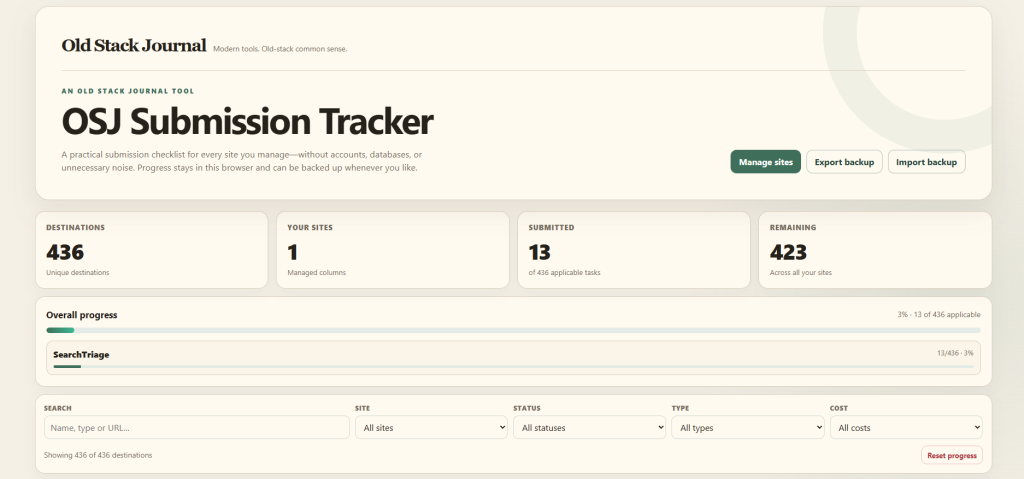
The OSJ Submission Tracker is a free, downloadable tool for keeping track of where you’ve submitted your websites, apps, SaaS products, plugins, and other web projects.
It comes with 436 submission destinations covering software directories, startup directories, launch platforms, AI directories, communities, app stores, business listings, review sites, and other places where a web project might be worth listing.
There’s no account to create, no database to configure, and no subscription. The entire tracker is contained in one HTML file that runs locally in your browser.
Your tracker data stays on your machine. Old Stack Journal doesn’t receive or store the sites you add or the progress you record.
Why I built it
Submitting a new app or website to directories sounds simple until you actually start doing it. You open twenty tabs, create a few accounts, fill out the same product description repeatedly, and eventually lose track of which sites you’ve finished.
It gets worse when you’re managing several projects at once. A spreadsheet can do the job, but it quickly becomes a wide collection of links, status columns, filters, and notes that you have to maintain yourself.
I wanted something more focused: one file I could open on my own computer, add each project to, and use as a practical submission checklist. That became the OSJ Submission Tracker.
What’s included
The tracker currently contains 436 submission destinations collected from several directory and launch-site lists.
They include:
- SaaS and software directories
- Startup directories and launch platforms
- AI tool and AI agent directories
- Developer communities
- Business directories
- App stores and marketplaces
- Review platforms
- Social profiles and general listings
- Indie-builder and product communities
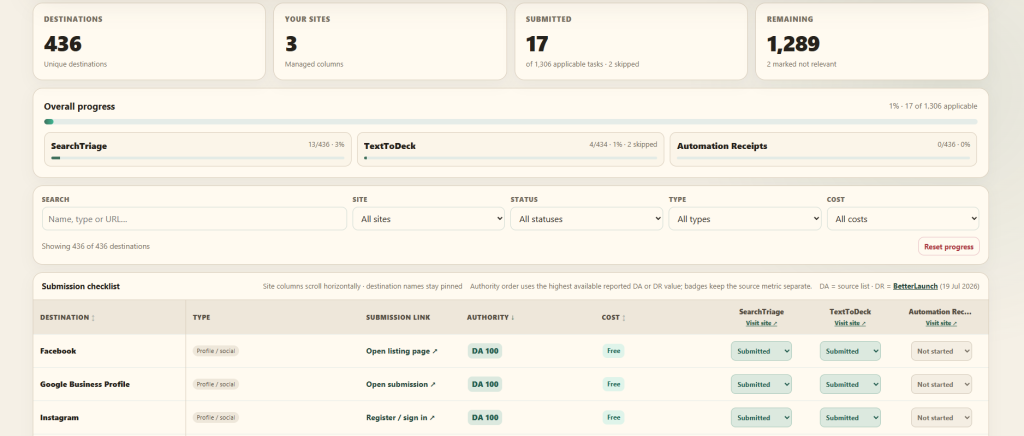
Each destination includes its submission or registration link, category, reported cost, and available DA or DR information.
DA and DR data isn’t available for every destination. The default authority ordering uses the highest available reported figure so destinations with only one known metric aren’t pushed to the bottom simply because the other metric is missing. The badges still identify each figure clearly as DA or DR.
These numbers are useful for sorting a long list, but they shouldn’t be treated as a promise that a submission will produce traffic, rankings, or a valuable backlink.
Track more than one website
You can add multiple websites to the same tracker. Each website receives its own status column, so you can use one copy for several apps, SaaS products, client sites, plugins, or side projects.
For every destination, you can choose:
- Not started
- Submitted
- Skip
The Skip option is important because not every destination will suit every project. An AI directory might be useful for an AI product but irrelevant to a local business website. Skipped destinations don’t count against your progress.
The summary at the top shows how many submissions you’ve completed, how many remain, and the overall progress for each website.
Search, sort, and filter the list
A list of 436 destinations isn’t much use if you have to scroll through the whole thing every time.
The tracker lets you:
- Search by destination name, category, or URL
- Filter by submission status
- Filter by project
- Filter by destination type
- Filter by free, freemium, or paid options
- Sort by name, reported authority, or cost
Directory names remain pinned while the project columns scroll horizontally, which makes larger multi-site trackers easier to work through.
How to use it
Download the HTML file and save it somewhere sensible on your computer. A folder for your project notes, marketing work, or launch material is ideal.
Open osj-submission-tracker.html in a modern browser such as Chrome, Edge, Firefox, or Safari. You don’t need to upload it to a web server.
Click Manage sites, add the name and URL of your first project, and work through the list. Change each destination to Submitted after you’ve completed it, or Skip when it isn’t relevant.
Your changes are saved automatically in that browser.
Your information stays local
The tracker doesn’t send your project names, URLs, or submission progress back to Old Stack Journal. There’s no analytics code, external JavaScript, account system, or remote database inside the downloaded tool.
Your data is stored using the browser’s local storage for that copy of the HTML file.
That also means you’re responsible for keeping a backup. Clearing browser data, switching browsers, using private browsing, moving the file, renaming it, or replacing it with a newer version can make the stored information appear empty.
Export a backup before updating
The tracker includes Export backup and Import backup buttons.
The exported JSON file contains your projects and saved submission statuses. Keep an occasional backup, especially after completing a large batch of submissions.
Before downloading a newer version of the tracker:
- Open your current copy.
- Click Export backup.
- Save the JSON backup file.
- Download and open the new tracker version.
- Click Import backup and choose the JSON file.
Version 1.2.1 can also migrate data and backups created by the earlier version of the tracker.
A practical starting list, not a guarantee
Directory links, prices, submission requirements, authority figures, and site availability can change. Some destinations provide a direct submission form, while others require registration or further navigation after opening the site.
Inclusion in the tracker isn’t an endorsement from Old Stack Journal. It also doesn’t guarantee acceptance, a dofollow backlink, higher rankings, traffic, customers, or any other result.
Check the current rules and pricing on each destination before submitting. I’ll update the downloadable tracker as I find broken links, useful new destinations, duplicates, and better information.
Who is this for?
The tracker is useful for solo builders, indie hackers, SaaS founders, app developers, WordPress plugin creators, agencies, and anyone managing several web projects without wanting another subscription-based tool.
It’s probably excessive if you only need to submit one local business to a handful of major profiles. It’s most useful when you have a real directory-submission campaign to work through or several projects to keep organised.
Download the OSJ Submission Tracker
The OSJ Submission Tracker is free to download and use. It’s a standalone HTML file, so there’s nothing to install and no account to create.
After downloading, open the file in your browser, add your first website, and start working through the list.
Found a broken link, duplicate, incorrect price, or worthwhile directory that’s missing? Let me know in the comments so I can check it for the next release.
Leave a Reply